A strategy can remain in a position long after its original edge has decayed. A bar-count exit provides a separate time-based reason to leave, without relying on a new indicator signal. It is useful for comparing holding horizons, but it is not a substitute for protective stops.
Example: five completed-bar evaluations
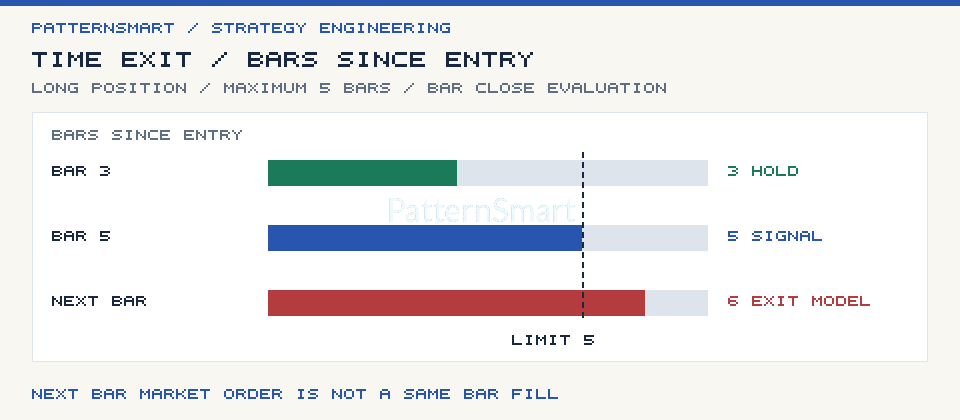
Assume a single entry, no pyramiding, and conventional bar-close calculation. When BarsSinceEntry(0) reports 3, the position remains open. At a value of 5, the exit condition is satisfied and a next-bar market order is generated. The historical model normally fills on the next available bar, not at the close where the signal was generated. For a five-minute chart, counting bars is not equivalent to exact elapsed wall-clock time: session gaps and missing bars change the relationship.
PowerLanguage signal excerpt
Place the following in the signal's exit-management section, evaluated on bar close. It assumes a single-entry position with an independent entry rule and protective orders. Use a positive integer input; validate the platform's actual entry-bar counter semantics using the trade list and diagnostic prints.
Inputs: MaxHoldBars(5);

if MarketPosition = 1 and
   BarsSinceEntry(0) >= MaxHoldBars then
    Sell ("TimeExitL") next bar at market;

if MarketPosition = -1 and
   BarsSinceEntry(0) >= MaxHoldBars then
    BuyToCover ("TimeExitS") next bar at market;
MarketPosition distinguishes long, short and flat. BarsSinceEntry(0) refers to the current position's entry history as reported by the strategy. With multiple entries, define whether the timeout applies to the first entry, latest entry, or individual legs; do not assume this excerpt implements per-leg timing.
Test matrix
- Log bar number, entry timestamp, MarketPosition, BarsSinceEntry and exit signal on each bar. Verify the entry bar and first following bar to catch off-by-one errors.
- Test MaxHoldBars=1, 5 and 10 with long and short positions. Compare actual historical exit bars with the intended definition.
- Check session boundaries and weekend gaps: a next-bar order may not execute until the next session, subject to platform and broker settings.
- Test simultaneous stop and time exits, and reconcile outstanding live exit orders so they do not create an unintended reversal.
- Compare holding horizons with out-of-sample results; do not choose the single best backtest number without robustness checks.
Intrabar Order Generation changes evaluation frequency; explicitly design and test that configuration rather than applying bar-close assumptions to intrabar logic. Live market orders may fill at different prices or be rejected.
Official reference: BarsSinceEntry.
This hypothetical teaching excerpt has not been compiled or backtested here. Trading involves risk of loss; simulated results do not guarantee future performance.
To adapt this free strategy idea to your trading rules, contact us about Custom MultiCharts strategy Development Services.