Scaling a futures strategy from one contract to three can quietly change its stop-loss exposure even when the PowerLanguage code is unchanged. In classic MultiCharts, the numerical argument to SetStopLoss is a currency amount, not a price distance. Its meaning depends on which built-in exit mode is active. A robust strategy makes that choice explicit rather than relying on defaults.
Decide what the amount represents
SetStopPosition applies the monetary threshold to the entire strategy position. SetStopContract applies it per contract or share. The default is position-based. These switches also affect other built-in exits, such as SetProfitTarget and SetDollarTrailing. According to the MultiCharts reference, when multiple switches are used by signals on the same chart, the last one controls. This is a chart-level coordination issue, not just a naming preference.
A worked example: one, two and three contracts
Assume a hypothetical futures instrument worth $12.50 per tick per contract, all contracts entered at the same price, with no transaction costs. A $150 loss threshold on one contract corresponds to 12 ticks. With two contracts and a fixed $150 position threshold, the distance shrinks to 6 ticks; with three, it shrinks to 4 ticks. Under a $150 per-contract threshold, the distance remains 12 ticks while total theoretical exposure becomes $150, $300 and $450 respectively.
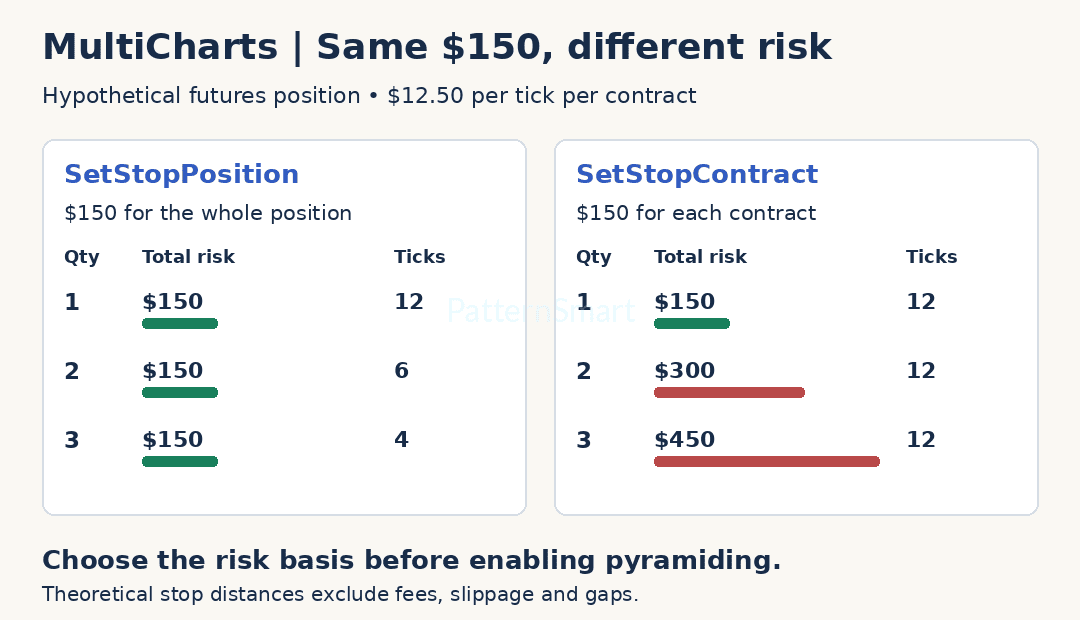
For quantity Q and tick value V, the theoretical position-based distance in ticks is budget/(Q × V). For a per-contract amount C, it is C/V. These formulas explain the difference, not necessarily the exact working stop price: tick rounding, differing entry prices and order handling must be checked in the platform. Use the symbol's actual tick size and monetary tick value; verify currency conversion where relevant.
Two alternative PowerLanguage signal configurations
Illustrative excerpts, not complete executable strategies. Choose one of these alternatives in the signal; do not paste both into the same strategy. These snippets are not compilation-tested.
Fixed position threshold
Inputs: PositionRisk(150);
SetStopPosition;
SetStopLoss(PositionRisk);
This fits a strategy whose monetary budget applies to all open contracts together. Before adding size, verify that the resulting tighter stop remains consistent with the trade thesis. A fixed total threshold does not mean an existing position can never lose more than that amount.
Fixed per-contract threshold
Inputs: ContractRisk(150);
SetStopContract;
SetStopLoss(ContractRisk);
This preserves the intended monetary threshold per unit when the position grows. Separately cap the number of contracts according to the total permitted exposure. If the overall budget is $300 and the per-contract threshold is $150, the simple theoretical maximum is two contracts, before allowing for fees and adverse fills.
Integrate the choice into the strategy
- Define a risk basis before writing entry logic, and make it explicit in the signal.
- Audit all signals on the chart for conflicting stop-mode switches. Keep the mode consistent for profit targets and trailing exits too.
- Check quantity limits before issuing an add-on entry, including already working entries; do not infer broker exposure solely from the strategy's simulated position.
- For entries at different prices, inspect the actual stop orders and aggregate exposure rather than extrapolating from the equal-price example.
- Confirm whether protective orders are held locally or at the broker under your specific connection and configuration. Reconcile strategy and broker positions after a restart or rejection.
Test the stop, not just the equity curve
SetStopLoss can evaluate intrabar and may exit on the entry bar, as described in the official SetStopLoss reference. Compare one-, two- and three-contract cases in a controlled test. Record actual entry prices, quantity, expected threshold, generated stop prices and fills. Repeat with staggered entries, partial exits, both long and short directions, and a gap through the stop. Review intrabar data resolution and Bar Magnifier settings. Simulated fills are not a guarantee of live fills. Include commissions and realistic slippage; stops cannot guarantee a maximum loss.
For help adapting position sizing, built-in exits or broker reconciliation to an existing PowerLanguage signal, see our Custom Trading Software Development Services.