Two MetaTrader 5 EAs may issue the same sell request and end up with very different open positions. The reason is not a signal calculation error: it is the account's position accounting model. A strategy that treats every opposite order as an exit can inadvertently create an additional position on a hedging account.
Start with the account model, not the signal
In MT5, an order is an instruction, a deal is an execution, and a position represents open exposure. A netting account consolidates deals into one position per symbol. A hedging account permits multiple positions for the same symbol, including opposite directions where the broker permits them. Both retail netting and exchange margin modes use netting position accounting. Read ACCOUNT_MARGIN_MODE through AccountInfoInteger when initializing the EA rather than assuming the model from the broker name or chart.
A worked example: same sell, different exposure
Assume a hypothetical EUR/USD account begins with a filled buy of 1.00 lot. The EA then sends a new market sell of 0.40 lot, fully filled, without identifying an existing position for closure. In netting mode the resulting position is a buy of 0.60 lot. In hedging mode the result can be a buy of 1.00 lot plus a separate sell of 0.40 lot. Signed net exposure is +0.60 in both cases, but gross open volume is 0.60 versus 1.40 lots.
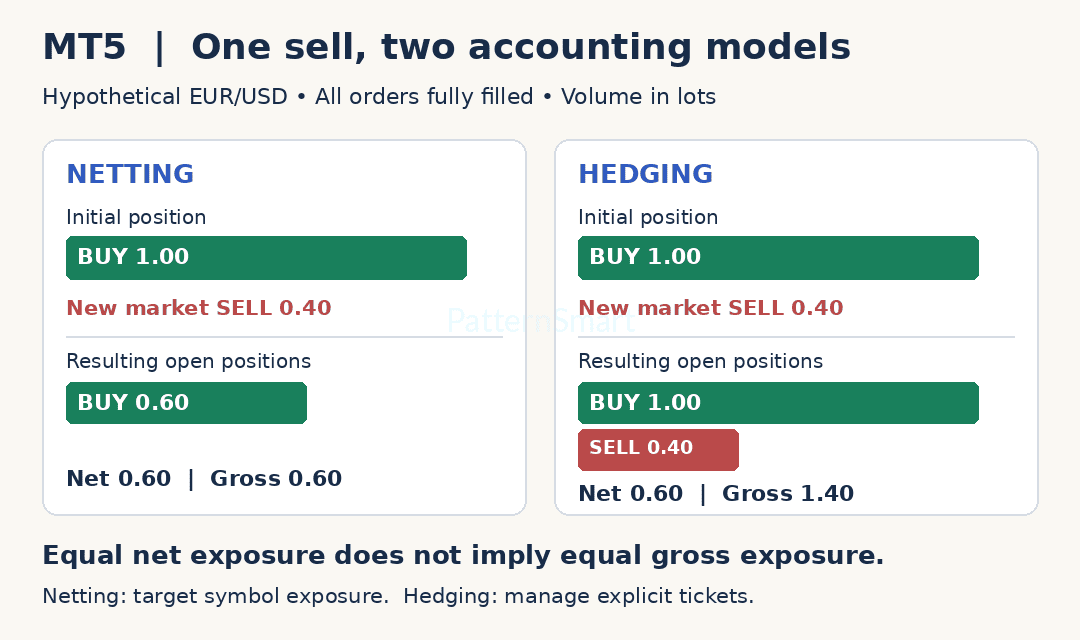
Gross volume matters for transaction costs, separate stop orders, operational complexity and potentially margin. Do not assume hedged margin is zero; its calculation depends on instrument and broker settings. If the intention is to reduce the original buy in hedging mode, request a partial close of the specific buy ticket instead of opening a separate sell.
Inspect the positions before choosing an execution path
The illustrative MQL5 excerpt below belongs inside an EA. Call IsHedgingAccount from OnInit and call InspectPositions on demand, or after relevant trade events for diagnostics. It deliberately submits no orders. It shows why a symbol alone is insufficient to identify a hedged position.
bool IsHedgingAccount()
{
    return AccountInfoInteger(ACCOUNT_MARGIN_MODE)
        == ACCOUNT_MARGIN_MODE_RETAIL_HEDGING;
}

void InspectPositions()
{
    for(int i = PositionsTotal() - 1; i >= 0; --i)
    {
        ulong ticket = PositionGetTicket(i);
        if(ticket == 0 || !PositionSelectByTicket(ticket))
            continue;
        if(PositionGetString(POSITION_SYMBOL) != _Symbol)
            continue;
        Print("Ticket=", ticket,
              " Type=", PositionGetInteger(POSITION_TYPE),
              " Volume=", PositionGetDouble(POSITION_VOLUME),
              " Magic=", PositionGetInteger(POSITION_MAGIC));
    }
}
PositionGetTicket enumerates open positions, not pending orders. PositionSelectByTicket refreshes the selected position before its properties are read. Recheck the ticket immediately before a modification, and treat a missing or changed position as a reason to refresh the decision. The loop does not create an atomic account snapshot; positions can change during inspection.
Separate the two execution policies
- Netting: calculate the desired signed exposure for the symbol and compare it with the current signed position. For example, moving from +1.00 to +0.60 implies a sell of 0.40 if no other orders or changes intervene. Coordinate all EAs and manual trades on that symbol; a position-level magic number cannot guarantee isolation of contributions from multiple strategies.
- Hedging: enumerate tickets and match symbol, strategy ownership and direction. For an intended reduction use the relevant ticket with an appropriate close or partial-close operation. Avoid symbol-only CTrade::PositionClose or PositionModify where multiple tickets exist: the documented symbol overload can act on the lowest ticket.
- Both: check permitted volume, volume step, fill policy, trading permissions and margin before a request. Inspect the server return code using ResultRetcode and reconcile actual deals and positions before treating the target as achieved. Do not confuse a successful local method return with a confirmed execution.
Test the account contract, not just profitability
Use separate compatible demo or tester configurations for the two accounting models. Start flat; enter 1.00 lot; send the 0.40-lot sell; compare the position count and gross volume against the figure. Repeat with partial fills, rejected requests, restarts, unrelated positions and a changed ticket. Log account mode, symbol, ticket, direction, requested and executed volume, server return code and resulting exposure. Confirm that a targeted exit does not touch an unrelated position. Include pending orders in a separate working-order check.
See the official account accounting model, position enumeration and CTrade PositionClose references.
For adapting a strategy to a broker's execution model or building a shared exposure controller, contact us through Custom Trading Software Development Services.
Educational example only. The excerpt has not been compiled or live-tested here. Actual fills, fees, margin, and losses may differ; no execution policy guarantees profitability or prevents all losses.