A breakeven stop should not behave like an ordinary price condition that switches on and off every bar. Once a trade has reached the defined favorable excursion, a one-way state flag can prevent a subsequent pullback from restoring the wider initial stop. In ProOrder, this is a position-management rule, not a new entry signal.
Worked example: two price units of initial risk, three to arm
Assume a single long position entered at 100.00. The initial stop is 98.00, and the strategy arms its breakeven rule only after a completed bar closes at or above 103.00. A close of 102.00 is insufficient; a close of 103.50 activates the rule. A subsequent close of 101.50 does not deactivate it. The requested stop remains at the position entry price, subject to execution constraints.
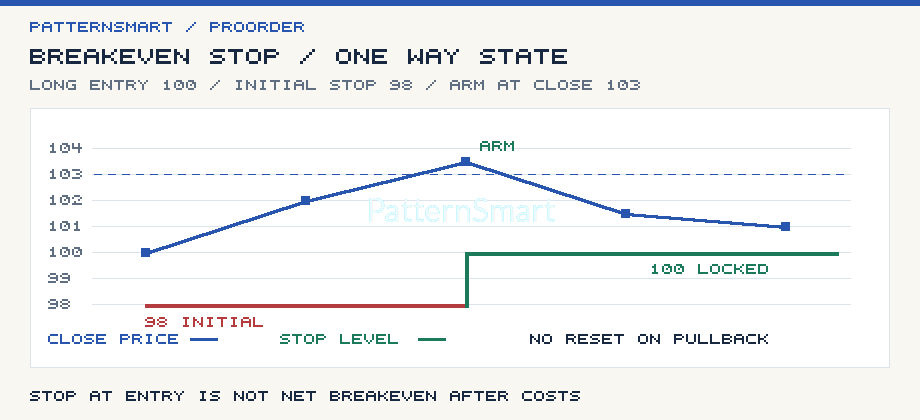
| Close | Armed | Requested stop |
|---|---|---|
| 102.00 | No | 98.00 |
| 103.50 | Yes | 100.00 |
| 101.50 | Yes | 100.00 |
Implementation: store the decision, not just the condition
Use the following fragment inside a long-only ProOrder trading system, with one position at a time and existing entry logic. The flat branch resets the flag and defines initial protection for the next position. After entry, PositionPrice is the average position price. The armed flag persists between bar evaluations until a flat state is observed. The mutually exclusive stop branches avoid overwriting the breakeven instruction with the initial stop on the same calculation.
DEFPARAM CumulateOrders = False

// Long-only illustrative management fragment.
// Add your entry conditions in the flat branch.
IF NOT ONMARKET THEN
    armed = 0
    SET STOP LOSS 2
    // Existing entry logic belongs here.
ENDIF

IF LONGONMARKET THEN
    IF Close >= PositionPrice + 3 THEN
        armed = 1
    ENDIF

    IF armed = 1 THEN
        SET STOP BREAKEVEN
    ELSE
        SET STOP LOSS 2
    ENDIF
ENDIF
This example is deliberately incomplete: it does not submit an entry. Place DEFPARAM at the start of the system, and integrate the flat branch with the actual entry order. Do not combine this fragment with another unconditional SET STOP statement that overrides the selected protection. If the design supports same-bar reversals or pyramiding, it needs a more explicit trade-identity and average-price policy.
Price units and execution timing
SET STOP LOSS 2 means a distance of two price units; SET STOP pLOSS uses instrument points instead. Verify the point size and tick grid for the traded market. The activation test uses Close, not High, so an intrabar touch of 103 followed by a close at 102.50 does not arm this particular rule. The close-based decision does not retroactively change the stop during the completed bar. Gaps, stop-distance restrictions, spread, slippage and commissions can all make an exit at the nominal entry price differ from net breakeven.
Validation checklist
- Test a trade that never reaches the trigger, then a trade that arms and pulls back; verify the stop does not widen again.
- Test a high above 103 with a close below 103 and confirm that the state remains unarmed.
- Test a gap below the requested stop and compare the modeled fill with the actual execution assumptions.
- After a completed exit, confirm that the next independently entered trade starts with its original protection. Test re-entry and session gaps.
- Compare ProBacktest with a paper-trading ProOrder run; verify the broker-side protection and instrument-specific order restrictions.
Reference: ProBacktest / ProOrder programming documentation, and ProRealTime automatic trading setup.
This is an illustrative fragment, not compiled or backtested here. Trading involves risk of loss, and a stop does not guarantee a fill at its specified level.
To adapt this free strategy idea to your own trade-management rules, contact us about Custom ProRealTime strategy Development Services.