A stateful trading signal often remembers the previous price, trend regime, or a counter. In MultiCharts .NET, the signal object can be recalculated as historical data and settings change. If an ordinary C# field keeps a value from an earlier calculation pass, the next pass can produce a signal that never occurred in the new sequence. The remedy is to define which state belongs to a calculation pass, reset that state explicitly and seed it before comparing values.
Worked example: the first observation is not a crossing
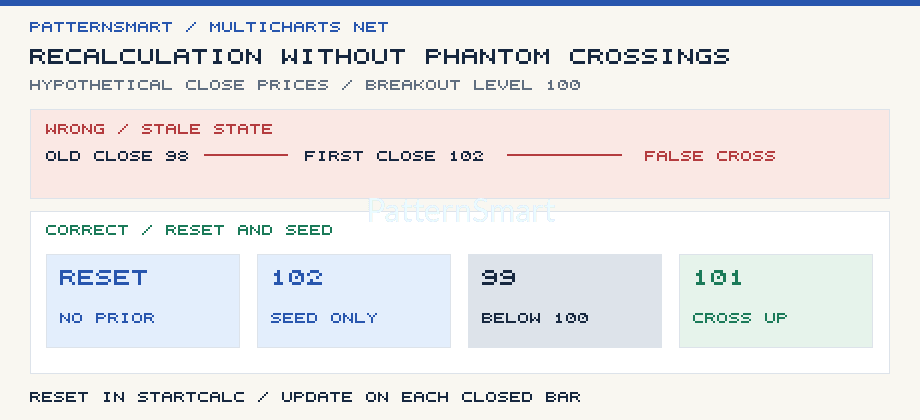
Suppose an illustrative breakout level is 100. A prior pass ended with a stored close of 98. A new pass begins at 102. Comparing the old 98 with 102 reports a crossover even though the two prices belong to different calculation passes. Instead, treat 102 as the first observation. The next close of 99 is below the level, and the following close of 101 is a valid upward crossing in the new sequence.
| Calculation event | Close | Expected decision |
|---|---|---|
| Old pass ends | 98 | Discard transient comparison state |
| New pass starts | 102 | Seed; no crossing |
| Next observation | 99 | Below threshold |
| Following observation | 101 | Upward crossing |
Illustrative C# signal excerpt
Keep transient fields in the signal class, reset them in StartCalc(), and perform the comparison in CalcBar(). This excerpt assumes normal bar-close calculations with IOG disabled, a fixed threshold and one primary data stream. It demonstrates state management only, not a full executable trading signal. Integrate the crossing with your existing order objects, position checks and risk controls.
private bool hasPrevious;
private double previousClose;
private const double Level = 100.0;

protected override void StartCalc()
{
    hasPrevious = false;
    previousClose = 0.0;
}

protected override void CalcBar()
{
    double close = Bars.Close[0];
    if (!hasPrevious)
    {
        previousClose = close;
        hasPrevious = true;
        return;
    }

    bool crossedUp = previousClose <= Level && close > Level;
    previousClose = close;

    if (crossedUp)
    {
        // Evaluate entry eligibility and existing order state.
        // Submit a configured entry only if appropriate.
    }
}
The early return seeds comparison state; in a full strategy, it must not bypass independent protective-order management. If the threshold is a calculated series instead of a constant, store the matching prior threshold too, and ensure all lookback values are ready before seeding. Use an explicit policy for NaN and missing inputs rather than storing them as valid state.
Historical recalculation versus live execution
Reset only state derived from historical calculation. A real broker position or working order is not erased by StartCalc(). Before accepting live entries after recalculation, reconcile actual positions, pending orders, and the intended strategy state. Do not automatically resend an old entry because the historical sequence reconstructed it. MultiCharts .NET can calculate signals on intrabar updates with IOG enabled; the example assumes that option is disabled. If you enable IOG, define whether the signal is tick-based or bar-close based and manage persistent state under the platform's intrabar recalculation rules.
Validation checklist
- Log StartCalc, the first valid observation, every threshold crossing and order request with a calculation identifier.
- Reload historical data and change an input; compare signal markers over the same common history.
- Test first observations above, below and exactly at the threshold. A crossing requires two valid comparable observations.
- Test missing data, warm-up periods and calculation restarts while a demo broker position is open.
- Keep broker acknowledgments, fills and rejections separate from signal logs; a crossing alone does not authorize another order.
Official references: Creating a .NET strategy and How signals are calculated.
This hypothetical example has not been compiled or backtested here. Trading involves risk of loss, and simulated performance does not guarantee future results.
To adapt this free strategy idea to your own execution rules, contact us about Custom MultiCharts .NET strategy Development Services.