Build an ATR Percentage Indicator in MT5 with MQL5 Indicator Handles
Beginner Trading Tutorial | MetaTrader 5 | Custom indicator
Average True Range is a useful measure of price movement, but the number displayed by a standard ATR indicator is expressed in the price units of the instrument. An ATR of 1.00 may be large for an instrument trading near 50 and relatively small for one trading near 200. This becomes particularly relevant when comparing different symbols or comparing an instrument's volatility during periods when its price level has changed substantially.
In this tutorial we build an ATR percentage indicator for MetaTrader 5. Instead of implementing another averaging algorithm, we retrieve the platform's existing ATR calculation using an indicator handle and normalize it by the corresponding closing price. The example provides a practical introduction to the MQL5 indicator interface, buffer indexing and the difference between data being requested and data being ready.
Why express ATR as a percentage?
True Range is the maximum of the current high minus low, the absolute difference between the current high and previous close, and the absolute difference between the current low and previous close. ATR averages this range over a selected number of bars according to the platform's calculation. As a result, ATR incorporates gaps relative to the previous close, rather than measuring only the high-low range of each candle.
Our normalization is ATR percentage = 100 × ATR / closing price. The result expresses the underlying ATR in percentage terms relative to the same bar's close. It is always nonnegative for valid positive prices and valid ATR values. It is not an annualized volatility estimate, a probability, or a forecast of tomorrow's price range.
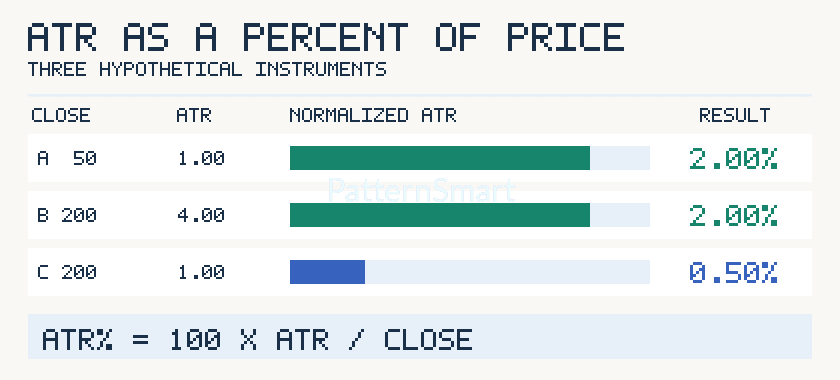
| Instrument | Close | ATR | ATR percentage |
|---|---|---|---|
| A | 50 | 1.00 | 2.00% |
| B | 200 | 4.00 | 2.00% |
| C | 200 | 1.00 | 0.50% |
All numerical examples are hypothetical. Instrument B has four times the raw ATR of instrument A, but its closing price is four times higher as well. Both therefore have the same normalized ATR of 2%. Instrument C has the same raw ATR as A, yet its relative ATR is only 0.5%. Normalization resolves the price-scale difference, but does not automatically make the instruments equally risky. Contract specifications, leverage, trading costs and liquidity still differ.
What we are building
The indicator displays a single line in a separate chart window with a nonnegative scale. Its default ATR period is 14 bars. The user can select completed bars only, which hides the unfinished current candle, or choose to display the live value. We use the chart symbol and timeframe rather than a separate data series. This avoids the extra synchronization logic required by multi-timeframe indicators.
The output buffer stores percentage points directly. For example, a stored value of 2.0 means 2%, not a decimal fraction of 0.02. This output contract is important if another custom indicator or EA later consumes the value through an indicator handle.
Complete MQL5 indicator source
// PatternSmart ATR Percent - MetaTrader 5
#property indicator_separate_window
#property indicator_buffers 1
#property indicator_plots 1
#property indicator_label1 "ATR Percent"
#property indicator_type1 DRAW_LINE
#property indicator_color1 clrRoyalBlue
#property indicator_width1 2
#property indicator_minimum 0

input int AtrPeriod = 14;
input bool ClosedBarsOnly = true;

double AtrPercent[];
double AtrValues[];
int AtrHandle = INVALID_HANDLE;

int OnInit()
{
   if(AtrPeriod < 1)
      return(INIT_PARAMETERS_INCORRECT);

   if(!SetIndexBuffer(0, AtrPercent, INDICATOR_DATA))
      return(INIT_FAILED);
   ArraySetAsSeries(AtrPercent, true);
   ArraySetAsSeries(AtrValues, true);
   PlotIndexSetDouble(0, PLOT_EMPTY_VALUE, EMPTY_VALUE);
   PlotIndexSetInteger(0, PLOT_DRAW_BEGIN, AtrPeriod);
   IndicatorSetInteger(INDICATOR_DIGITS, 2);
   IndicatorSetString(INDICATOR_SHORTNAME,
                      "ATR % (" + IntegerToString(AtrPeriod) + ")");

   // MQL5 iATR returns a handle, not an ATR value.
   AtrHandle = iATR(_Symbol, PERIOD_CURRENT, AtrPeriod);
   if(AtrHandle == INVALID_HANDLE)
   {
      Print("iATR handle creation failed: ", GetLastError());
      return(INIT_FAILED);
   }
   return(INIT_SUCCEEDED);
}

int OnCalculate(const int rates_total,
                const int prev_calculated,
                const datetime &time[],
                const double &open[],
                const double &high[],
                const double &low[],
                const double &close[],
                const long &tick_volume[],
                const long &volume[],
                const int &spread[])
{
   ArraySetAsSeries(close, true);

   // A history reset requires a complete recalculation.
   bool reset = (prev_calculated <= 0 ||
                 prev_calculated > rates_total);
   if(reset)
      ArrayInitialize(AtrPercent, EMPTY_VALUE);

   if(rates_total <= AtrPeriod ||
      BarsCalculated(AtrHandle) < rates_total)
      return(0);

   int oldest = rates_total - AtrPeriod - 1;
   int count = oldest + 1;
   if(!reset)
      count = MathMin(count,
                      rates_total - prev_calculated + 2);

   // Require the entire requested range before using it.
   int copied = CopyBuffer(AtrHandle, 0, 0, count, AtrValues);
   if(copied != count)
      return(0);

   // Series index zero is now the newest copied ATR value.
   ArraySetAsSeries(AtrValues, true);
   for(int i = count - 1; i >= 0; i--)
   {
      AtrPercent[i] = EMPTY_VALUE;
      if(ClosedBarsOnly && i == 0)
         continue;

      double atr = AtrValues[i];
      if(atr == EMPTY_VALUE || !MathIsValidNumber(atr) ||
         atr < 0.0 || !MathIsValidNumber(close[i]) ||
         close[i] <= 0.0)
         continue;

      // Normalize price-unit ATR by the same bar's close.
      AtrPercent[i] = 100.0 * atr / close[i];
   }
   return(rates_total);
}

void OnDeinit(const int reason)
{
   if(AtrHandle != INVALID_HANDLE)
   {
      IndicatorRelease(AtrHandle);
      AtrHandle = INVALID_HANDLE;
   }
}
How the MQL5 handle lifecycle works
OnInit first validates the period, binds the output array as an indicator data buffer and sets its indexing direction. It then calls iATR with the current chart symbol, current period and requested averaging length. In MQL5, this function returns an integer handle representing an indicator instance. It does not return the ATR value for a specific shift as the corresponding MQL4 function does. The handle must be checked against INVALID_HANDLE before being used.
Because creating a handle does not guarantee that its values have already been calculated, OnCalculate checks BarsCalculated against the number of chart bars. CopyBuffer then requests buffer zero, starting at the newest bar, and asks for the number of observations needed for this calculation. ATR has one buffer. The program requires the returned count to equal the requested count before reading the array. A partial copy is not treated as a successful data retrieval.
CopyBuffer physically places the oldest copied element first in memory. The temporary ATR array is given series indexing so that logical index zero refers to the newest copied observation, matching the chart close array and the output buffer. This prevents a common migration mistake: combining an older ATR value with a newer close because arrays use different index directions. The ATR handle is released when the custom indicator is removed.
Incremental calculation and initialization
On the first calculation, or after a reset of the history, the output is initialized to EMPTY_VALUE. The earliest displayed reading is restricted to bars with enough preceding history for ATR. Subsequent calculations request only the recent portion of the ATR buffer, including the newest completed bar and the developing bar. If several bars arrive at once, the requested count expands accordingly. When data is temporarily unavailable, the function returns zero so that a later calculation can rebuild the output rather than declaring incomplete work finished.
Using a built-in handle also means that the exact initialization and smoothing follow the terminal's implementation. If the broker supplies additional historical bars or corrects previous prices, historical ATR values may be revised. A closed-bar option reduces normal live fluctuations but does not prevent underlying data revisions.
Parameters and interpretation
| Input | Default | Effect |
|---|---|---|
| AtrPeriod | 14 | ATR averaging length in chart bars |
| ClosedBarsOnly | true | Hide the current unfinished bar |
A shorter period, such as seven, generally responds more quickly to a change in recent ranges. A longer period, such as 28, smooths fluctuations but reacts more slowly to a sudden change in volatility. The percentage denominator also changes with price. If raw ATR stays constant while price declines, the normalized value increases; that is a property of the chosen formula, not necessarily evidence of a larger absolute trading range.
With ClosedBarsOnly enabled, the current buffer element is intentionally empty. The latest completed value is at shift one. With the option disabled, both the current ATR and current close can change while the candle forms. Values should be compared using the same timeframe, period and bar shift.
Install and verify in MT5
- Open File → Open Data Folder in MetaTrader 5, and navigate to MQL5/Indicators.
- Create PS_ATRPercent.mq5 in MetaEditor, paste the source and compile it.
- Review diagnostics, refresh the Navigator, and attach the indicator to a chart.
- Add the standard ATR indicator with the identical period to the same chart.
- Use the Data Window to find the close and ATR of one completed bar. Divide ATR by close and multiply by 100; compare with the custom output to two displayed decimal places.
Repeat the check on a different symbol and timeframe, change the period to 7 and 28, and confirm the built-in and custom periods still match. Toggle ClosedBarsOnly and inspect shift zero before and after a new candle appears. Test a chart with limited available history: the warm-up section should be empty, not misleadingly zero. If the indicator does not appear immediately, allow for the source ATR handle's data to become available and inspect the terminal journal for initialization errors.
Limitations and possible extensions
ATR percentage is a useful descriptive input for volatility screening, relative-range research and comparing different price regimes. It does not specify direction. A high value can occur during a rising, falling or sideways market, and there is no universal threshold that defines high volatility. Instruments with different trading hours, gap characteristics and bar construction can produce different results even when their normalized readings match. Very small closing prices can also inflate the ratio, so use appropriate universe filters.
Interested in extending this free indicator with multi-symbol volatility comparisons, percentile thresholds, alerts or an EA integration? Contact us through our Custom Trading Software Development Services.
The MQL5 implementation was reviewed against official API documentation but has not been compiled or executed in MetaTrader 5. Verify it in your terminal before using it. Trading involves risk, and ATR percentage cannot guarantee a particular outcome.