Why MT4’s direct iCustom() value retrieval differs from MT5’s indicator-handle model—and how to build dependable indicator-to-EA integrations.
A custom indicator can display a perfect buy arrow on a chart while the Expert Advisor (EA) reading that indicator executes no trade—or, worse, interprets the wrong signal. This becomes especially common when migrating code from MetaTrader 4 (MT4) to MetaTrader 5 (MT5). Although both platforms use indicator buffers to expose calculated data, the interfaces through which an EA retrieves that data are fundamentally different.
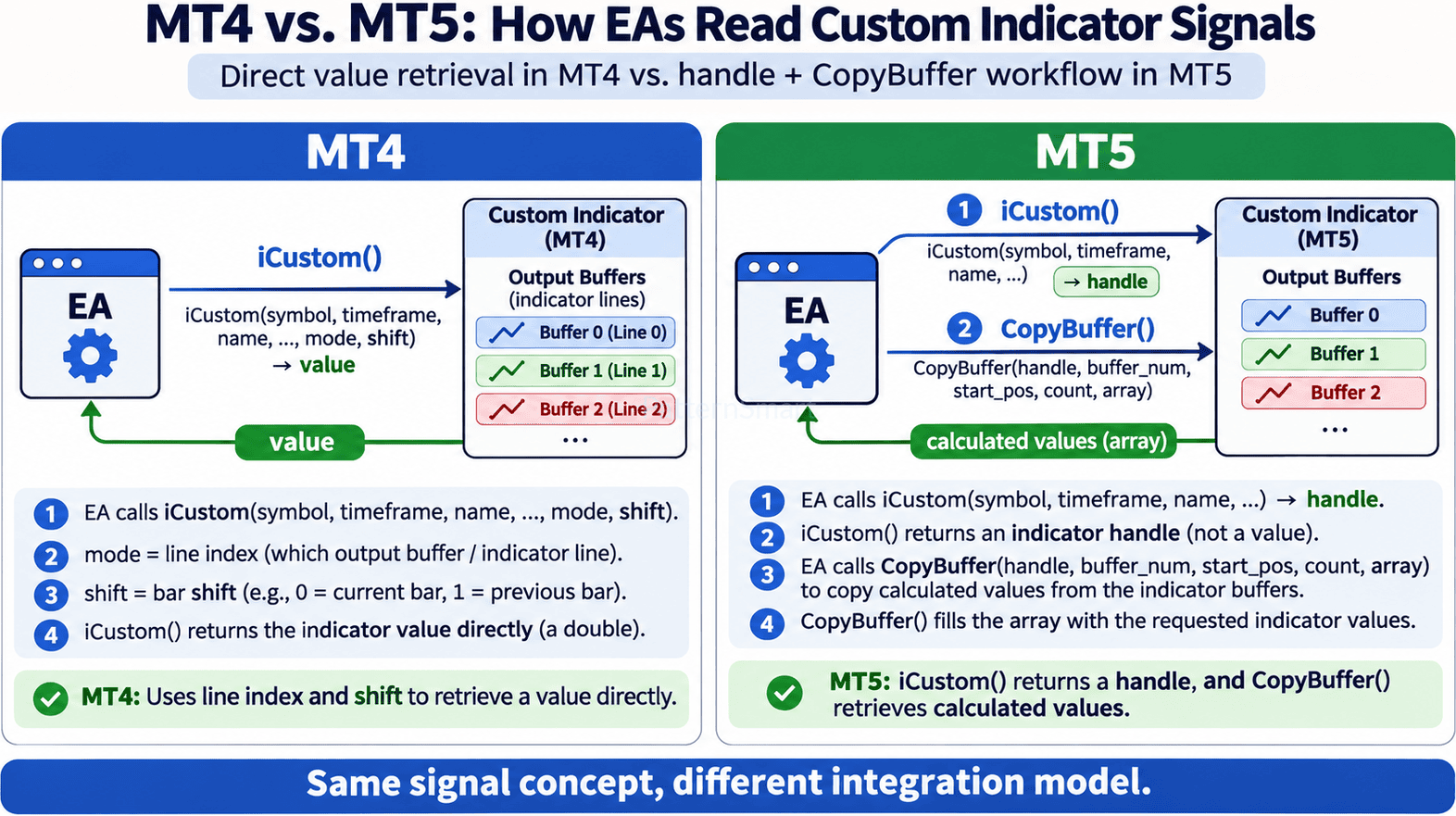
The essential distinction is simple: in MQL4, iCustom() returns a numeric value from a selected indicator line at a selected bar shift. In MQL5, iCustom() returns a handle identifying the indicator instance; the EA then calls CopyBuffer() to retrieve calculated buffer values. Understanding that difference is the starting point for reliable MT4 vs MT5 custom indicator buffers integration.
This article explains buffer numbering, current-bar versus closed-bar access, output contracts, practical code patterns, and the migration pitfalls that can quietly change an EA’s behavior.
1. What Is an Indicator Buffer—and Why Does an EA Need One?
An indicator buffer is a numeric array associated with a custom indicator. Its elements typically correspond to chart bars, holding such values as a moving-average line, oscillator reading, histogram component, arrow location, or custom signal state. A visual plot may use one or several buffers, and some buffers are reserved for calculations rather than the visible chart.
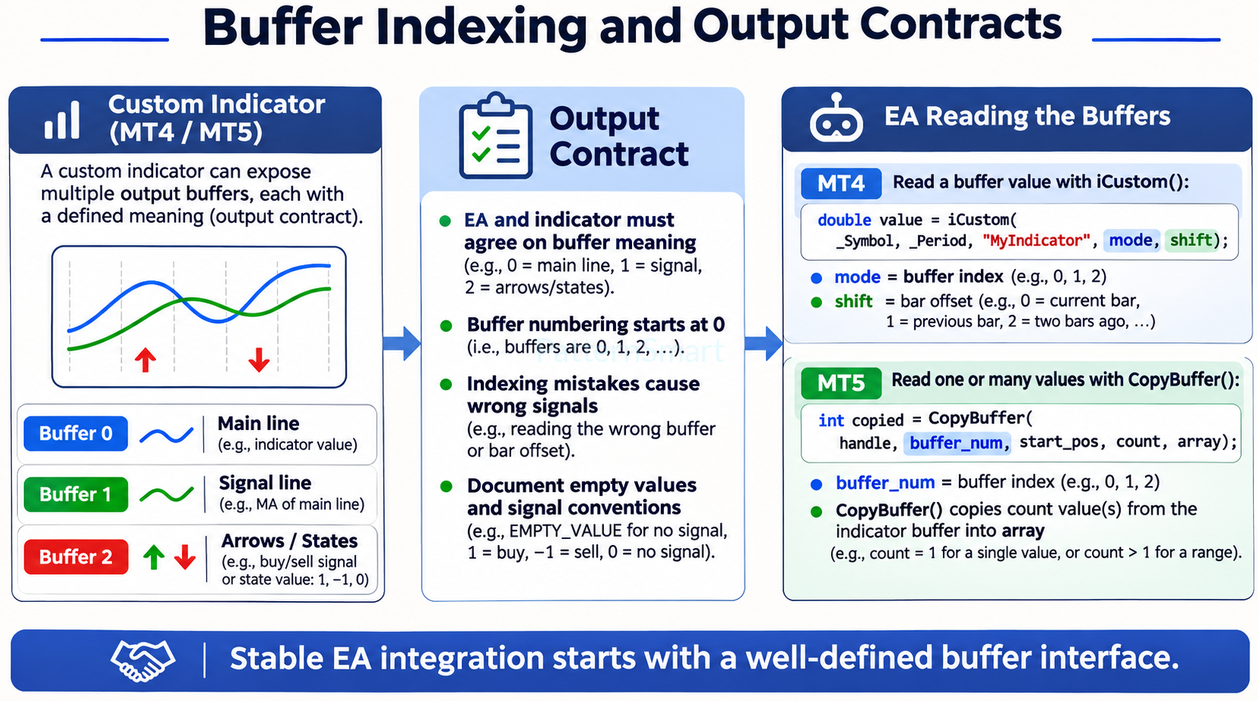
An EA cannot safely infer a signal merely because an arrow is visible. It needs a machine-readable interface: which buffer contains the signal, what its numeric values mean, and which bar is authoritative? This is the indicator’s output contract.
Consider a hypothetical custom indicator with these outputs:
| Buffer index | Intended content | EA interpretation |
|---|---|---|
| 0 | Main trend line | Numeric indicator value |
| 1 | Signal line | Numeric comparison value |
| 2 | Buy-state output | 1 means buy; 0 means no buy |
| 3 | Sell-state output | 1 means sell; 0 means no sell |
These indices are an example, not universal MetaTrader conventions. The indicator developer decides which mapped buffer serves which purpose. If an EA reads buffer 3 while assuming it is the buy state, it can act on a completely different condition without encountering a compilation error.
2. MT4: iCustom() Retrieves a Value Directly
The MQL4 iCustom() call combines indicator selection, custom inputs, buffer selection, and bar selection into one function. Its last two arguments are important:
modeselects the indicator line/buffer index exposed throughSetIndexBuffer(); the documented MQL4iCustom()interface supports indices 0–7.shiftselects the bar:0for the current developing bar,1for the previous bar, and so forth.
For an indicator called MySignal with one input parameter, a simplified EA example is:
// MQL4: read the buy-state output (buffer 2) on the last closed bar.
double buyState = iCustom(Symbol(), PERIOD_CURRENT,
                          "MySignal", 14, 2, 1);

if (buyState == 1.0)
{
   // Evaluate the EA's long-entry rules.
}
The assumed indicator contract is input period = 14, buffer 2 = buy state, and 1.0 = buy. If the indicator uses a different input order or a different buffer mapping, the call must change. Indicator inputs supplied through iCustom() must match the indicator’s declared inputs; otherwise the EA may run with unintended settings or fail to obtain the desired calculation.
Why developers like this approach: one call produces one numeric result. Why it becomes fragile: buffer indexes and input positions are often hard-coded throughout an EA, making later indicator revisions difficult to manage.
3. MT5: iCustom() Returns a Handle; CopyBuffer() Retrieves Values
MQL5 separates indicator creation from data access. The EA generally creates an indicator handle in OnInit(), checks that it is valid, and reuses it when reading signals. Buffer values are obtained with CopyBuffer().
// MQL5: example EA-side integration.
int signalHandle = INVALID_HANDLE;

int OnInit()
{
   signalHandle = iCustom(_Symbol, PERIOD_CURRENT, "MySignal", 14);

   if (signalHandle == INVALID_HANDLE)
   {
      Print("Failed to create indicator handle: ", GetLastError());
      return INIT_FAILED;
   }
   return INIT_SUCCEEDED;
}

void OnTick()
{
   // Request exactly one element from buffer 2, at closed-bar position 1.
   double buyState[1];
   if (BarsCalculated(signalHandle) < 2)
      return;

   int copied = CopyBuffer(signalHandle, 2, 1, 1, buyState);
   if (copied != 1)
      return; // Data not ready or copy failed: do not trade from stale values.

   if (buyState[0] == 1.0)
   {
      // Evaluate the EA's long-entry rules.
   }
}

void OnDeinit(const int reason)
{
   if (signalHandle != INVALID_HANDLE)
      IndicatorRelease(signalHandle);
}
The example deliberately copies one value from bar position 1. This avoids a common multi-element array-ordering mistake. In MT5, the start_pos parameter counts from present to past (0 = current bar), but copied values are physically arranged with the oldest element at the beginning of the destination array. When copying a larger range, developers must account for that physical layout and any AS_SERIES indexing behavior.
A handle also introduces lifecycle responsibilities. A failed iCustom() call returns INVALID_HANDLE. Even a valid handle does not guarantee that all requested history has already been calculated. Check BarsCalculated() where appropriate and always verify the number of elements returned by CopyBuffer(). Release unneeded indicator handles when the application is done with them; the platform’s tester may manage release differently.
4. MT4 vs. MT5 Custom Indicator Buffers: Side-by-Side
| Feature | MT4 / MQL4 | MT5 / MQL5 |
|---|---|---|
iCustom() return | Indicator numeric value (double) | Indicator handle (int) |
| Buffer selection | mode argument | buffer_num in CopyBuffer() |
| Bar selection | shift in iCustom() | start_pos or time arguments in CopyBuffer() |
| Reading many values | Repeated value requests | Copy a requested range into an array |
| Resource management | No EA-side indicator handle in this interface | Validate and manage indicator handle |
| Readiness checks | Check returned values and errors as relevant | Check handle, calculated bars, and copy result |
| Migration challenge | Direct value access may be embedded throughout the EA | Requires separate creation and retrieval stages |
The critical migration rule is do not translate an MT4 iCustom() call by merely renaming parameters. The EA’s data-access architecture must be changed.
5. Buffer Indexing Is an Interface Contract, Not a Visual Guess
Many indicators use several buffers for a single plot. A colored indicator, for example, may require a data buffer and a separate color-index buffer. In MQL5, indicator_buffers and indicator_plots are not necessarily equal, and an EA must read the exact buffer that holds the required numerical output. Merely counting the lines displayed on a chart is unreliable.
Likewise, an arrow location is not necessarily a buy/sell state. A plotted buy arrow might store a price level such as 1.08642, while its absence is represented by an empty value. Code that assumes 1 = buy would misinterpret this interface.
A robust output contract should document:
- Buffer index and descriptive name.
- Numeric data type and units: price, oscillator value, direction flag, or arrow coordinate.
- Signal semantics: e.g.,
1 = buy,-1 = sell,0 = neutral. - Empty-value convention:
EMPTY_VALUE, zero, or another explicitly configured sentinel. - Signal timing: developing bar or confirmed close.
- Repainting behavior: whether past plotted values can be revised.
- Indicator input order, defaults, and version compatibility.
For EA-focused indicators, separate machine-readable state buffers can be preferable to interpreting plotted arrows. A visual arrow may be shifted to avoid overlapping a candle, whereas a state output can communicate a stable discrete signal.
6. Closed Bars, Empty Values, and Repainting
Bar position is as important as buffer number. Reading position 0 in either platform usually means reading the still-forming bar. Values and arrow signals may change while price moves. Reading position 1 usually provides the last closed bar and is suitable for strategies requiring bar-close confirmation—but a custom indicator can still deliberately revise historical values, so closed-bar access alone does not guarantee non-repainting behavior.
The EA should also distinguish no signal from failed retrieval. An unsuccessful MT5 CopyBuffer() call does not mean the signal is zero. A buffer containing EMPTY_VALUE does not necessarily mean an indicator calculation failed. Those are different states that require different responses.
For example, an EA might adopt a three-way decision:
- Valid signal: the indicator returned a documented buy or sell state.
- Valid neutral: the indicator returned its documented no-signal value.
- Unavailable: the handle, history, or copy result is invalid or incomplete; the EA should defer the decision.
This avoids accidental trades triggered by stale array contents or by mistaking an error for a market condition.
7. Practical Migration Pitfalls When Converting MQL4 to MQL5
Pitfall 1: Treating the MT5 handle as a signal. An int returned by MQL5 iCustom() identifies an indicator instance, not a bullish or bearish state. Calling CopyBuffer() is mandatory for normal EA-side access to the indicator buffers.
Pitfall 2: Misplacing parameters. MT4 calls end with mode, shift after custom inputs. MT5 iCustom() takes the indicator’s inputs but not that trailing pair; buffer and position are specified in CopyBuffer().
Pitfall 3: Reversing array chronology. For multi-value copies, CopyBuffer() writes the oldest requested element to the start of physical memory. Verify orientation instead of assuming array[0] must be the current bar.
Pitfall 4: Ignoring readiness. A valid MT5 handle can exist before data is ready. BarsCalculated() and the CopyBuffer() return count are important safeguards.
Pitfall 5: Forgetting buffer mapping. An MQL5 port may rework indicator plots, color buffers, or calculation buffers. The EA’s requested buffer number must match the actual new mapping, not an outdated MQL4 assumption.
Pitfall 6: Using chart objects as the only interface. Arrows, labels, and text objects may help discretionary traders but create fragile dependencies for automated reading. Expose dedicated numerical outputs where practical.
Pitfall 7: Assuming visual equivalence means behavioral equivalence. An indicator can look similar in MT4 and MT5 while producing different values due to calculation initialization, bar indexing, rounding, source data, or state handling. Verify a known set of historical and live outputs.
8. A Safer Conversion Workflow for Indicators and Expert Advisors
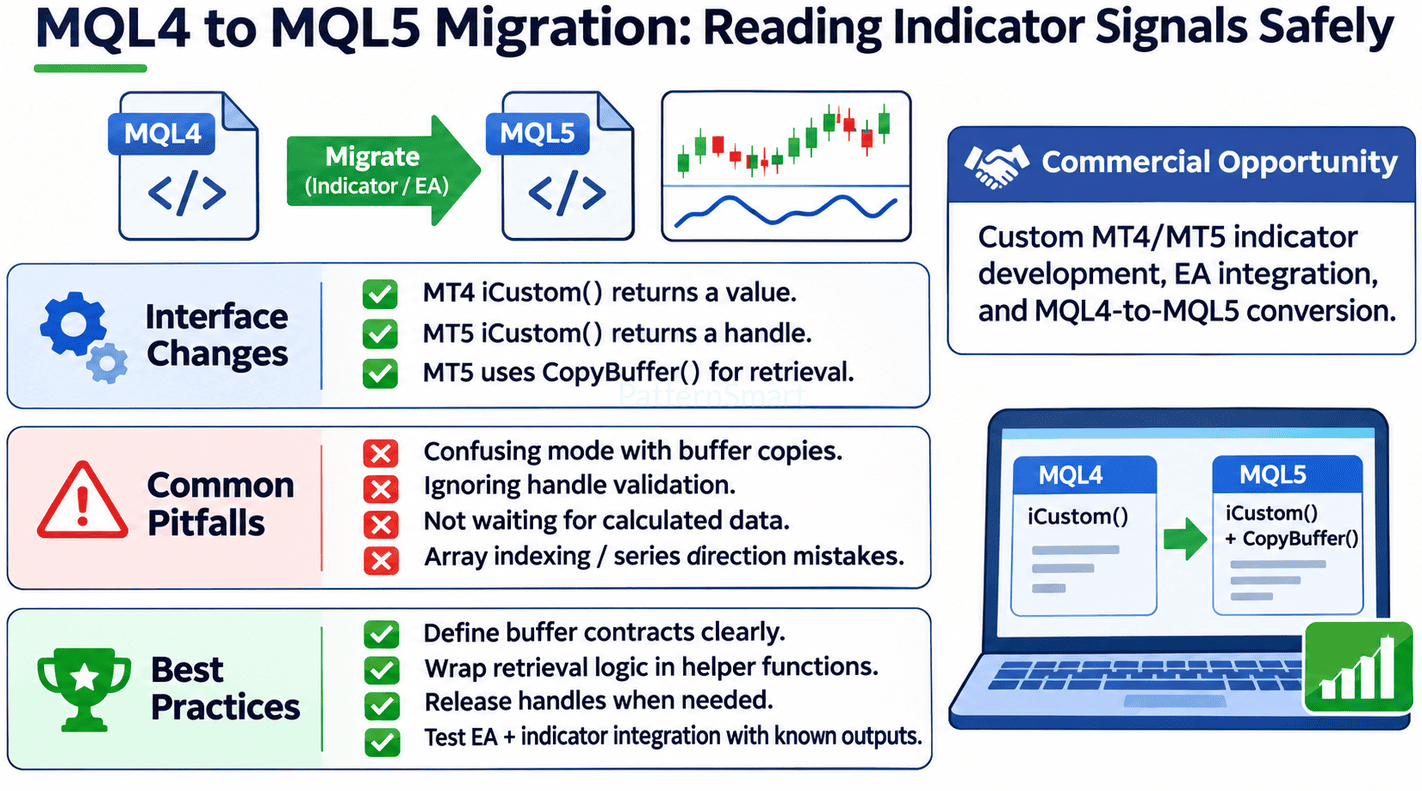
A sound MQL4-to-MQL5 migration project starts with requirements, not syntax replacement.
First, inventory the original indicator outputs. Identify all buffers, chart objects, signals, input parameters, and empty-value conventions. For each EA condition, trace exactly which indicator data it consumes.
Second, define a versioned output contract. Preserve established signal meanings where possible. If the MT5 implementation needs additional calculation buffers or plot buffers, document which public outputs are intended for EA consumption.
Third, separate strategy logic from retrieval logic. Functions such as GetTrendState(), GetBuySignal(), or ReadClosedBarSignal() can hide platform-specific mechanics. The trading strategy can remain readable while MT4 uses direct retrieval and MT5 uses a managed handle.
Fourth, design MT5 handle management. Create or recreate handles at appropriate lifecycle points, handle INVALID_HANDLE, check calculated-data readiness, and avoid unnecessary handle recreation on every tick.
Fifth, test against known outputs. Record indicator-buffer values for selected bars, compare expected and actual EA decisions, and test neutral, empty, boundary, and failure cases.
Finally, verify live and historical consistency. Use controlled testing across market sessions, chart refreshes, and strategy-tester modes. The objective is not simply compiling successfully; it is preserving the intended meaning of every signal.
9. When Custom MT4/MT5 Indicator and EA Development Makes Sense
Standard indicators are useful for straightforward analysis, but professional strategies often require more predictable machine-readable interfaces. Typical development needs include converting a visual MT4 indicator into an EA-ready MT5 implementation, exposing buy/sell state buffers, integrating a custom trend or momentum indicator with automated order logic, and debugging why a signal appears on the chart but never reaches the EA.
A well-designed custom project can define stable buffer contracts, separate provisional and confirmed signals, and validate the complete chain from indicator calculation to EA decision. The result is easier to maintain than a collection of undocumented buffer-index assumptions.
PatternSmart provides resources for MT4 indicators and tools and MT5 conversion. For tailored indicator engineering, EA integration, and MQL4-to-MQL5 conversion, see Custom Trading Software Development Services.
Frequently Asked Questions
Does iCustom() work the same way in MT4 and MT5?
No. MQL4 iCustom() returns a numeric value selected by mode and shift. MQL5 iCustom() returns an indicator handle, and CopyBuffer() is used to fetch the data.
What does mode mean in MT4?
It selects the indicator’s exposed line/buffer index. It is not a buy/sell signal itself. The meaning of the returned numeric value depends on the custom indicator.
What does buffer_num mean in MT5?
It identifies the indicator buffer from which CopyBuffer() should retrieve values. The EA must know which numbered buffer contains the intended output.
Can an MT5 EA use CopyBuffer() to read only the last closed bar?
Yes. A single-value call such as CopyBuffer(handle, 2, 1, 1, value) requests one element from buffer 2 at bar position 1, where value is an appropriately declared double array. Always verify that the function returned the requested number of elements.
Why is my MT5 EA reading the wrong candle?
Common causes include using start_pos = 0 instead of 1, confusing physical array order with timeseries indexing, or misinterpreting the indicator’s historical alignment.
Do I need to rewrite my trading strategy to move from MT4 to MT5?
Not necessarily. Many strategy conditions can be preserved. However, indicator construction, buffer retrieval, lifecycle handling, and execution APIs need careful adaptation and testing rather than mechanical copying.
Conclusion
The decisive difference in MT4 vs MT5 custom indicator buffers is not the idea of an indicator buffer—it is how an Expert Advisor accesses that buffer. MT4 commonly reads a selected value directly through iCustom(mode, shift). MT5 creates an indicator handle with iCustom() and retrieves data through CopyBuffer().
Reliable EA integration depends on a documented buffer output contract, correct bar indexing, explicit empty-value rules, readiness checks, and systematic verification. With those safeguards in place, developers can migrate MQL4 indicators and EAs to MQL5 while preserving the intended meaning of their trading signals.
For project-specific implementation, explore PatternSmart’s Custom Trading Software Development Services.