A stop condition in a thinkScript strategy is not automatically a working broker stop. A close-based exit is evaluated using a bar's closing value; a low-based test uses the bar's observed minimum. These are different research models, particularly on wide-range bars. Mixing them can produce a misleading estimate of both exit speed and risk.
Separate the condition from the fill assumption
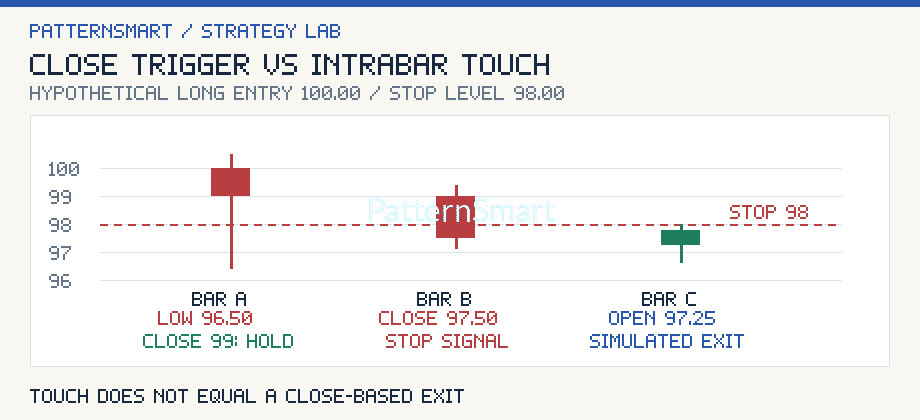
Consider a hypothetical one-unit long entered at 100 with a threshold of 98. On bar A the low is 96.50 but the close recovers to 99.00. A close-based rule remains false; a low-based rule is true. On bar B the close is 97.50, so the close rule finally triggers. With AddOrder's default next-bar-open convention the simulated exit is 97.25 on bar C, a loss of 2.75 per unit before costs rather than the nominal 2.00. A touch test alone does not justify recording a fill at 98.
| Bar | Low | Close | Interpretation |
|---|---|---|---|
| A | 96.50 | 99.00 | Intrabar breach; no close trigger |
| B | 97.20 | 97.50 | Close trigger becomes true |
| C | 96.70 | 97.80 | Simulated exit at open 97.25 |
Illustrative thinkScript strategy excerpt
Place this excerpt in a chart strategy, alongside a separately implemented long entry and position-management logic. EntryPrice() obtains the strategy entry price; the stop distance is in price units, not ticks. The guard rejects missing entry prices but is not a complete flat-position or repeated-exit guard. SELL_TO_CLOSE expresses the intended exit side. The explicit open[-1] is the next bar's opening price used by AddOrder, not an input to the signal.
input stopDistance = 2.0;
def entry = EntryPrice();
def closeStop = !IsNaN(entry) and close <= entry - stopDistance;
AddOrder(OrderType.SELL_TO_CLOSE, closeStop,
    open[-1], 1, Color.RED, Color.RED, "Close stop");
For a touch-based experiment replace close with low in the condition and keep the fill model explicit. The strategy report should still be interpreted as a next-bar simulation, not a reconstruction of an intrabar stop fill. Do not use future bar data to decide whether the signal occurred.
Implementation and audit checklist
- Define the aggregation, session and price units before selecting a stop distance. For instruments with discrete ticks, convert tick distances into valid price increments.
- Keep entry and exit state consistent; test one exit per position, a second entry after exit and missing entry-price cases.
- Manually inspect a wick-only breach, a close below the level and a gap through the level. Compare the signal bar and following simulated fill in the strategy report.
- Repeat at smaller aggregations and with realistic commissions and slippage. Smaller bars do not guarantee true tick sequence or liquidity.
Live execution is a separate design
AddOrder adds hypothetical chart strategy orders; it does not send unattended live orders. A live protective stop must be submitted and acknowledged by the broker using an appropriate supported workflow. A gap, spread, latency or thin liquidity can cause execution away from a stop level. Do not infer real protection from a chart arrow.
Official references: AddOrder and EntryPrice.
This example is hypothetical and illustrative; it has not been compiled or backtested here. Trading involves risk of loss, and simulated results do not guarantee future performance.
If you would like to adapt this free strategy idea to your own trading rules, contact us about Custom Thinkorswim strategy Development Services.