One of the easiest ways to unintentionally increase exposure in a ProOrder system is to confuse a condition that stays true with a new entry event. A moving-average filter may remain bullish for several consecutive bars. If the strategy submits a buy instruction each time that condition is true, the intended one-contract position can become a multi-contract position.
Two separate decisions: signal and permission
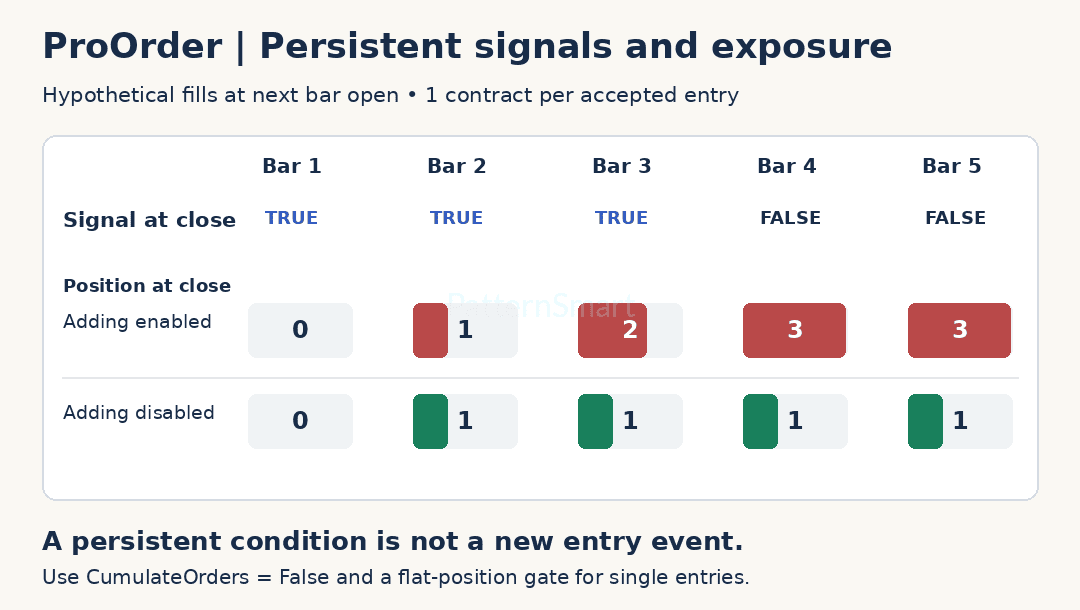
In ProRealTime's trading-system language, DEFPARAM CumulateOrders determines whether the system may accumulate entries. Programmed systems default to allowing accumulation according to the official programming guide. Set it to False at the beginning of the program when the design calls for a single open position. It is a configuration setting for the run, not a switch that can be toggled every bar.
The separate NOT ONMARKET check expresses the strategy's own flat-only entry policy. A persistent trend condition and permission to establish a position are not interchangeable. Neither is a confirmation of broker execution.
Five bars: why exposure changes
Assume a hypothetical futures strategy starts flat, buys one contract whenever its entry condition is true, and receives every accepted market order at the following bar's open. Assume no exits, no position cap below three contracts, and no rejection. The condition is true at the close of bars 1–3 and false at bars 4–5. With accumulation permitted and no flat gate, position size at the five closes is 0, 1, 2, 3, 3. With accumulation disabled and the flat gate, it is 0, 1, 1, 1, 1. A false entry condition does not itself close an existing trade.
Implement a flat-only entry gate
The following illustrative excerpt belongs in the ProBacktest/ProOrder trading-system editor, not a ProBuilder indicator. The 20-bar moving average is only a demonstration condition. This excerpt is not a complete executable trading strategy: it deliberately omits exits, risk sizing and protective stops, and has not been compiled or tested here.
DEFPARAM CumulateOrders = False

entrySignal = Close > Average[20](Close)
IF entrySignal AND NOT ONMARKET THEN
    BUY 1 CONTRACT AT MARKET
ENDIF
Keep the DEFPARAM directive at the top. Evaluate the entry condition in the strategy's normal bar evaluation cycle. Add independent exit and protection rules before any deployment, and set a suitable maximum position size in the platform's configuration. If the business rule is one entry per bullish episode rather than one entry per open position, also require a fresh transition from false to true or implement a rearm flag. Otherwise an exit while the condition remains true can allow re-entry on a later evaluation.
When adding is actually intentional
For a scale-in design, enable accumulation explicitly and define a maximum quantity, a separate addition condition and the remaining permitted size using COUNTOFPOSITION. Account for outstanding entry orders and simultaneous triggers when designing the cap; a count of filled contracts is not a complete pending-order inventory. A position limit of three is an example, not a recommendation. Changing position size also changes aggregate stop exposure and margin requirements. Test the broker and instrument's minimum order size and the system-level maximum position setting.
Validation before ProOrder deployment
- Replay the five-bar sequence and compare the order list, fill timestamps and position size, not just profit.
- Test exits during a persistent signal, a fresh crossover, and an opposite signal while a position is open.
- Verify behavior with a rejected entry, session boundary, and platform or broker position-size limit.
- Include realistic fees, slippage and spread in ProBacktest where supported; compare against paper trading before live use.
Market orders can fill at prices different from simulated opens, and stops cannot guarantee a maximum loss. This educational design example does not establish profitability or suitability for live trading.
Reference: ProRealTime trading systems programming guide.
If you need a custom scale-in policy, entry rearming, or risk controls integrated into your existing system, contact us through our Custom Trading Software Development Services.