A common ACSIL bracket-order bug is invisible in the entry logic: a trader enters a stop distance of 12 ticks, but the code assigns 12 directly to Stop1Offset. On a futures contract with a 0.25 tick size, that creates a 48-tick offset instead of 12. The signal may work perfectly while the protective order exposes four times the intended price risk.
Separate ticks, price offsets and currency risk
Sierra Chart's ACSIL trading interface expects the attached-order offset fields to contain a price distance, not a tick count. Multiply a tick-based parameter by sc.TickSize before assigning it. Currency risk is a separate calculation: ticks × currency value per tick × quantity. Verify the symbol's tick size and currency value in the chart settings rather than assuming all futures share the same specifications.
Worked example: a 12-tick stop and a 20-tick target
Assume a hypothetical long fill at 6000.00, one contract, tick size 0.25 and $12.50 per tick. The stop offset is 3.00 price points and the target offset is 5.00 points. The corresponding theoretical prices are 5997.00 and 6005.00. The planned stop distance is worth $150, while the target distance is worth $250 before costs. A mistaken raw offset of 12.00 means 48 ticks, or $600.
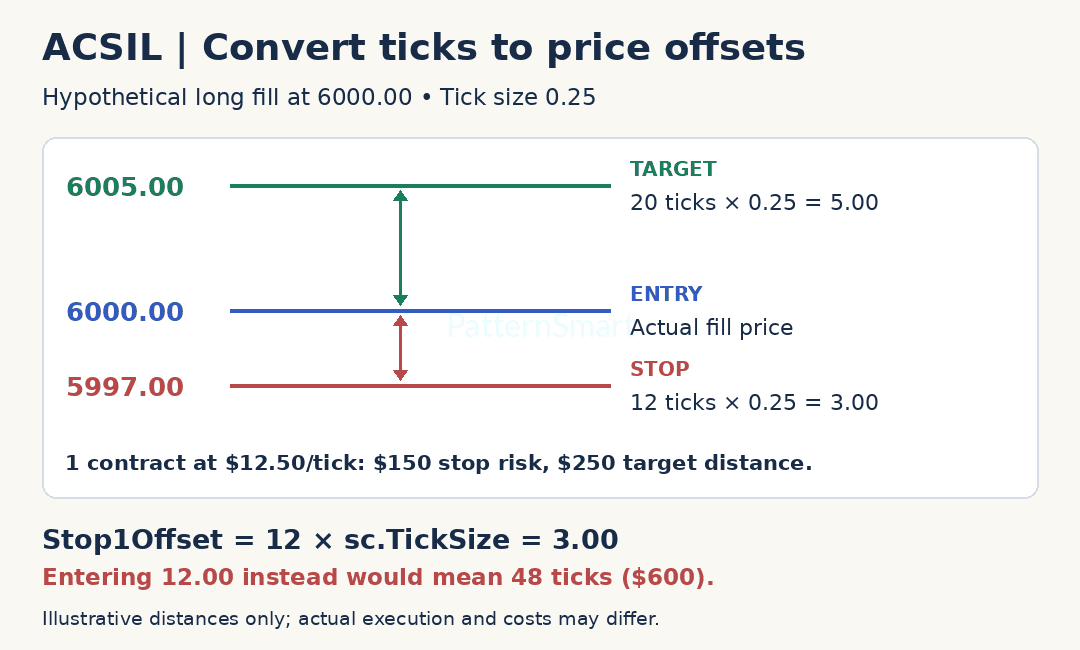
| Parameter | Tick count | ACSIL offset | Value per contract |
|---|---|---|---|
| Stop | 12 | 3.00 | $150 |
| Target | 20 | 5.00 | $250 |
| Wrong stop assignment | 48 | 12.00 | $600 |
Build the parent order with explicit attached orders
The following illustrative ACSIL excerpt is not a complete executable study and has not been compiled here. Place it in a guarded entry branch of your study function after initialization, not in sc.SetDefaults. Validate quantity, chart context, positive tick size, risk limits, position state and working entry orders first. Use simulation while developing.
s_SCNewOrder order;
order.OrderQuantity = 1;
order.OrderType = SCT_ORDERTYPE_MARKET;
order.TimeInForce = SCT_TIF_DAY;
order.Target1Offset = 20 * sc.TickSize;
order.Stop1Offset = 12 * sc.TickSize;
order.AttachedOrderTarget1Type = SCT_ORDERTYPE_LIMIT;
order.AttachedOrderStop1Type = SCT_ORDERTYPE_STOP;
const int result = sc.BuyEntry(order);
A positive return from sc.BuyEntry indicates the trading function accepted the submission, not that the parent has filled or that both protective orders are already working. Inspect the Trade Orders window and order updates. The example specifies a market parent, limit target and stop child. For a short entry the offsets remain positive; attached-order direction is determined by the parent side and order configuration.
Modification is not another offset calculation
After the attached orders exist, modify an individual child using its internal order ID and an actual price in Price1. Do not put a new tick count into Stop1Offset and assume that an existing stop will move. For example, moving this long stop to 5998.50 requires an absolute price of 5998.50, subject to valid market-side checks and routing rules. Reconcile the child's current status before modification and confirm the response. Do not assume a rejected modification changed protection.
Validation before deployment
- Log configured ticks, tick size, calculated offsets, quantity and actual fill price separately.
- Replay the example and inspect the resulting target and stop in Trade Orders; repeat with a symbol of different tick size.
- Test short entries, partial fills, rejected modifications and cancellation of the sibling attached order. Verify OCO behavior with the intended routing service.
- Check that simulation and live routing settings are intentional and that the study cannot submit another entry on every update.
Backtests and simulated fills do not reproduce all live routing behavior. A stop order is not a guaranteed loss limit; gaps, slippage, fees and order rejection can increase loss. If you need symbol-aware sizing, bracket management or a custom ACSIL strategy, contact us through our Custom Trading Software Development Services.
Reference: Sierra Chart ACSIL automated trading documentation.