A trailing stop calculated from a completed bar can become invalid before the strategy submits its amendment. A rapid price reversal or gap can move the current bid below the proposed sell stop. Rather than assume a calculated level is always executable, a NinjaTrader 8 strategy should separate the desired stop, the currently confirmed working stop and the actual market reference used before sending a change.
Worked example: a gap invalidates the candidate
Assume a long position with an acknowledged stop at 99.00, tick size 0.25, and a new desired stop of 101.00. When the bid is 102.00, the candidate is four ticks below the bid and improves protection. When the bid falls to 100.75 before submission, the same candidate is above the bid and fails the illustrative validation rule. This is a local conservative policy, not a complete exchange-specific price rule.
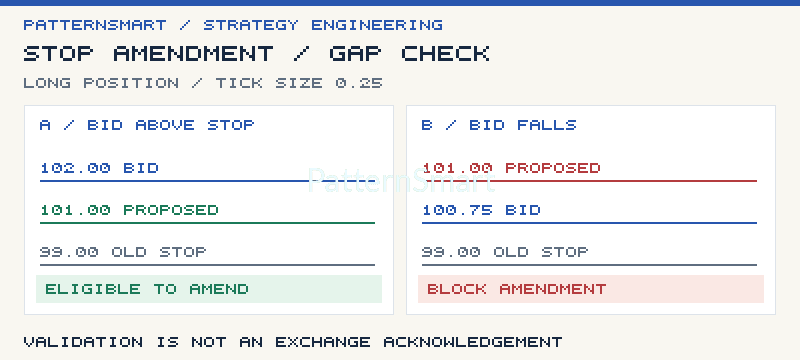
| Bid | Existing stop | Candidate | Local decision |
|---|---|---|---|
| 102.00 | 99.00 | 101.00 | Eligible |
| 100.75 | 99.00 | 101.00 | Block |
Place validation in the stop-management branch
The helper below is intended for an existing single-instrument managed strategy and checks only real-time long-position amendments. It rounds the candidate to a valid tick, requires an improvement over a confirmed stop, and requires at least one tick of separation from the current bid. It does not implement the full order-state controller. Supply confirmedStop and candidate from the existing strategy, and use the actual entry signal name. Initialize protective stop parameters before entering; reset dynamic stop parameters when flat before the next entry.
// Illustrative helper inside a NinjaScript Strategy.
// confirmedStop must come from reconciled order state.
private bool TryLongStopPrice(double proposed,
    double confirmedStop, out double price)
{
    price = Instrument.MasterInstrument.RoundToTickSize(proposed);
    if (State != State.Realtime ||
        Position.MarketPosition != MarketPosition.Long)
        return false;

    double bid = GetCurrentBid();
    if (bid <= 0 || double.IsNaN(bid) ||
        double.IsNaN(price) || double.IsInfinity(price))
        return false;

    return price > confirmedStop &&
        price <= bid - TickSize;
}
// In the existing long-position management branch,
// after checking no amendment is pending:
// if (TryLongStopPrice(candidate, confirmedStop, out double level))
//     SetStopLoss("LongEntry", CalculationMode.Price, level, false);
// Reconcile acknowledgement/rejection in OnOrderUpdate.
Use a fresh quote and check connection health independently. A one-tick buffer is not a guarantee that the order will be accepted: the quote can change before routing, and venue trigger rules can differ. For shorts, reverse the comparison and use an appropriate ask-side reference. Never silently loosen an existing stop to satisfy a price check.
Handle an invalid amendment explicitly
Keep the acknowledged protective order unless a deliberate replacement or exit policy requires otherwise. If the desired protection has already been crossed, decide whether the strategy should retain the existing order and retry on a fresh eligible update or request an emergency exit under a separately designed policy. Avoid issuing competing exits without reconciling actual exposure and pending orders. An existing stop may itself be in the process of filling.
Track submitted, acknowledged, pending-change, rejected and filled states separately in OnOrderUpdate and reconcile fills in OnExecutionUpdate. A SetStopLoss call is not evidence of acceptance. Respect NinjaTrader's real-time error handling; do not disable its safeguards merely to suppress rejection messages.
Validation plan
- Test both numerical cases and the exact one-tick boundary.
- Simulate stale quotes, a disconnect, a delayed amendment and a stop fill during the amendment.
- Verify that a rejected change does not get recorded as the confirmed stop and that the next trade starts with its original protection parameters.
- Compare Strategy Analyzer results with Playback and a simulation account. Historical bid substitutes and bar-resolution data do not reproduce every live quote or routing race.
Protective stop orders do not guarantee a maximum loss. Gaps, slippage, rejected orders and connectivity failures can affect actual execution.
Official references: SetStopLoss and GetCurrentBid.
This educational excerpt has not been compiled or backtested here. Trading involves risk of loss.
To adapt this free strategy idea, contact us about Custom NinjaTrader strategy Development Services.