Two breakout signals may look equally attractive while requiring very different stop distances. An entry just above recent support may have a stop inside normal price noise; an extended breakout may demand a stop far beyond the strategy's risk budget. A distance gate rejects both extremes before ProOrder submits an entry.
Define the admissible distance before entry
Consider a long-only strategy on a hypothetical instrument with a tick size of 0.25 and a contract value of $10 per full price unit. Use the highest high of the preceding 20 bars as the breakout threshold and the lowest low of the preceding five bars as the structural reference. When the completed bar closes above the breakout threshold, compute D = close minus the structural low. The illustrative admissible range is 2 to 6 price units inclusive. All three cases below assume the breakout condition is satisfied.
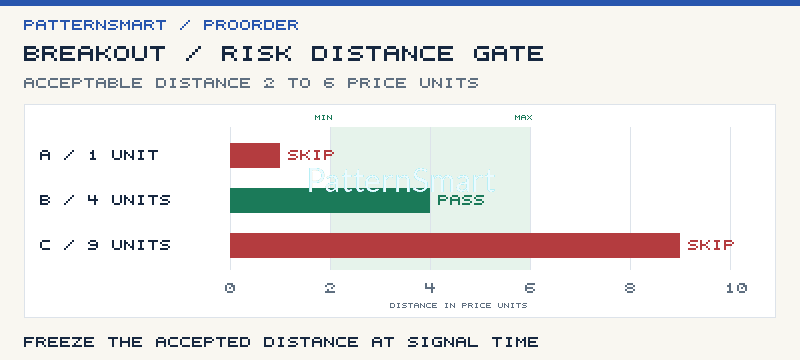
| Case | Close | Reference low | D | Decision |
|---|---|---|---|---|
| A | 101 | 100 | 1 | Skip: too narrow |
| B | 104 | 100 | 4 | Eligible |
| C | 109 | 100 | 9 | Skip: too wide |
For B, the nominal protective distance is 4 units, or 16 ticks. One contract has a theoretical stop-distance exposure of $40 before commissions, slippage and gaps. A two-to-one target distance is 8 units, or $80 gross if executed at the intended price. These numbers are illustrative, not historical results.
ProBuilder implementation
The code uses completed-bar inputs and excludes the current bar from both lookbacks. The candidate is measured only for the new-entry decision; the accepted distance is retained until another eligible flat-state signal. This prevents a rising structural reference from inadvertently changing the initial distance each bar. The example uses a market entry, one contract, and no position accumulation.
DEFPARAM CumulateOrders = False
ONCE riskDistance = 4
minDistance = 2
maxDistance = 6

IF BarIndex >= 21 THEN
    breakoutLevel = Highest[20](High[1])
    structuralLow = Lowest[5](Low[1])
    candidate = Close - structuralLow
    IF NOT OnMarket AND Close > breakoutLevel THEN
        IF candidate >= minDistance AND candidate <= maxDistance THEN
            riskDistance = candidate
            BUY 1 CONTRACT AT MARKET
        ENDIF
    ENDIF
ENDIF

SET STOP LOSS riskDistance
SET TARGET PROFIT (2 * riskDistance)
Understand the stop's reference point
SET STOP LOSS specifies a price-unit distance from the actual position entry, not an absolute chart level. SET TARGET PROFIT likewise specifies a price-unit distance. If B fills at 104.50 rather than the signal close of 104, the nominal stop becomes 100.50 and target 112.50, before broker rounding or constraints. The stop therefore does not necessarily coincide with the structural low. For a strategy requiring an exact structural stop, design separate fill-aware absolute-price management and validate its protection timing. Do not confuse price units with pLOSS points or monetary loss.
DEFPARAM CumulateOrders = False prevents adding to an existing position under the strategy's accumulation rules. It is not a substitute for checking broker-specific quantity, price increments and maximum exposure. This example uses a breakout state, not a one-time crossing; after an exit it can enter again if the conditions remain valid. Add a fresh-cross or cooldown policy if the intended design requires one trade per setup. Adapt contract syntax and stop restrictions to the traded instrument.
Testing checklist
- Test distances of 1, 2, 4, 6 and 9 units, including exact boundary values.
- Verify that a new bar cannot widen the retained stop distance while the position is open.
- Inspect the entry and protective orders in simulation, including a next-bar gap of 0.50 and larger adverse gaps.
- Compare net outcomes with and without the gate across multiple volatility regimes; include rejected-signal counts, costs and drawdown.
- Use out-of-sample periods and nearby thresholds rather than selecting a single historically optimal range.
A distance filter controls planned exposure, not guaranteed loss. Stops may execute beyond their intended level, and some instruments have minimum stop distances. A production system also needs an account-level risk policy.
Official reference: ProRealTime trading systems help and programming guide.
This educational example has not been compiled or backtested here. Trading involves risk of loss.
To adapt this free strategy idea to your own trading rules, contact us about Custom ProRealTime strategy Development Services.