A pending entry can remain valid long after the market setup that produced it has disappeared. An EA that intends to trade a short-lived pullback should treat the order's lifetime as part of its strategy specification, rather than an optional convenience. In MetaTrader 5, expiration capabilities differ by symbol. A request for an exact deadline must be checked against the symbol's supported modes before submission.
Worked example: a 15-minute setup
Suppose a hypothetical buy-limit signal appears at 10:00 broker-server time. The strategy accepts an entry only until 10:15. Price reaches the limit at 10:24, after the signal has expired. An unrestricted working order could still enter this stale setup. A server-accepted exact expiration instead instructs the server to expire any remaining pending quantity at the specified deadline, subject to the server's processing rules.
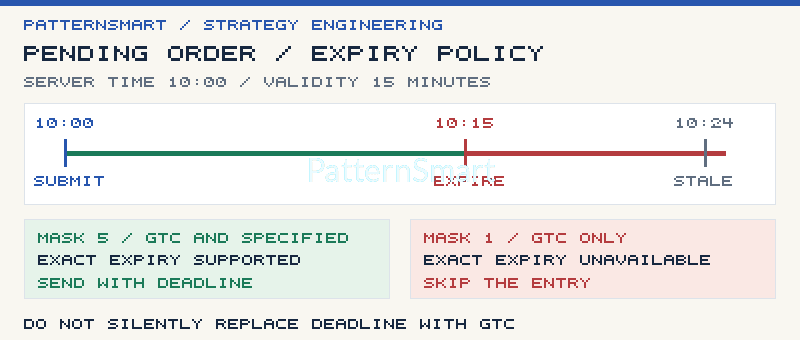
| Symbol expiration mask | Supported modes in this example | Policy |
|---|---|---|
| 5 | GTC (1) and specified time (4) | Request 10:15 expiration |
| 1 | GTC only | Skip exact-deadline entry |
| 2 | Day only | Skip exact-deadline entry |
Separate the capability flags from request values
Read SYMBOL_EXPIRATION_MODE with SymbolInfoInteger. It is a bit mask, so test the bit SYMBOL_EXPIRATION_SPECIFIED rather than comparing the entire mask with 4. ORDER_TIME_SPECIFIED, in contrast, is a value of ENUM_ORDER_TYPE_TIME for the request's type_time field. Do not substitute the flag for the enumeration. A date-only expiration or end-of-day validity is not equivalent to a fifteen-minute deadline.
The following helper modifies a previously prepared pending-order request. It deliberately rejects unsupported exact expiration rather than silently changing the strategy to a different lifetime. It is an integration excerpt, not a complete EA.
// Call before sending a fully prepared pending-order request.
bool ApplyExactExpiry(MqlTradeRequest &request,
                      const datetime deadline)
{
    long modes = 0;
    if(request.action != TRADE_ACTION_PENDING ||
       !SymbolInfoInteger(request.symbol,
                          SYMBOL_EXPIRATION_MODE, modes))
        return false;

    if((modes & SYMBOL_EXPIRATION_SPECIFIED) == 0)
        return false;

    datetime now = TimeCurrent();
    if(now <= 0 || deadline <= now)
        return false;

    request.type_time = ORDER_TIME_SPECIFIED;
    request.expiration = deadline;
    return true;
}

// Example at signal creation, in server-time coordinates:
// datetime deadline = TimeCurrent() + 15 * 60;
// Preserve that deadline; do not extend it on retries.
// If ApplyExactExpiry(request, deadline) is false, skip.
// Otherwise validate with OrderCheck, then send and
// evaluate the server retcode. Reconcile in OnTradeTransaction.
Integrate with the order lifecycle
Create the deadline once when the signal becomes actionable, using the intended server-time reference. A retry five minutes later must not automatically receive another full fifteen minutes. TimeCurrent is the last known server time, and may be stale outside active quotes; reject submissions when quote freshness or clock validity cannot be established. OrderCheck helps identify invalid requests but does not guarantee subsequent acceptance. Inspect the trade server result and reconcile the order ticket and actual expiration after submission. OnTradeTransaction can report multiple events for one request, so track the actual working order rather than treating a successful function return as a fill.
A partial execution before expiry leaves an open position; expiration only concerns the remaining pending order. Protect and manage the filled quantity independently. If the venue does not support exact server expiration, an alternative design may use a persistent local deadline and timer-driven cancellation, but that is weaker during terminal downtime and disconnections. Cancellation can race a fill. The example chooses to skip instead.
Validation and risk
- Test masks 1, 2, 4 and 5, invalid deadlines and retries near expiry.
- Test a fill before 10:15, no fill until 10:24, and a partial fill before expiry.
- Test trading breaks, stale quotes, restart and connection loss using a demo account.
- Compare the Strategy Tester and demo order histories, including the actual expiration and transaction timestamps.
Expiration limits order lifetime, not market loss. Slippage, partial fills and server-specific processing still affect results. Maintain independent position risk controls.
Official references: Pending order expiration rules and Placing a pending order.
This educational excerpt has not been compiled or backtested here. Trading involves risk of loss.
To adapt this free strategy idea to your own trading rules, contact us about Custom MT5 strategy Development Services.