MetaTrader 4 indicator
Broadening Formation Chart Pattern Indicator for MT4
Find expanding-range megaphone patterns the moment they form. The indicator scans your MetaTrader 4 chart, draws both trendlines, projects them forward and sounds an alert, so you stop hunting for the pattern by eye.
- MetaTrader 4
- Any symbol
- Any timeframe
- Sound alerts
The pattern
What is a broadening formation?
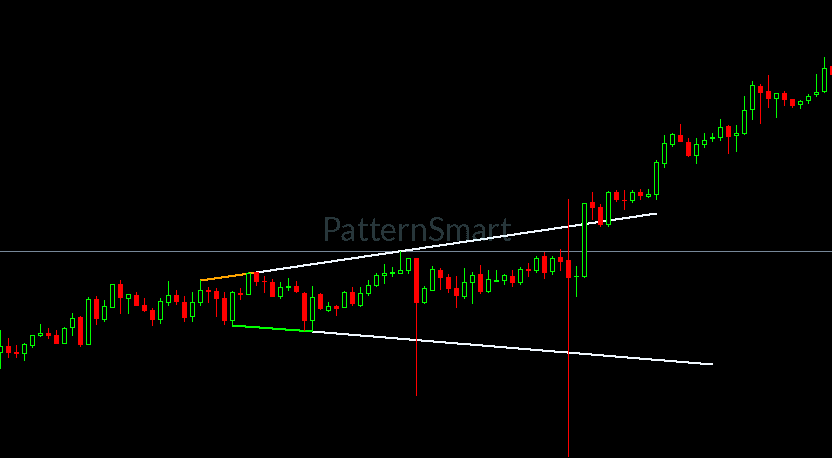
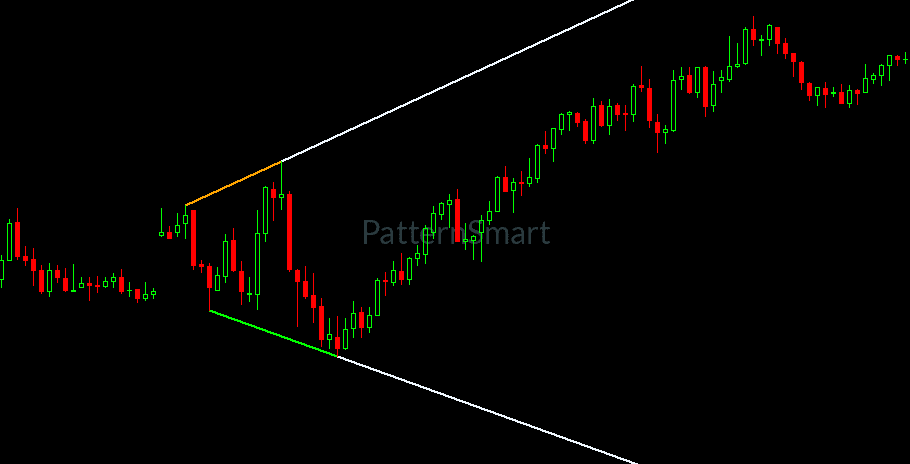
A broadening formation, also called a megaphone pattern or broadening wedge, is a chart structure where each swing high is higher than the last and each swing low is lower than the last. Triangles and wedges squeeze price toward a point. A broadening formation does the opposite: the range opens up and the two trendlines spread apart.
That widening shows up when volatility is rising and neither buyers nor sellers are in control. Traders watch it near major turning points and in news-driven markets, and use it as context for both reversals and breakouts.
The pattern is easy to miss and slow to draw. It needs two rising highs and two falling lows in the right order, and the shape keeps changing as new bars print. The Broadening Formation Chart Pattern Indicator for MT4 does that scanning for you, on every bar, so you can spend your time on the trade instead of the trendline.
Features
Everything you need to trade megaphone patterns on MT4
A chart-window indicator built for one job: finding broadening formations quickly, drawing them clearly and telling you when a new one appears.
Automatic pattern detection
Scans the visible history and every new bar for broadening formations. No manual trendlines, no counting swings, no second-guessing which highs to connect.
Small, medium and large sizes
Look for compact formations, mid-sized ones or wide structures. Switch each size on or off to match the scale you trade.
Trendlines drawn for you
The upper and lower boundaries are placed on the chart as standard MT4 trend lines, so they stay visible, selectable and easy to inspect.
Forward projection lines
Dotted extensions show where both boundaries are heading. Set how many bars they run ahead to fit your timeframe.
Sound and log alerts
When a formation appears on the live bar, the indicator plays your chosen sound file and writes a message to the Experts log, so you do not have to watch the screen.
Latest-pattern-only mode
Keep only the most recent formation on the chart. Older lines are removed automatically, which keeps busy charts readable.
Full control of line style
Choose separate colors for the upper boundary, lower boundary and projection lines, and set the line width. Match your chart theme or make the pattern stand out.
Detection marker and data buffer
A dot marks each bar where a formation is detected, and the same value is held in an indicator buffer you can read from your own tools.
Pattern sizes
Choose the pattern size that fits your trading
Broadening formations come in different scales. Pick the sizes you care about and leave the rest off.
Small
Compact formations
Short structures that develop over a handful of bars. Suited to lower timeframes and fast intraday trading.
Medium
Everyday formations
Mid-sized structures that fit most day trading and short swing setups. A balanced choice for general use.
Large
Wide formations
Big structures that take longer to build. Useful on higher timeframes for swing and position traders.
All three sizes are on by default. Turn off the ones you do not trade and the chart stays cleaner.
Setup
Install the indicator and start scanning in minutes
Copy the file into MetaTrader 4
In MT4, choose File, then Open Data Folder. Place
ChartPatternBroadeningFormation.ex4inMQL4/Indicators. Restart MT4, or right-click the Navigator and choose Refresh.Attach it to a chart
Open any symbol and timeframe, find the indicator under Navigator, Indicators, and drag it onto the chart.
Pick your pattern sizes and style
In the inputs window, enable the sizes you want, set the projection length, and choose line colors and width. The defaults work well out of the box.
Let the chart do the scanning
Formations appear with their trendlines and projections. Keep alerts on and MT4 will play a sound when a new one forms on the live bar.
Requires MetaTrader 4 build 600 or newer.
In practice
How traders use broadening formations
Broadening formations are volatile structures. Many traders wait for confirmation and plan for wider swings than they would use in a tight range. The indicator finds the pattern. Your plan decides what to do with it.
Breakout watching
Use the projected boundaries as reference levels. Watch how price behaves when it reaches the upper or lower line, and wait for your own confirmation before acting.
Reversal context
A widening range near a major support or resistance level can flag a market that is losing direction. Combine it with the levels you already trade.
Volatility awareness
An expanding structure is a reminder that swings are growing. Use it to review stop distances and position size before the next move.
Multi-timeframe confirmation
Run the Large size on a higher timeframe for the bigger picture and the Small size on a lower one to time entries within it.
Settings
Inputs you can adjust
Every option appears in the standard MT4 inputs window when you attach the indicator.
| Input | Default | What it does |
|---|---|---|
EnableSmall | true | Look for small broadening formations. |
EnableMedium | true | Look for medium-sized formations. |
EnableLarge | true | Look for large formations. |
LastOnly | false | Show only the most recent formation and remove older ones. |
SetAlert | true | Play a sound and write to the Experts log when a formation appears on the live bar. |
ExtensionBars | 50 | How many bars the dotted projection lines run ahead. Set to 0 to hide them. |
LineWidth | 2 | Thickness of all pattern lines. |
UpperLineColor | Orange | Color of the upper boundary line. |
LowerLineColor | Lime | Color of the lower boundary line. |
ExtensionLineColor | AliceBlue | Color of the dotted projection lines. |
SoundAlertFile | notify.wav | Sound file played by the alert. Use any file in your MT4 Sounds folder. |
Compatibility
Requirements and compatibility
- Platform
- MetaTrader 4, build 600 or newer
- Indicator type
- Chart window overlay
- Symbols
- Any instrument your broker offers
- Timeframes
- M1 to MN
- Alerts
- Sound file and Experts log message
- Trading
- Analysis only, places no orders
FAQ
Frequently asked questions
What does a broadening formation indicator do?
It scans price for the broadening formation, also known as the megaphone pattern, where swing highs keep rising and swing lows keep falling. When it finds one, it draws the upper and lower trendlines on your MT4 chart, projects them forward and can alert you.
Does it work on every symbol and timeframe?
Yes. It runs on any symbol your broker offers in MetaTrader 4, from forex pairs to metals, indices and crypto CFDs, and on every timeframe from M1 to monthly.
What is the difference between small, medium and large patterns?
The three sizes look for formations of different scales. Small suits quick intraday structures, medium suits everyday trading, and large picks up wide, slow-forming structures on higher timeframes. You can enable any combination.
How do the alerts work?
With alerts enabled, the indicator plays a sound file and writes a message to the Experts log when a formation appears on the live bar. The default sound is notify.wav, and you can point it at any file in your MT4 Sounds folder.
Does it place trades for me?
No. It is an analysis tool that marks patterns on your chart. It does not open, modify or close orders, so every trading decision stays with you.
Can the signal change while a bar is still forming?
Yes. The indicator evaluates every bar, including the one still forming, so a formation flagged on the live bar can change before that bar closes. Many traders wait for the bar to close before acting on it.
Can I keep only the latest pattern on the chart?
Yes. Turn on the latest-only option and the indicator keeps just the most recent formation, removing older lines as new ones appear.
Can I read the signal from an Expert Advisor?
The indicator exposes one data buffer that holds a value on bars where a formation is detected. You can read it from your own tools with iCustom.
Does a broadening formation guarantee a profitable trade?
No chart pattern does. Broadening formations can be volatile and unpredictable, so use the indicator alongside your own analysis, confirmation and risk management.
Get started
Add the Broadening Formation Indicator to your MT4 charts
Stop redrawing megaphone patterns by hand. Attach the indicator, choose your pattern sizes and let MetaTrader 4 tell you when a new formation appears.
Trading leveraged products such as forex and CFDs carries a high level of risk and may not be suitable for everyone. You can lose more than your initial deposit.
The Broadening Formation Chart Pattern Indicator is a charting tool for MetaTrader 4. It is not financial advice and does not guarantee results. Past patterns do not predict future price movement. MetaTrader is a trademark of its respective owner.