A breakout strategy may calculate a perfectly reasonable stop-entry level at the close of a bar, only to have the market cross that level before its order reaches the trading connection. In NinjaTrader 8, a stop-market entry is not a market order waiting to be submitted at any price. The stop must satisfy the receiving venue's rules at submission or modification. A preflight check can reduce avoidable rejections without changing the strategy's intended entry behavior.
Separate the signal from order eligibility
Store the proposed breakout level as part of the signal, round it to the instrument's tick size, and inspect current quotes immediately before submitting a new order. For a conservative buy-stop policy, require at least one tick above the current ask; for a sell-stop entry, require at least one tick below the current bid. These are local strategy safeguards, not universal exchange rules. The venue may use other trigger references, price bands or minimum distances. A quote can also become stale while the order is in transit.
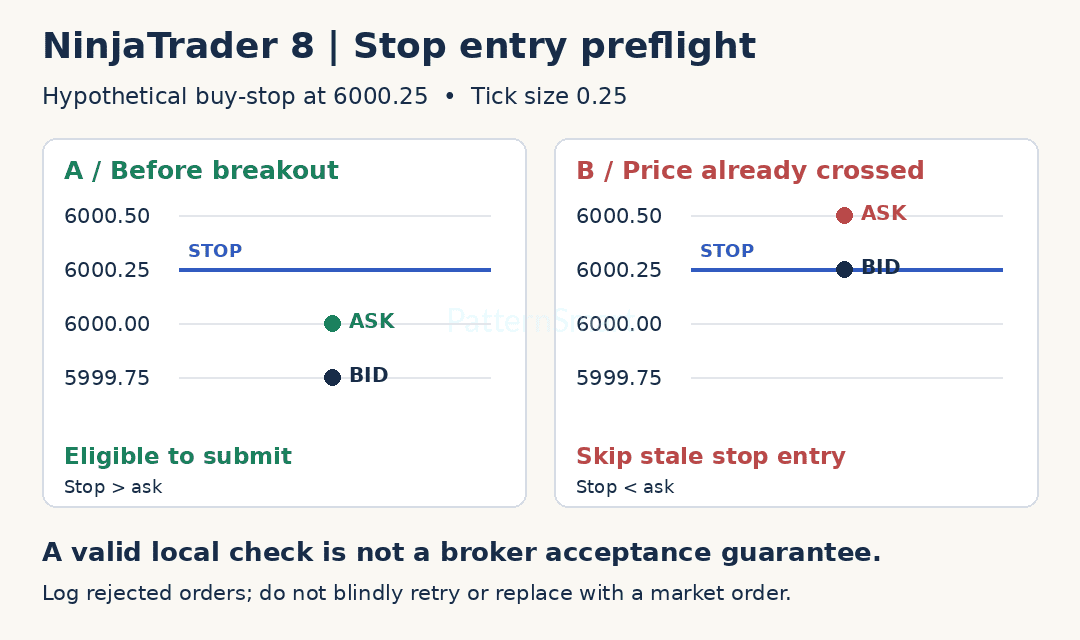
Worked example: a missed breakout
Assume a tick size of 0.25 and a planned buy stop of 6000.25. With a bid of 5999.75 and ask of 6000.00, the stop is one tick above the ask, so the local check permits submission. If the bid rises to 6000.25 and ask to 6000.50 before submission, the same stop is now below the ask. Skip the stale entry under this policy. Automatically moving the stop to 6000.75 or entering at market would change the strategy and must be evaluated separately.
A small NinjaScript preflight excerpt
The following is an illustrative excerpt, not a complete executable strategy. Place it in the primary series's OnBarUpdate() entry branch after checking signal freshness, market-data readiness, position and working-order state. The fixed price is for the worked example; a real strategy supplies its calculated stop. The code has not been compiled or tested here. The real-time branch is deliberate: historical quote methods can return substituted bar values, so do not treat them as recorded live bid/ask.
// Illustrative excerpt inside OnBarUpdate(), primary series.
// Call only for a fresh signal with no working entry order.
if (State != State.Realtime || BarsInProgress != 0)
    return;

double stop = Instrument.MasterInstrument.RoundToTickSize(6000.25);
double ask = GetCurrentAsk();
double bid = GetCurrentBid();

if (ask <= 0 || bid <= 0 || ask < bid)
    return;

if (stop >= ask + TickSize)
    EnterLongStopMarket(1, stop, "BreakoutLong");
else
    Print("Skipped stale buy stop: " + stop + " ask: " + ask);
For short entries use the mirrored inequality and EnterShortStopMarket. Reject invalid or stale quotes, track the age of market data where available, and use the correct instrument if the strategy runs multiple series. The excerpt is not an order lifecycle manager: a successful submission must still be tracked to avoid issuing a fresh entry every bar.
What happens after submission?
Track order updates by signal identity and log the submitted stop, quote snapshot, timestamp, order state, error code and native comment. OnOrderUpdate() reports changes including rejection; use OnExecutionUpdate() for fill-driven actions. If a rejection arrives, reconcile outstanding orders and executions before allowing another attempt. Keep the default protective RealtimeErrorHandling behavior unless a separately tested recovery architecture justifies changing it. Do not set IgnoreAllErrors simply to suppress a popup.
Validation checklist
- In Playback or simulation, replay prices one tick below, equal to and above the planned stop; confirm the local entry decision.
- Test a rapid quote change between validation and submission, including a rejected order.
- Verify that repeated signals cannot create duplicate working orders, and that a canceled or rejected order does not trigger an uncontrolled retry.
- Compare historical and live-simulation results separately; bar-close data cannot reconstruct the exact live quote or network latency.
- Validate the broker's specific stop rules and emergency procedures before deployment.
Stop-market orders do not guarantee the stop price as a fill price. Gaps, latency, spread, fees and slippage can increase losses. This is an educational design pattern, not a profitability claim.
Official NinjaScript references: GetCurrentAsk() · OnOrderUpdate() · RealtimeErrorHandling.
If you need custom entry validation, order lifecycle diagnostics or a broker-specific recovery workflow, explore our Custom Trading Software Development Services.