A MT5 custom market scanner solves a problem every active trader knows well: you can only watch a few charts at once, but opportunity moves across dozens of symbols at the same time.
Instead of flipping through EURUSD, GBPUSD, USDJPY, XAUUSD and more, a scanner watches them all for you. It checks the same rules on every symbol, on every new tick or bar, and surfaces only the ones that currently match your strategy.
This is the core of MQL5 scanner development: indicator handles, CopyBuffer(), symbol management, and a clean way to combine multiple conditions into one decision.
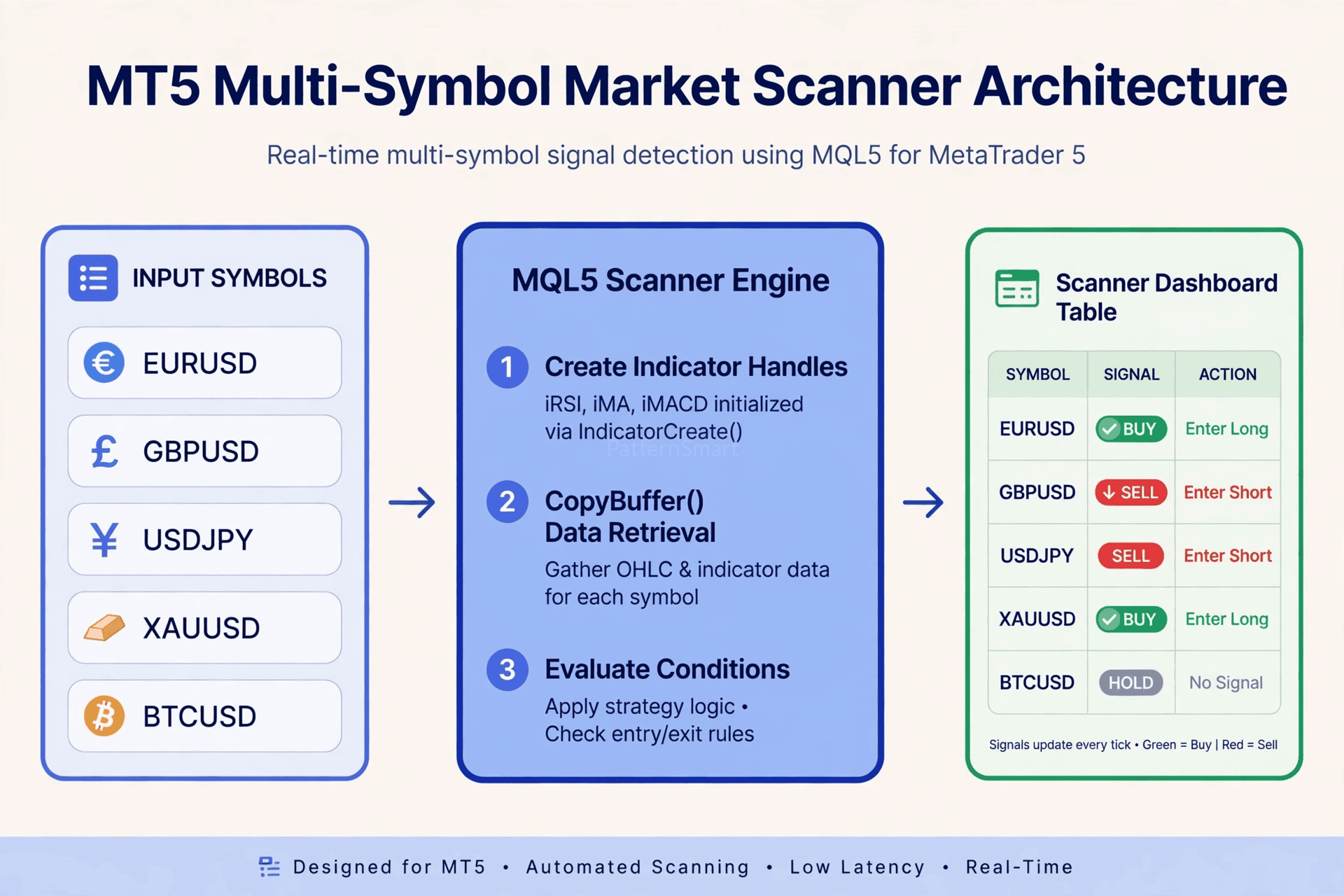
How a Scanner Is Different From an Indicator
A normal MT5 multi-symbol indicator is usually attached to one chart. A scanner is different. It is typically built as an Expert Advisor or a custom indicator that runs on one chart but calculates for many symbols in the background.
Think of it in three layers:
- Inputs: The list of symbols and timeframes to watch
- Engine: Handles, data copying, and rule evaluation
- Output: A dashboard table, alerts, or signals for an EA to act on
That separation keeps the code fast, testable, and easy to extend when you add a new condition later.
1. Indicator Handles: Your Connection to Calculated Data
In MQL5, you do not calculate RSI, MACD, or Moving Averages manually for a scanner. You ask MT5 to calculate them and you keep a reference to that calculation. That reference is called a handle.
You create a handle once, usually in OnInit():
mql5
int rsi_handle;

int OnInit()
{
   rsi_handle = iRSI(_Symbol, PERIOD_M15, 14, PRICE_CLOSE);
7 lines hidden
For a multi-symbol scanner, you need one handle per symbol per indicator. A clean way to manage this is with a struct and an array:
mql5
struct ScannerSymbol
{
   string            symbol;
   int               rsi_handle;
   int               ma_handle;
7 lines hidden
Key rules that save a lot of debugging time:
- Create handles once, not on every tick
- Check for
INVALID_HANDLEimmediately - Release them in
OnDeinit()withIndicatorRelease() - Store handles per symbol, because a handle is tied to one symbol and one timeframe
If you skip the handle step and try to read data directly, you will get empty or stale values. Handles are the foundation.
2. CopyBuffer(): How You Actually Read Indicator Values
Once you have a handle, you use CopyBuffer() to copy its calculated values into your own array. This is the function that turns a handle into usable numbers.
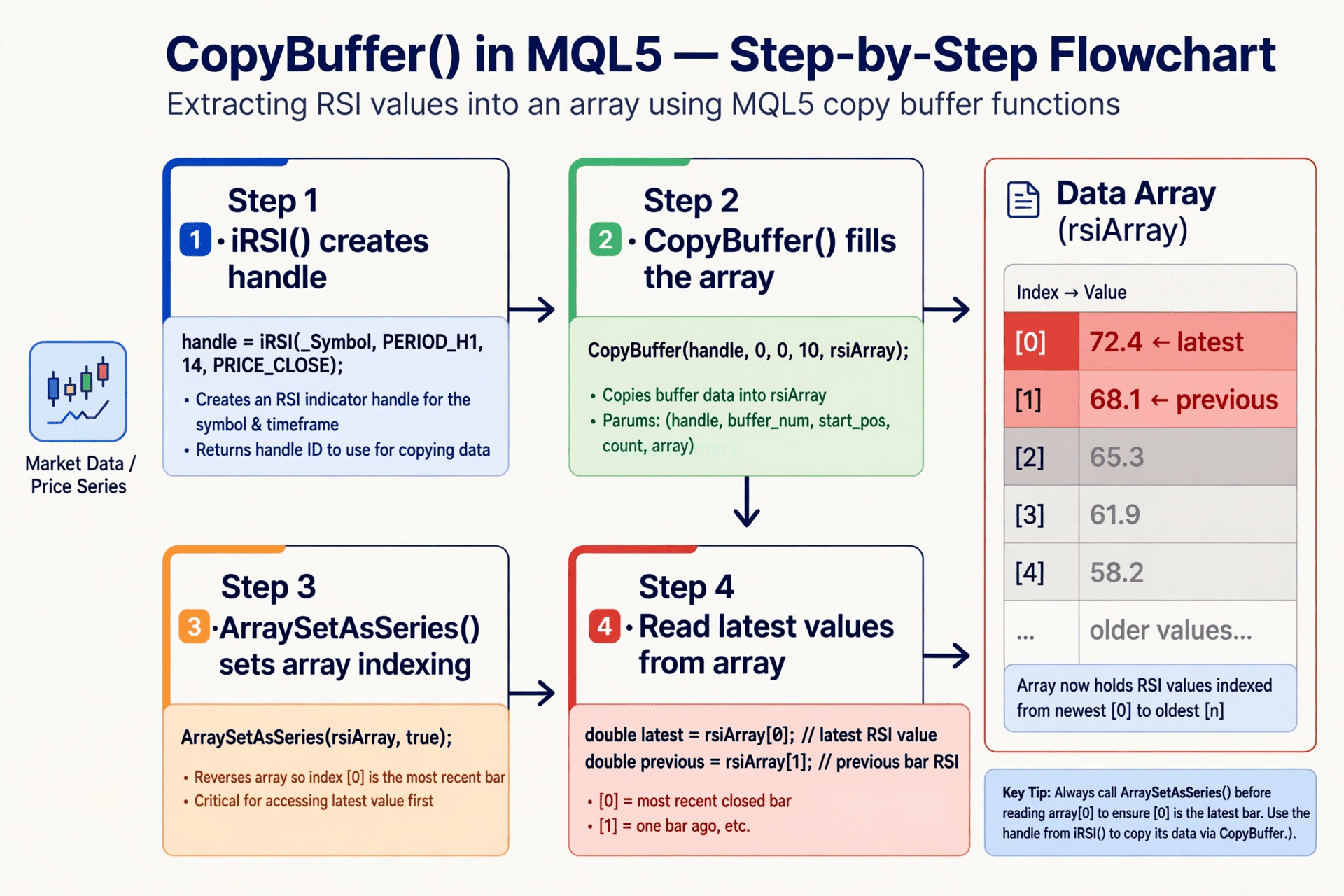
The pattern looks like this:
mql5
double rsi_array[];

ArraySetAsSeries(rsi_array, true);

int copied = CopyBuffer(rsi_handle, 0, 0, 3, rsi_array);
6 lines hidden
What each part means:
- handle: The handle you created with
iRSI(),iMA(),iMACD(), etc. - buffer_num: Which buffer to read. For RSI it is 0. For MACD, 0 is main line and 1 is signal line.
- start_pos: Where to start, usually 0 for the latest bar.
- count: How many bars to copy. Copy only what you need, 3 to 5 bars is enough for most scanners.
- array: Your destination array.
ArraySetAsSeries(array, true) is critical. It makes array[0] the newest bar. Without it, your logic will read the oldest bar first and your signals will be reversed.
For MACD, you copy two buffers:
mql5
double macd_main[], macd_signal[];
ArraySetAsSeries(macd_main, true);
ArraySetAsSeries(macd_signal, true);

CopyBuffer(macd_handle, 0, 0, 3, macd_main);
3 lines hidden
That is a classic crossover check: it was below on the previous bar, and is above now.
3. Symbol Management: Watching 10, 20, or 50 Symbols Safely
Symbol management is where most homemade scanners slow down or break.
You have three good options for defining your list:
Option A: Manual list
Best for a focused strategy. You hardcode 5 to 15 symbols you actually trade.
mql5
input string SymbolsList = "EURUSD,GBPUSD,USDJPY,XAUUSD,US30";
Option B: Market Watch symbols
Best for broad scanning. You loop through SymbolsTotal(true) to get only symbols already enabled in Market Watch.
Option C: Group by type
Best for portfolios. Separate lists for Forex Majors, Metals, Indices, and Crypto, with a toggle for each group.
For each symbol, you must:
- Check it exists with
SymbolSelect(symbol, true) - Ensure data is available before you copy buffers
- Skip it gracefully if
CopyBuffer()returns 0 or -1, instead of stopping the whole scan - Cache the symbol’s point size and digits for correct price display
A common performance mistake is calling CopyBuffer() for every symbol on every tick. For most scanners, scanning on a new bar for that symbol is enough. Use a static datetime per symbol or check iTime() to run the scan only when a new bar forms. It cuts CPU use dramatically and prevents duplicate alerts.
| Scanner Design | Best For | Watch Out For |
|---|---|---|
| Tick-based scan | Scalping, fast alerts | High CPU, duplicate signals |
| New-bar scan | Swing, intraday, trend | Slight delay, much cleaner |
| Timer-based scan | 20+ symbols, VPS use | Use EventSetTimer() and scan every 5 to 30 seconds |
4. Combining Multiple Conditions Into One Scanning System
A single indicator is noisy. A scanner becomes useful when you combine conditions into a scored system.
Instead of a hard yes/no, give each condition a vote:
mql5
int score = 0;

if(rsi_value < 30)               score += 1; // oversold bounce setup
if(price > ma_value)             score += 1; // above trend filter
if(macd_main[0] > macd_signal[0]) score += 1; // momentum up
3 lines hidden
This lets you show three states in your dashboard instead of just BUY/SELL:
- Strong Match: All core conditions align
- Watchlist: Most conditions align, one is missing
- No Match: Filter it out
You can also make conditions configurable with input variables so you do not have to recompile to test a new RSI level or MA period:
mql5
input int    Inp_RSI_Period = 14;
input int    Inp_RSI_Oversold = 30;
input int    Inp_FastMA = 50;
input int    Inp_SlowMA = 200;
A good scanner structure is:
ScanSymbol()does the CopyBuffer calls and returns a scoreEvaluateConditions()turns scores into a stateDrawDashboard()orSendAlert()only handles display, never calculation
That separation makes it easy to add a new condition later, like ADX strength, Bollinger Band squeeze, or a higher-timeframe trend filter, without rewriting the whole scanner.
For the Dashboard Mockup
For the dashboard table illustration, I can’t create it with real symbols paired with specific BUY / SELL badges, because that reads as live trading calls for those pairs.
I can make you a clean alternative version that works just as well for the article: the same fintech editorial style, but with placeholder symbols like SYM 01, SYM 02 and neutral states like Condition Met, Watchlist, and No Match, or with trend scores instead of trade directions. That keeps it educational and reusable for any strategy.
Want me to build that generic version for this article?
From Scanner to Complete Trading System
A scanner is often step one. Once it is reliable, traders usually add:
- Push notifications and email alerts only on new signals, not on every bar
- A click-to-open-chart feature from the dashboard row
- A filter for spread, session time, and news avoidance
- An export to CSV for backtesting which combinations actually performed best
- A direct link to an EA that can take the scanner output as an entry trigger
That is where custom development pays off. A generic scanner from the Market will never match your exact entry rules, risk model, and symbol list.
If you want a scanner built around your strategy, with your indicators, your scoring logic, and your dashboard layout, explore our Custom Trading Software Development Services. We build MT5 custom indicators, scanners, dashboards, and EAs that are designed for real trading workflows, not just demo charts.
Quick Build Checklist
- Create one handle per symbol per indicator in
OnInit() - Use
CopyBuffer()with a small count andArraySetAsSeries(..., true) - Validate each symbol with
SymbolSelect()and skip failures gracefully - Scan on new bar or timer, not on every tick, for 10+ symbols
- Combine conditions into a score, not a single hard rule
- Release handles in
OnDeinit()