MetaTrader 4 ships with dozens of built-in indicators, but almost all of them calculate on a single timeframe — the one currently displayed on your chart. A trader who wants an RSI computed on H4 while watching an M15 chart, or a moving average blend of three timeframes at once, quickly hits the platform’s limits. That is exactly the gap an MT4 multi-timeframe indicator fills, and building one is one of the most common requests in MQL4 custom indicator development.
This article walks through the three technical pillars of MTF indicator design: indicator buffers, reading values from other symbols and timeframes, and retrieving custom indicator output with iCustom(). The official MQL4 reference (docs.mql4.com) provides useful technical examples of indicator buffers and accessing indicators across symbols and timeframes, and this guide builds on those foundations with a practical architecture you can reuse.
Why Multi-Timeframe Indicators Matter
Single-timeframe analysis hides context. A scalper on M5 cannot see whether the H1 trend agrees with the entry; a swing trader on H4 has no view of the daily structure. A well-built MTF custom indicator:
- Pulls higher-timeframe values into lower-timeframe charts (the most common case)
- Combines several timeframes into a single, easy-to-read buffer
- Feeds expert advisors with aligned higher-timeframe context via
iCustom()
Figure 1 shows the architecture: each timeframe series is requested independently, the results are merged using shift arithmetic, and one or more buffers draw the final output on any chart.
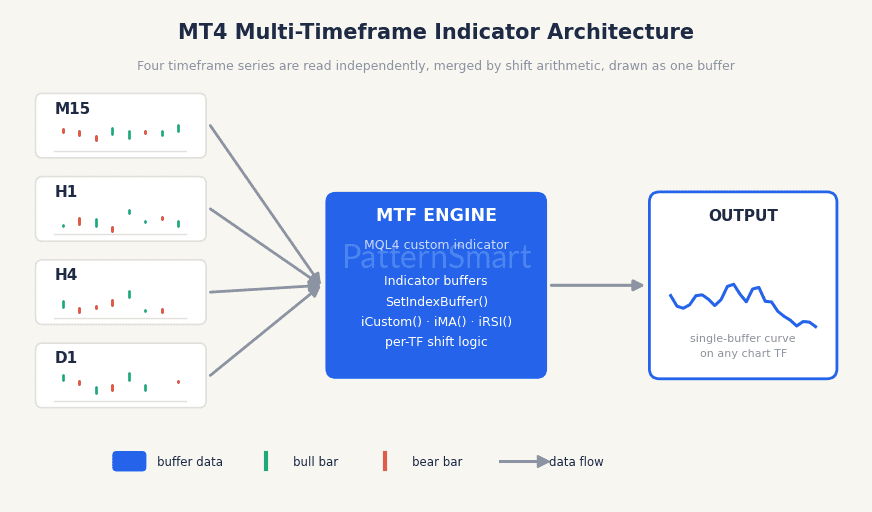
Figure 1 — MT4 multi-timeframe indicator architecture
Pillar 1: Indicator Buffers — the Foundation of MT4 Indicator Programming
Every value an MT4 indicator draws lives in a buffer: an ordinary double array that the terminal renders as a line, histogram, arrow, or custom drawing. Mastering buffers is the prerequisite for all MT4 indicator programming, single- or multi-timeframe.
A minimal two-buffer skeleton looks like this:
#property indicator_separate_window
#property indicator_buffers 2
#property indicator_color1 RoyalBlue
#property indicator_color2 LimeGreen

double FastBuf[];
double SlowBuf[];

int OnInit()
{
   IndicatorShortName("MTF Trend Blend");
   SetIndexStyle(0, DRAW_LINE);
   SetIndexBuffer(0, FastBuf);
   SetIndexLabel(0, "Fast (M15)");
   SetIndexStyle(1, DRAW_LINE);
   SetIndexBuffer(1, SlowBuf);
   SetIndexLabel(1, "Slow (H4)");
   return(INIT_SUCCEEDED);
}
Three rules to internalize:
- Buffers are declared as plain
doublearrays —double FastBuf[];— and bound to plot indexes inOnInit()withSetIndexBuffer(index, array). - Buffer index 0 is the first plot;
mode 0iniCustom()refers to this same buffer (more on that below). - Index 0 is the newest bar, indexes grow into the past — the same series ordering that
iCustom()reads back with its shift parameter.
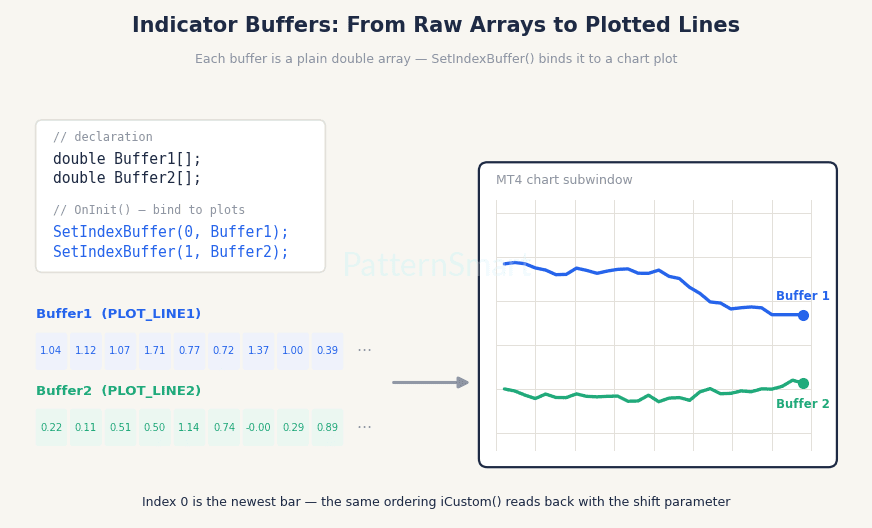
Figure 2 — How declared arrays become plotted lines via SetIndexBuffer()
The Calculation Loop: prev_calculated vs. IndicatorCounted()
In the modern OnCalculate() form, MT4 passes prev_calculated — the number of bars already processed on the previous call. Your loop should only recalculate what is new:
int OnCalculate(const int rates_total,
                const int prev_calculated,
                const datetime &time[],
                /* ... price arrays ... */)
{
   int counted = prev_calculated;
   if(counted < 0) counted = 0;
   if(counted > 0) counted--;        // recalc the last bar (still forming)
   for(int i = counted; i < rates_total; i++)
   {
      // one calculation per bar, index i is oldest-first here
   }
   return(rates_total);
}
Older examples use the legacy start() function with IndicatorCounted(); both patterns are valid, but new code should use OnCalculate().
Pillar 2: Accessing Different Timeframes and Symbols
Here is the key insight that makes any MT4 multi-timeframe indicator possible: every MQL4 price function accepts a timeframe and symbol parameter.
double m15ema = iMA(NULL, PERIOD_M15, 14, 0, MODE_EMA, PRICE_CLOSE, shift);
double h4rsi = iRSI("EURUSD", PERIOD_H4, 14, PRICE_CLOSE, shift);NULLmeans “the chart’s current symbol”; you can pass any symbol string to read another instrument (it must be visible in Market Watch or the data won’t exist).PERIOD_M15,PERIOD_H4,PERIOD_D1, … select the source timeframe.shiftcounts bars on the source timeframe, where 0 is its newest bar.
Aligning Shifts Across Timeframes
The subtle part is alignment. If your indicator runs on M15 and you ask for iMA(NULL, PERIOD_H4, …, 0), you get the still-forming H4 bar — which repaints on every M15 tick. To anchor each chart bar to the correct higher-timeframe bar, use iBarShift(), which converts a timestamp into a bar index on any timeframe:
for(int i = counted; i < rates_total; i++)
{
   int h4Shift = iBarShift(NULL, PERIOD_H4, time[i]);

   FastBuf[i] = iMA(NULL, PERIOD_M15, 14, 0, MODE_EMA, PRICE_CLOSE,
                    iBarShift(NULL, PERIOD_M15, time[i]));
   SlowBuf[i] = iMA(NULL, PERIOD_H4, 50, 0, MODE_SMA, PRICE_CLOSE, h4Shift);
}
For signals rather than visual context, point one bar further back — h4Shift + 1 — so you read only closed H4 bars and avoid repainting.
Pillar 3: Retrieving Values with iCustom()
Buffers become useful beyond their own chart when other code reads them. iCustom() is the universal reader: it loads any custom indicator and returns one buffer value:
double h4Signal = iCustom(NULL, PERIOD_H4,
                          "MyMTFIndicator",          // indicator file name
                          14, 3,                     // input parameters, in declared order
                          0,                         // mode = buffer index
                          iBarShift(NULL, PERIOD_H4, Time[0]));
Four parameters deserve special attention (see Figure 3):
modeis the buffer index —0for the firstSetIndexBuffer()binding,1for the second, and so on.- The input parameters must match the indicator’s own
inputlist exactly — same count, same order, same types. A mismatch silently returns0(checkGetLastError()while debugging). - The shift counts bars on the indicator’s timeframe (
PERIOD_H4above), not on the chart. This is whyiBarShift()is essential for alignment. NULLsymbol means the chart symbol; passing a symbol string lets an EA combine multi-timeframe and multi-symbol logic in one call.
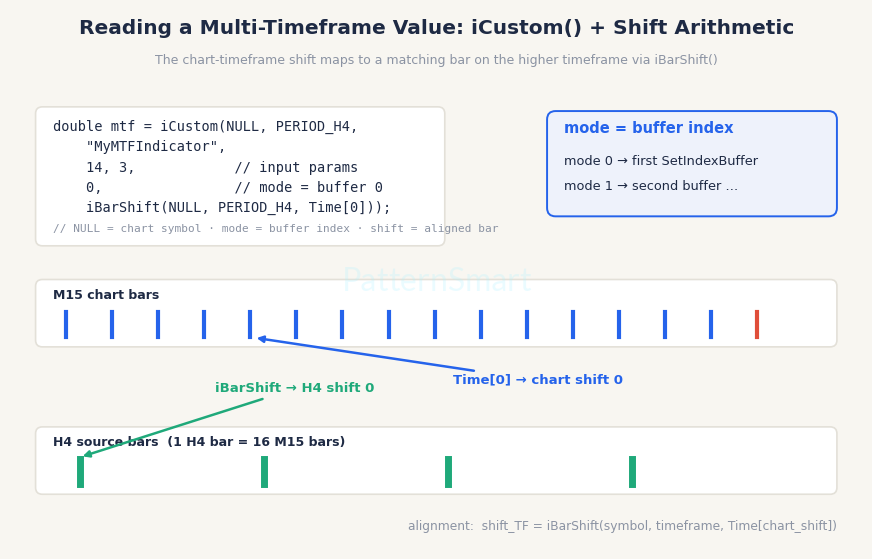
Figure 3 — iCustom() call anatomy and timeframe shift alignment
This design has a nice architectural consequence: you can build small, single-purpose indicators and compose them — an EA calls a “regime” indicator on D1 for trend permission and a “trigger” indicator on M15 for entries — instead of maintaining one monolithic codebase.
Common Pitfalls in MQL4 Custom Indicator Development
- Repainting: reading shift
0of a higher timeframe means the value changes until that bar closes. Use shift1for trade decisions. iBarShift()returning -1: the requested time is not in the available history (data not loaded or bar missing). Always guard the result.- Insufficient history:
iMA(..., 200, ...)on D1 needs 200+ loaded daily bars; request history inOnInit()viaiBars()checks. - Series vs. non-series confusion:
OnCalculate()arrays are oldest-first, whileiCustom/iMAshifts are newest-first. Convert between them withiBarShift()rather than hand-rolled arithmetic. - Hardcoded symbol/timeframe: make them
inputparameters so the same indicator works on any chart without recompilation.
From Indicator to Product: Custom MT4 Indicator Programming
Multi-timeframe logic is deceptively simple in a code snippet and genuinely hard to get right in production: alignment edge cases, repaint control, buffer performance on deep history, and cross-symbol data availability all surface only after real-world use. Many traders start with a tutorial, hit those walls, and then look for professional custom MT4 indicator programming.
If that is where you are, our team builds production-grade indicators and the expert advisors that consume them — see our Custom Trading Software Development Services for end-to-end design, implementation, and testing of MT4/MT5 tools, including dedicated MT4 Custom Indicator Development Services for traders who need a specific multi-timeframe calculation turned into a reliable, chart-ready product.
Conclusion
A robust MT4 multi-timeframe indicator rests on three skills: binding and filling indicator buffers, requesting values from other symbols and timeframes with correct shift alignment via iBarShift(), and exposing the result cleanly through iCustom() so EAs and other indicators can consume it. Get those right — and guard against repainting and history gaps — and a few dozen lines of MQL4 become a genuinely professional analytical tool.