A cBot that always trades 0.10 lots may expose radically different amounts of capital as its stop distance changes. Fixed monetary risk sizing reverses that relationship: the strategy first establishes a stop distance and a maximum estimated cash loss, then calculates a permitted trade volume. In cTrader, the critical details are the units, rounding direction and final risk check.
Calculate volume from the stop, not the other way around
Use the account deposit currency for the risk budget and pips for the stop distance. cTrader's VolumeForFixedRisk returns volume in units, not lots. For a hypothetical USD account trading EUR/USD, assume one unit has a pip value of $0.0001, the stop is 23 pips, and the broker permits increments of 1,000 units. A $100 budget implies a theoretical volume of 43,478.26 units.
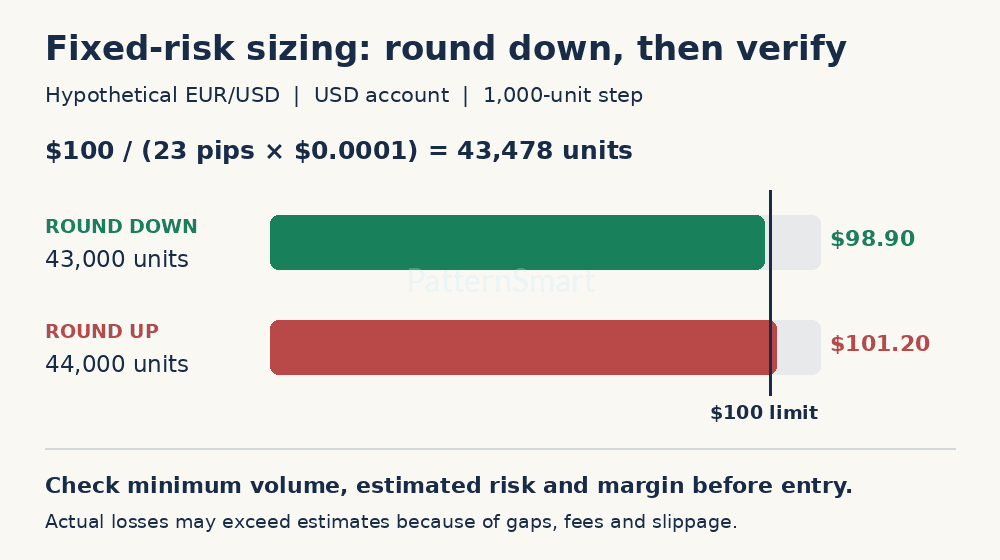
At 43,000 units the estimated loss is $98.90; at 44,000 it is $101.20. Rounding upward would breach the stated budget even before transaction costs. This distinction matters particularly for small accounts and symbols with coarse volume steps.
Integrate a sizing gate into the cBot
Run this gate immediately before the existing entry logic in OnBarClosed or OnTick, depending on the strategy's signal timing. Do not make it an unconditional order on every tick. The following is an illustrative C# excerpt, not a complete executable strategy; it assumes a valid positive budget and stop distance and a long entry. Use the actual trade direction for margin checks.
double budget = 100;
double stopPips = 23;
double volume = Symbol.VolumeForFixedRisk(budget, stopPips, RoundingMode.Down);
volume = Symbol.NormalizeVolumeInUnits(Math.Min(volume, Symbol.VolumeInUnitsMax), RoundingMode.Down);
if (volume < Symbol.VolumeInUnitsMin || volume <= 0)
    return;
double estimatedRisk = Symbol.AmountRisked(volume, stopPips);
if (double.IsNaN(estimatedRisk) || double.IsInfinity(estimatedRisk) || estimatedRisk <= 0 || estimatedRisk > budget)
    return;
if (Symbol.GetEstimatedMargin(TradeType.Buy, volume) > Account.FreeMargin)
    return;
// Continue to the existing entry and protection logic.
The maximum volume cap prevents oversized requests, while the minimum check deliberately skips a trade rather than forcing the smallest tradable size. AmountRisked provides a second estimated monetary-risk check. Estimated margin is a separate constraint: a position can satisfy the risk budget yet require too much margin. In production, validate finite inputs and all returned values, account for existing exposure and reserved margin, and check the actual TradeResult after submission. Attach the intended protection and verify its state after execution; a sizing calculation alone does not place a stop.
Test failure cases before deployment
- Repeat the example with a 46-pip stop: theoretical volume falls to about 21,739 units; rounding down to 21,000 estimates $96.60 risk.
- Test a budget smaller than the risk of the minimum allowable volume: the entry should be skipped.
- Test several instruments and account currencies; never assume the EUR/USD pip value applies universally.
- Log requested budget, stop pips, normalized volume, estimated risk, margin, execution outcome and actual protection. Compare backtest and demo results using realistic spread and costs.
What this control cannot guarantee
Fixed-risk sizing controls an estimate, not a guaranteed maximum realized loss. Slippage, gaps, currency conversion, commissions and execution failures may increase loss. Reserve part of the budget for costs, enforce aggregate exposure limits and test adverse scenarios. See the official cTrader Symbol API for the relevant methods. For integration into an existing cBot or customized portfolio risk controls, contact our Custom Trading Software Development Services.