MultiCharts Opening Range Breakout Alerts: Confirmed Bar Signals Without Duplicate Notifications
Trading Tips / Sunday practical workflow — A full PowerLanguage indicator for collecting a fixed opening range, confirming a close beyond its boundary, and limiting alerts to one per direction each day. This is classic MultiCharts PowerLanguage, not MultiCharts .NET C#.
Why an opening-range alert needs a state machine
An opening-range breakout (ORB) is simple on paper: watch the first thirty minutes, record its high and low, and react when price leaves the box. In code, three details determine whether the result is useful: which bars belong to the opening range, when the range is considered finished, and how often an alert may trigger. An indicator that recalculates the high while treating it as a fixed threshold will silently move its own goalposts. An indicator that fires on every tick may also produce repeated messages for a move that never holds through the close.
This tutorial supplies a commented, self-contained PowerLanguage indicator built around confirmed bar updates, a daily reset, a minimum required number of opening bars, a symbol-aware tick buffer, and separate upward/downward alert latches. It is an alerting and chart-review utility, not an automatic order execution strategy. It has no profit objective, position size, stop order, or performance claim.
Define the time window precisely
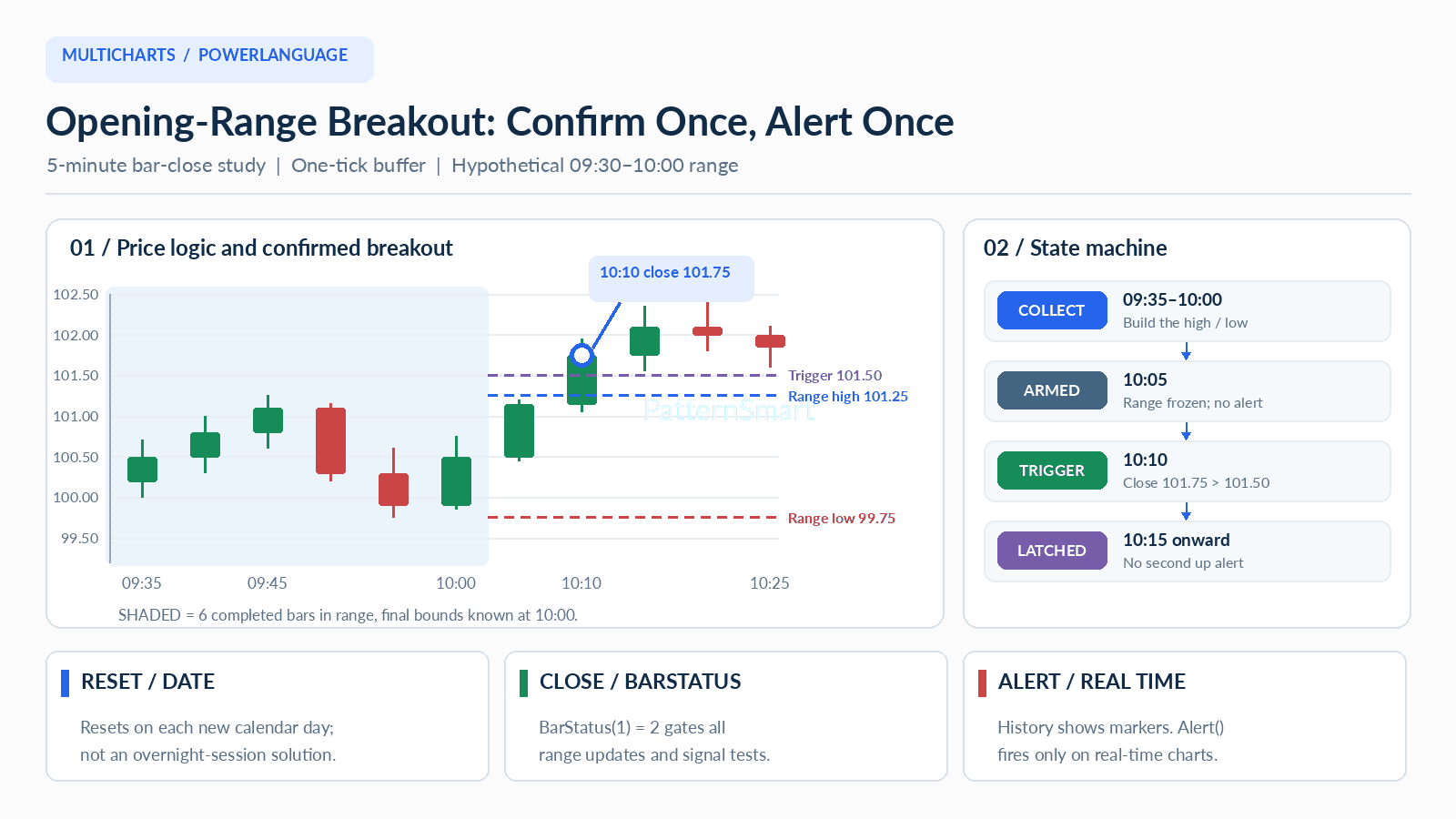
MultiCharts Time returns each bar's closing timestamp in 24-hour HHmm. For a chart of five-minute bars whose clock is aligned with a regular session starting at 09:30, the six bars ending at 09:35, 09:40, 09:45, 09:50, 09:55, 10:00 form the thirty-minute range. Accordingly, the collection expression is Time > 930 And Time <= 1000. Changing it to include the 09:30-ending bar could unintentionally pull in premarket or a previous period, depending on the chart session template.
Before 10:00, the final box is unknown. This implementation publishes the range plots only once the range has enough observations and the ending time is reached. The first eligible breakout is therefore the 10:05-ending bar, not the still-forming 10:00 bar. The condition Date <> Date[1] resets the accumulation when the calendar date changes; this is deliberately a same-day regular-session model, not an overnight-futures session detector.
A worked six-bar example: what actually counts as a break?
Take a hypothetical instrument with minimum price increment $0.25, opening-range high 101.25, and opening-range low 99.75. Using BreakoutTicks = 1 creates an upper close threshold of 101.50 and lower threshold of 99.50. The increment comes from MinMove / PriceScale, not from an arbitrary fixed percentage or a Forex pip assumption.
| Closing bar | Close | State / decision |
|---|---|---|
| 09:35–10:00 | varies | Accumulate six bars; final high 101.25, low 99.75 |
| 10:05 | 101.15 | No signal: close stays below 101.50 |
| 10:10 | 101.75 | Confirmed up event: first close above 101.50 |
| 10:15 | 102.10 | No repeat: previous-side latch is already set |
Notice that a wick at 101.75 during 10:05 would not count if the bar later closed at 101.15. Conversely, the signal at 10:10 is tied to the entire completed close, not a provisional live tick. The event also requires the previous close to be at or below the same buffered threshold; it is a crossing event rather than a generic condition that remains true for dozens of bars.
Parameter contract and sensitivity
| Input | Default | Engineering role and trade-off |
|---|---|---|
ORStart |
930 | Exclusive start boundary for bar-closing times; use a chart with the intended session. |
OREnd |
1000 | Inclusive last opening bar. No valid signals until after this point. |
LastSignalTime |
1530 | Cutoff for new confirmation events; range plots can persist afterward. |
MinOpeningBars |
5 | Minimum data-completeness guard; lower catches incomplete sessions, higher rejects them. |
BreakoutTicks |
1 | Close buffer above/below the box. Increasing reduces boundary noise but delays events. |
OnePerSide |
True | Allow up to one upside and one downside confirmation per calendar day. |
EnableAlerts |
True | Creates a real-time alert request; the chart must separately enable alerts. |
Two parameters deserve special attention. MinOpeningBars = 5 tolerates one missing five-minute observation in a nominal six-bar opening range; it is a guard, not proof that the exact session data are complete. Use six if your workflow requires every five-minute interval. Setting OnePerSide = False permits another message only after a new crossing, not on each bar that merely remains outside the range. EnableAlerts is still subject to MultiCharts chart-level alert settings.
Complete ready-to-copy PowerLanguage indicator
Create a new Indicator in PowerLanguage Editor named PS_ConfirmedOpeningRange. The following is one complete program; it uses no external functions or second data series. It has been reviewed against the relevant official syntax, but has not been compiled in a live MultiCharts instance, so perform a platform-side compile and manual test before relying on it.
{