PATTERNSMART · PINE SCRIPT ENGINEERING NOTES
TradingView Pine Script v6 Webhook Alert Debugging: RSI Zone Exits, Cooldowns, and Dynamic JSON
A practical audit-friendly alert pipeline: detect a completed RSI zone exit, enforce a shared bar cooldown, and deliver machine-readable JSON instead of ambiguous prose.
Level: Trading Tips · Pine Script v6 · Free complete indicator source · Example values are hypothetical
Why a clean chart signal can still create a noisy alert feed
A line crossing a threshold and a webhook message are not the same event. An RSI line can pass through 30 during a live candle and finish below it; another alert may fire from a different configuration; or a condition may remain true over several bars. If a downstream application assumes every notification is a unique, confirmed signal, small details in script execution become operational errors.
This Sunday practical tutorial builds an indicator, not an automated trading strategy. It detects two strictly defined zone-exit events: RSI crossing above an oversold boundary, and RSI crossing below an overbought boundary. It then checks that the chart bar has finished, applies a shared cool-off interval, and emits one structured message using Pine’s alert() function. It also plots the accepted event for a visual audit.
The implementation avoids higher-timeframe requests, deliberate lookahead, and intrabar signal delivery. It is still not a universal “non-repainting” guarantee: data revisions, chart type, input edits, session changes, and alert snapshots can change what a later historical replay shows.
The decision pipeline, not just the indicator formula
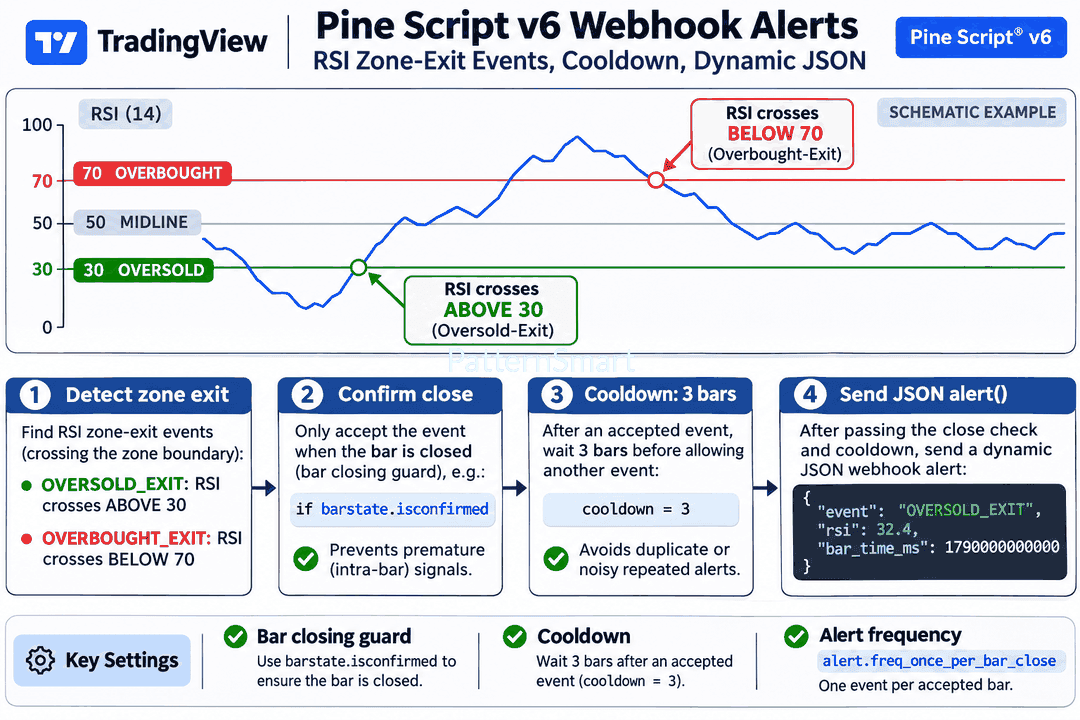
Step 1 · Detect an event, not a persistent condition
Pine’s ta.rsi(close, 14) calculates Wilder-style relative strength from the selected chart’s closing-price series. An oversold exit is true when the previous RSI was at or below 30 and the current RSI is greater than 30. An overbought exit is true when the previous RSI was at or above 70 and the current RSI is less than 70. This is implemented with ta.crossover() and ta.crossunder(), not a test that remains true while RSI stays in the middle range.
Step 2 · Confirm the close and account for live execution
barstate.isconfirmed is true for historical bars and the final update of a realtime bar. Placing it in the acceptance rule prevents the chart from marking a transient threshold crossing as a confirmed event. Separately, alert.freq_once_per_bar_close instructs an alert() call to trigger only when a realtime bar closes. These safeguards complement one another: the first is part of event selection; the second is the alert-delivery frequency. A signal cannot be sent from historical bars merely because the historical condition is true.
Step 3 · Apply a shared, explicit cooldown
A single var int lastAcceptedBar remembers the bar index of the most recently accepted event, regardless of direction. The next event passes only if bar_index - lastAcceptedBar > quietBars. With the default of three full intervening bars, an event accepted at bar 420 blocks candidate events on 421, 422, and 423; the earliest subsequent accepted event is 424. The state advances only when an event passes every filter. A suppressed crossing is not queued for later delivery.
Step 4 · Emit a useful payload
The dynamic JSON contains event direction, ticker identifier, timeframe, bar opening time in Unix milliseconds, bar index, RSI, and closing price. Volume can be included or omitted. The chart’s bar_time_ms and symbol/timeframe combination provide a more useful downstream deduplication key than bar index alone; chart history may be loaded differently later. A receiving system should still enforce its own idempotency and validate all values before making decisions.
A reproducible hypothetical walkthrough
| Event bar | Hypothetical RSI and state | Result |
| 419 | RSI = 29.6, below the 30 oversold boundary | No accepted oversold exit |
| 420 | RSI closes at 32.4; first close above 30, with no active cooldown | Accept OVERSOLD_EXIT; set lastAcceptedBar=420 |
| 421–423 | Suppose additional qualifying crossings occur after separate returns into the zones | All candidates suppressed: 1–3 bars since last accepted event |
| 424 | Suppose RSI crosses below 70 from 73.8 to 69.2 at the close | Accept OVERBOUGHT_EXIT if enabled: 424 − 420 = 4 > 3 |
The values above are intentionally schematic, not a TradingView backtest. Because an oversold exit cannot itself repeat without a return below 30, the suppressed 421–423 examples require intervening RSI movements. The cooldown blocks events in both directions; choose a larger number if repeated notifications are a nuisance, or zero when every distinct closed-bar crossing should be reported.
Settings and their practical trade-offs
| Input | Default | How it affects behavior |
| RSI length | 14 | Shorter periods respond faster and cross thresholds more frequently; larger values smooth movement. |
| Oversold / overbought boundary | 30 / 70 | Adjusts the exact zone-exit boundary; asymmetric thresholds are supported. |
| Full intervening cooldown bars | 3 | Blocks all new accepted events for the next three complete bars, including opposite-direction exits. |
| Alert on oversold / overbought exits | Both on | Disable either direction to restrict webhook messages without changing the remaining logic. |
| Include volume in JSON | On | Adds chart-provided volume. A missing value is represented as JSON null, not fabricated zero. |
Complete Pine Script v6 indicator — ready to paste
The program is complete and includes signal conditions, confirmation, shared event-state management, dynamic alert payload construction, chart markers, and optional static alert conditions. It has been checked against current official Pine Script documentation, but it has not been compiled inside a TradingView account; review and compile in Pine Editor before use.
//@version=6
indicator("PS RSI Zone-Exit Webhook Auditor", shorttitle="PS RSI Alerts", overlay=false, max_labels_count=300)

// Signal definition and alert preferences.
rsiLength = input.int(14, "RSI length", minval=2)
lowerLevel = input.float(30.0, "Oversold boundary", minval=1.0, maxval=49.0)
upperLevel = input.float(70.0, "Overbought boundary", minval=51.0, maxval=99.0)
quietBars = input.int(3, "Full intervening cooldown bars", minval=0, maxval=100)
allowLong = input.bool(true, "Alert: exit above oversold")
allowShort = input.bool(true, "Alert: exit below overbought")
includeVolume = input.bool(true, "Include volume in JSON")

// A zone exit is a directional crossing of a boundary.
rsiValue = ta.rsi(close, rsiLength)
rawLong = ta.crossover(rsiValue, lowerLevel)
rawShort = ta.crossunder(rsiValue, upperLevel)

// Track ONLY previously accepted events. History initializes state;
// actual alert() delivery occurs on live bars, never historical bars.
var int lastAcceptedBar = na
cooldownReady = na(lastAcceptedBar) or (bar_index - lastAcceptedBar > quietBars)

// Both the explicit confirmation guard and alert frequency matter.
longEvent = barstate.isconfirmed and allowLong and rawLong and cooldownReady
shortEvent = barstate.isconfirmed and allowShort and rawShort and cooldownReady
acceptedEvent = longEvent or shortEvent

if acceptedEvent
    lastAcceptedBar := bar_index
    string side = longEvent ? "OVERSOLD_EXIT" : "OVERBOUGHT_EXIT"
    // A structured payload is preferable to parsing prose downstream.
    string payload = '{"event":"' + side + '"'
    payload += ',"symbol":"' + syminfo.tickerid + '"'
    payload += ',"timeframe":"' + timeframe.period + '"'
    payload += ',"bar_time_ms":' + str.tostring(time)
    payload += ',"bar_index":' + str.tostring(bar_index)
    payload += ',"rsi":' + str.tostring(rsiValue, "#.##")
    payload += ',"close":' + str.tostring(close, format.mintick)
    if includeVolume
        payload += ',"volume":' + (na(volume) ? "null" : str.tostring(volume))
    payload += '}'
    alert(payload, alert.freq_once_per_bar_close)

// The pane shows accepted events, not every temporary intrabar touch.
plot(rsiValue, "RSI", color=color.rgb(37, 94, 224), linewidth=2)
hline(lowerLevel, "Oversold", color=color.rgb(29, 144, 88), linestyle=hline.style_dashed)
hline(upperLevel, "Overbought", color=color.rgb(193, 55, 65), linestyle=hline.style_dashed)
hline(50.0, "Center", color=color.new(color.gray, 50))
plotshape(longEvent, title="Accepted oversold exit", style=shape.triangleup, location=location.bottom, color=color.green, size=size.tiny, text="L")
plotshape(shortEvent, title="Accepted overbought exit", style=shape.triangledown, location=location.top, color=color.red, size=size.tiny, text="S")
bgcolor(not cooldownReady and barstate.isconfirmed ? color.new(color.gray, 94) : na)

// Optional static conditions: they do NOT carry the dynamic JSON body.
alertcondition(longEvent, title="Oversold exit (static)", message="RSI exited oversold on {{ticker}} at {{close}}")
alertcondition(shortEvent, title="Overbought exit (static)", message="RSI exited overbought on {{ticker}} at {{close}}")
Install and create the right type of alert
- Open TradingView Pine Editor on a time-based chart, paste the complete Pine Script v6 code, save it, and choose Add to chart. Address any compiler messages before setting up notifications.
- Open the indicator settings. Choose your RSI thresholds and cooldown. Look for the green and red accepted-event markers, and compare each to the confirmed-bar RSI series.
- In Create Alert → Condition, choose this indicator and Any alert() function call. This option sends the dynamic JSON assembled by the code; configure webhook delivery only to an endpoint you control.
- Do not select the separate Oversold exit (static) or Overbought exit (static) conditions when expecting the JSON payload. Those
alertcondition()options deliberately carry constant messages and appear as separate condition choices. - Open the alert log after a real closed-bar event. Confirm that it contains a complete JSON object, the expected symbol/timeframe and event direction, a valid numeric timestamp, and no unexpectedly repeated messages.
TradingView creates alert snapshots when an alert is configured. Updating the indicator’s script or settings afterward does not necessarily update a pre-existing running alert; recreate the alert intentionally and verify the new configuration. A weekend test on an instrument without active bars will not produce new realtime events merely because historical markers exist.
What can go wrong — and how to diagnose it
“I see a marker but did not receive a webhook.” Historical plotting is not alert delivery. Confirm the alert is active, the selected Condition is “Any alert() function call,” the market is producing realtime bars, and the event actually survived the cooldown.
“Two notifications arrived for one candle.” The script suppresses events within one running alert instance, not across multiple separately created alerts or duplicated external deliveries. A webhook receiver should reject already-processed event keys.
“RSI crossed 30 but no marker appeared.” Check whether the crossing persisted at bar close, whether that direction is enabled, and whether the event fell inside the shared cooldown interval. A temporary intrabar crossing is intentionally ignored.
“The payload has missing or unexpected fields.” The optional volume field depends on the toggle and may be null. Non-time-based chart behavior, symbol metadata and receiver-side JSON parsing need separate tests.
A five-point acceptance test before connecting automation
- Set
quietBars=0on a copy of the indicator and verify that distinct closed-bar zone crossings are all marked. Then restore three and verify the shared filter blocks the next three complete bars. - On a live market, observe a threshold touch that retreats before candle close. It must not become an accepted event if the close does not satisfy the crossing condition.
- Create one alert using the dynamic
alert()condition and, separately if desired, one using a staticalertcondition()option. Confirm that their message types differ as described. - Validate a sample webhook body with a JSON parser; check missing volume, decimal price formatting, and the numeric
bar_time_ms. Do not assume every symbol provides trade volume. - Disable one direction, change chart timeframe, and recreate a fresh alert. Verify alert-snapshot behavior and remove obsolete alert instances to reduce duplicates.
The practical lesson is architectural: a well-defined event, an explicit clock boundary, a transparent cooldown, and structured output make alerts easier to audit. They do not establish predictive power or guarantee profitable trades. RSI signals can fail in persistent trends, and webhooks may be delayed or duplicated in transit. Use independent receiving-system validation and risk controls before any order-routing integration.
Interested in extending this free alert-auditing indicator for your own watchlist, webhook schema, or data pipeline? Our Custom Trading Software Development Services can help discuss a tailored implementation or modification.