When an ACSIL strategy evaluates the most recent bar during its formation, a breakout can appear and disappear several times. A strategy that claims to act on completed bars must explicitly separate the signal from updates to the unfinished bar. Otherwise its replay and live behavior may diverge from the apparent historical chart.
Worked example: threshold 100
Suppose the preceding completed close is 99.5. Bar A rises intrabar to 101.5, then finishes at 99.5. A price-touch rule may trigger during A, but the completed-close rule must not. Bar B subsequently finishes at 101, creating a valid crossing from below 100 to above it. This is a hypothetical signal example, not an execution-price forecast.
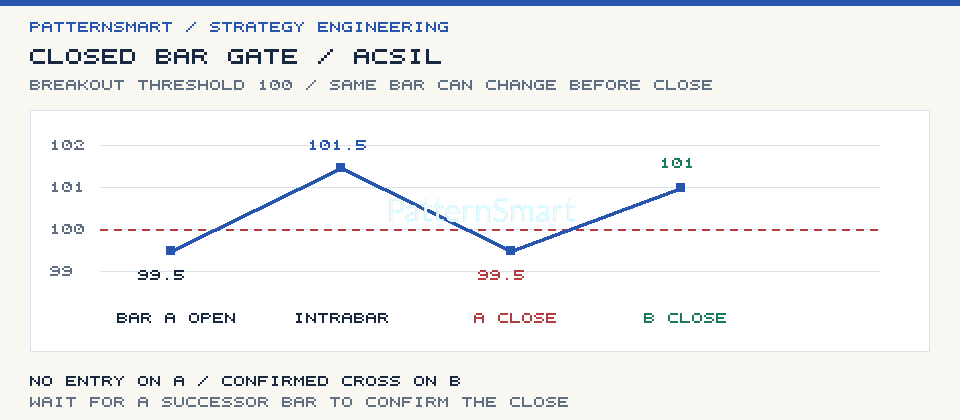
| Observation | Price | Decision |
|---|---|---|
| A intrabar | 101.5 | Wait |
| A completed | 99.5 | No cross |
| B completed | 101 | Confirmed upward cross |
Place the closed-bar guard before the signal
In an automatic-loop study, set sc.AutoLoop = 1 in sc.SetDefaults. The no-argument GetBarHasClosedStatus call evaluates the current loop index. Sierra Chart treats the last chart bar as not closed for this function; the next bar must exist for the preceding bar to qualify. Do not assume that reaching a clock boundary alone changes the return value. The following excerpt demonstrates detection and a separate execution guard, not a complete strategy.
// Inside an AutoLoop ACSIL study, after sc.SetDefaults.
// Example: signal detection only, not a full trading study.
if (sc.Index < 1)
    return;

if (sc.GetBarHasClosedStatus() != BHCS_BAR_HAS_CLOSED)
    return;

const float level = 100.0f;
const bool crossedUp =
    sc.Close[sc.Index - 1] <= level &&
    sc.Close[sc.Index] > level;

// Historical signal markers may be calculated here.
// Gate the live execution branch separately.
if (sc.IsFullRecalculation)
    return;

if (crossedUp)
{
    // Check session, position, working orders and
    // one-attempt-per-bar policy before sc.BuyEntry().
}
Calculate historical signal markers before the full-recalculation return if they are needed. This particular execution guard is intended to prevent submissions during a chart rebuild; do not assume it is compatible with every backtest procedure. Configure and test the dedicated historical/replay workflow separately. An execution policy must also deduplicate repeated evaluations of the same closed bar, distinguish a rejected request from an accepted order, and reconcile actual fills. Use a durable signal identity, including the instrument and bar timestamp, when restarting a live strategy.
Why the signal close is not the fill
When the next bar arrives, the price may already have moved. A real market order can therefore fill above 101, particularly after a gap. A bar-based backtest and a chart replay may use different fill data. Use actual order timestamps, order IDs and execution prices rather than crediting the strategy with the signal bar's close automatically.
Validation
- Test the illustrated intrabar breach and recovery, then the confirmed crossing on the next completed bar.
- Check the final bar before a session break and the first successor bar after reopening.
- Reload the chart and verify that historical recalculation does not submit unwanted live orders.
- Run replay and simulated trading with repeated updates; inspect logs for duplicate signals and order attempts.
- Test range and volume bars separately, because their completion is not simply a fixed clock interval.
Official reference: Platform developer documentation.
This hypothetical educational example has not been compiled or backtested here. Trading involves risk of loss; simulated performance does not guarantee future results.
To adapt this free strategy idea to your own trading rules, contact us about Custom Sierra Chart strategy Development Services.