A position limit based only on filled quantity can be misleading when a Sierra Chart automated strategy has entry orders still working. An order may be accepted without being filled, and position updates can arrive later. For a long-only futures strategy, reserve capacity for all remaining buy-entry quantities before allowing another entry. This provides a conservative exposure budget, complementary to the platform's automated trading management settings.
Worked example: five-contract maximum
Assume the account holds two long contracts, a working buy entry can add another two, and a new signal requests two more. The current position is only two, but the potential long exposure is six. A five-contract cap leaves room for only one additional contract. Rejecting the two-contract request is the policy used here; reducing the quantity is an alternative only if explicitly allowed by the strategy.
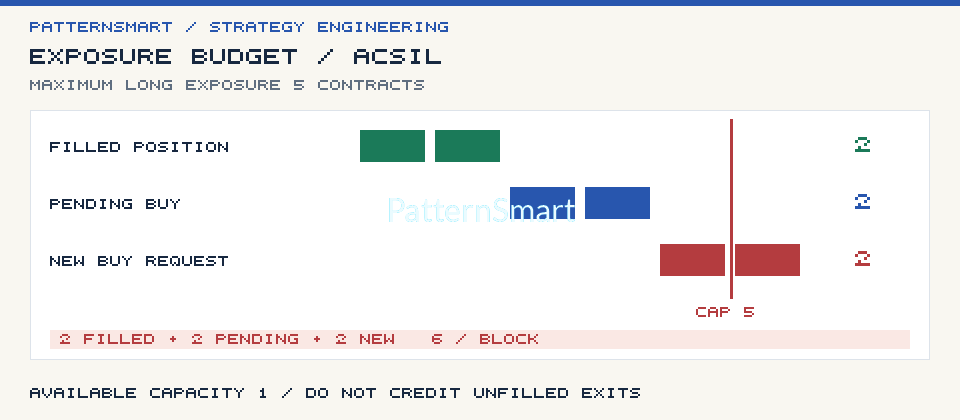
| Component | Contracts |
|---|---|
| Confirmed long position | 2 |
| Remaining buy-entry reservation | 2 |
| New request | 2 |
| Potential exposure | 6 (reject) |
| Available before request | 1 |
Separate the position snapshot from reservations
Read the chart's symbol and trade-account position using sc.GetTradePosition. PositionQuantity reflects fills rather than order requests. The result is a snapshot and must be refreshed. The order controller should separately track remaining entry quantity, including requests sent but not yet reconciled. Do not subtract a working sell target from the long-exposure budget: that target might not fill before new buy orders do.
// Illustrative long-only, whole-contract entry gate.
// Called by the existing study before any new buy entry.
// pendingBuys must be reconciled by the order controller.
bool CanAddLong(SCStudyInterfaceRef sc,
    int pendingBuys, int requested, bool ledgerReady)
{
    if (!ledgerReady || pendingBuys < 0 || requested <= 0)
        return false;

    s_SCPositionData pos;
    if (sc.GetTradePosition(pos) != 1)
        return false;

    const double cap = 5;
    const double filled = pos.PositionQuantity;
    if (filled < 0 || filled > cap)
        return false;

    return requested <= cap - filled - pendingBuys;
}

// Set sc.MaximumPositionAllowed = 5 in the study defaults.
// Reserve accepted/in-flight entries until reconciled.
// Do not apply this gate to protective exits.
This C++ excerpt is a helper for whole-contract, long-only strategies, not a standalone ACSIL study. Call it within the existing entry branch after signal and session validation. In sc.SetDefaults configure a suitable MaximumPositionAllowed as an additional platform safeguard. Other automated trade management settings govern whether scaling in and entries with working orders are allowed. The helper does not override those rules or authorize live routing. Existing stop and exit handling must remain independent.
Reconcile asynchronous order updates
Reserve quantity before an entry request can race another signal. Track its internal order ID after acceptance, and distinguish request acceptance from execution. For a pending buy of two contracts that fills one, a consistent snapshot becomes three filled and one reserved, leaving the same one-contract capacity. Retain reservations during pending cancellation; release only after confirmed cancellation or rejection and reconciliation of possible fills. Do not release a reservation merely because a local timeout expires. If position and order snapshots cannot be matched reliably, block further entries until they can. The pendingBuys argument deliberately represents a validated ledger rather than an assumed API field.
Deployment and testing
- Test the 2 + 2 + 2 case, then a one-contract request at the boundary.
- Simulate partial fills, cancellation delays, rejection, and a fill arriving during a cancellation.
- Test two signals on consecutive updates before the position has changed. Ensure the first request reserves capacity immediately.
- Rebuild or reconcile the ledger after restart, disconnect and manual intervention. Multiple strategies sharing a symbol and account need a coordinated risk budget.
- Use simulation and replay before live deployment. Historical results may not reproduce external routing delays or partial fills; inspect the Trade Activity Log and broker position.
A quantity cap limits intended exposure, not monetary loss. Slippage, gaps, stale account information and concurrent orders may defeat a local gate. Keep broker-side limits and independent emergency controls where available.
Official reference: ACSIL automated trading documentation.
This educational example has not been compiled or backtested here. Trading involves risk of loss.
To adapt this free strategy idea to your own rules, contact us about Custom Sierra Chart strategy Development Services.