A five-contract entry order is not the same as a five-contract position. If executions arrive separately, submitting protection for the requested quantity can over-cover the current exposure; waiting until the entire entry fills can leave an initial execution exposed. NinjaTrader's execution callback is the appropriate place to observe individual strategy fills and maintain an execution ledger.
Worked example: five contracts in three executions
Assume a long entry receives two contracts at 100.00, one at 100.25 and two at 100.50. No exit fills occur during this sequence. Cumulative exposure becomes two, three and five contracts; the volume-weighted average entry price becomes 100.00, approximately 100.08333 and 100.25. These are hypothetical execution prices.
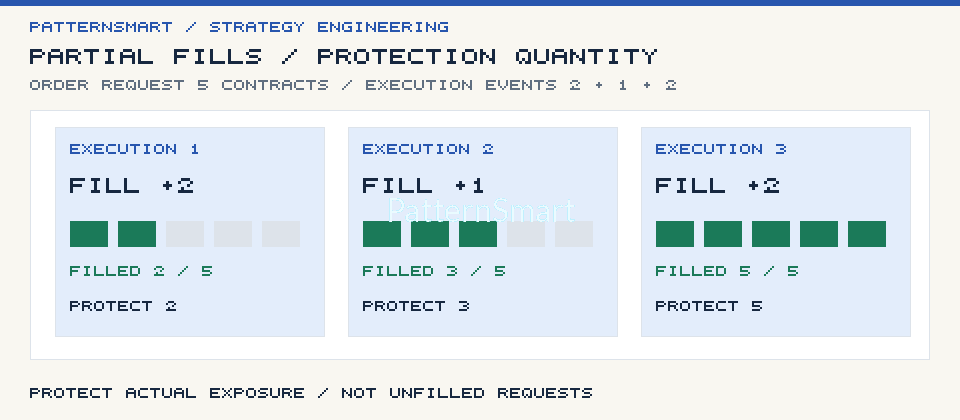
| Execution | Fill | Cumulative quantity | Average |
|---|---|---|---|
| 1 | 2 at 100.00 | 2 | 100.00 |
| 2 | 1 at 100.25 | 3 | 100.08333 |
| 3 | 2 at 100.50 | 5 | 100.25 |
Keep order state and execution state separate
OnOrderUpdate reports order-state changes; OnExecutionUpdate reports fills. One order can generate multiple executions. The following audit-only fragment identifies one unique entry signal and sums passed price and quantity values. It is intended for a simple single-entry campaign with no simultaneous exits; integrate it into an existing Strategy class with the standard NinjaScript imports.
private int filledEntryQty;
private double filledEntryValue;

// Illustrative audit for one uniquely identified long entry.
// Reset counters before a new entry campaign, not per bar.
protected override void OnExecutionUpdate(
    Execution execution, string executionId,
    double price, int quantity,
    MarketPosition marketPosition, string orderId,
    DateTime time)
{
    if (execution.Name != "AuditLong")
        return;

    filledEntryQty += quantity;
    filledEntryValue += price * quantity;
    double avg = filledEntryValue / filledEntryQty;

    Print(string.Format("{0} qty={1} avg={2}",
        executionId, filledEntryQty, avg));
    // Reconcile actual open exposure and protective orders.
    // This excerpt does not submit or change an order.
}
For a real controller, identify the specific campaign and persist processed execution IDs in a scope appropriate to the provider and session. Track exit executions as well, so the protection target reflects remaining exposure rather than cumulative entries. When computing a stop from an average fill, round the resulting order price to the instrument tick and validate the order against current market conditions.
Choose one protective order architecture
For straightforward managed strategies, review SetStopLoss, SetProfitTarget and StopTargetHandling, including the difference between per-entry-execution protection and strategy-position handling. For manual protection, use the documented OnExecutionUpdate and OnOrderUpdate reference sample as a starting point, track live order references, handle pending changes and rejected requests, and reconcile quantities before replacing or adding orders. Do not mix architectures casually. Confirm accepted protection, rather than merely counting submitted requests. Execution/order event sequencing can vary by connection; avoid treating mutable order properties as an infallible execution snapshot.
Validation scenarios
- Replay the three executions and check cumulative quantity and weighted price.
- Cancel the remaining entry after the first partial fill: protection should match two contracts, not five.
- Simulate a protective exit during later entry fills; calculate net open exposure.
- Test delayed order acknowledgements, rejected amendments, and strategy restarts.
- Compare historical tests with Playback and simulated live trading; historical fills may not reproduce live partial-fill behavior.
Stops may fill at unfavorable prices or fail to execute during disruptions. Coverage auditing does not guarantee a maximum loss.
Official reference: Platform developer documentation.
This hypothetical educational example has not been compiled or backtested here. Trading involves risk of loss; simulated performance does not guarantee future results.
To adapt this free strategy idea to your own trading rules, contact us about Custom NinjaTrader strategy Development Services.