A strategy report can show a position closed on the final bar while an automated live strategy still holds exposure. The reason is the distinction between a historical bar's closing price, the moment an order can be submitted and the exchange's willingness to accept it. MultiCharts documents that SetExitOnClose can generate an order at the last session bar's close and that live orders can be rejected where post-market trading is unavailable. A pre-close buffer is an operational design, not a profit signal.
Design three separate deadlines
Assume a daytime-only session ending at 16:00 and five-minute bars. Stop creating new entries at 15:40, evaluate the flattening rule at 15:50, and use 15:55 as an independent execution-monitoring checkpoint. The remaining minutes are a contingency window, not a guaranteed fill opportunity.
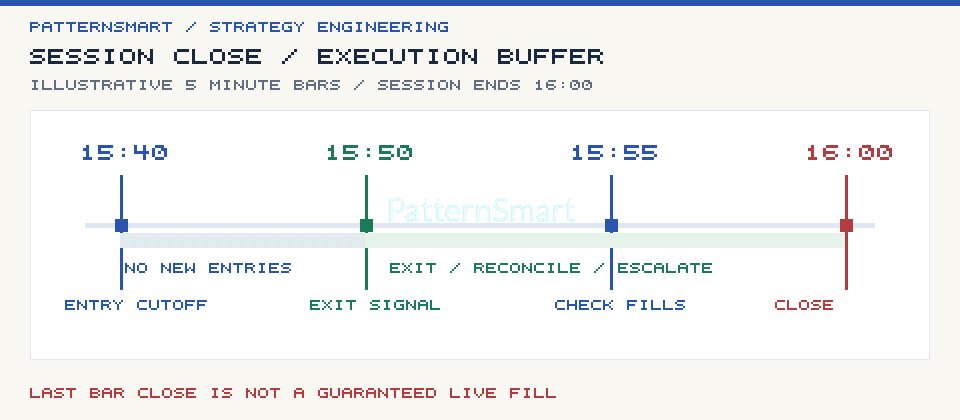
| Time | Policy | Evidence required |
|---|---|---|
| 15:40 | No new exposure | Working entries reconciled |
| 15:50 | Initiate exit | Order acknowledgement |
| 15:55 | Check actual position | Broker fills and remaining quantity |
| 16:00 | Session end | Flat position or explicit exception |
PowerLanguage signal placement
The illustrative signal fragment assumes regular time bars with timestamps aligned to the chart session, and bar-close calculation without intrabar order generation. It emits next-bar market exits when its position is non-flat during the exit window. Integrate AllowEntry into the original entry conditions. It is not a complete order controller or a full executable strategy.
Inputs: EntryCutoff(1540), ExitStart(1550), SessionEndTime(1600);
Vars: AllowEntry(false);

AllowEntry = Time < EntryCutoff;
// Combine AllowEntry with the existing entry signal.
// This excerpt assumes a daytime-only chart session.
If Time >= ExitStart and Time < SessionEndTime then begin
    If MarketPosition = 1 then
        Sell ("PreCloseL") next bar at market;
    If MarketPosition = -1 then
        BuyToCover ("PreCloseS") next bar at market;
end;
A signal evaluated at the bar timestamp 15:50 can result in an order processed at the following bar's opening tick, which is not necessarily exactly five minutes later. Timestamp conventions and missing ticks matter. Inspect actual chart timestamps in your setup. Do not repeatedly submit independent market exits while an earlier exit remains working; the broker-facing automation layer must reconcile outstanding requests, fills and rejections. Cancel outstanding entry orders according to a defined policy, retaining protective exits until the actual position is flat.
Test the session assumptions
Do not reuse these fixed HHmm values for an overnight or split session. Holidays, early closes, daylight-saving changes and chart time-zone settings may change the relevant cutoff. Derive deadlines from a validated session calendar in production. A fixed example does not handle all of these cases.
- Compare the last-bar exit and buffer exit on identical history with commission and slippage.
- Check the exact signal and fill timestamps, including missing bars and early closes.
- Simulate a rejected exit, partial fill and late entry fill; verify the escalation procedure.
- Confirm the strategy and broker positions agree before declaring the session flat.
Even a generous buffer cannot guarantee liquidation during a halt or connectivity failure. Define an independent risk-monitoring and manual intervention plan.
Official reference: Platform developer documentation.
This hypothetical educational example has not been compiled or backtested here. Trading involves risk of loss; simulated performance does not guarantee future results.
To adapt this free strategy idea to your own trading rules, contact us about Custom MultiCharts strategy Development Services.