A stop-loss signal and a fresh entry signal can occur only a few bars apart in a choppy market. A post-stop cooldown offers a testable way to suppress immediate re-entry without altering the original signal or protective exit. In thinkorswim, the important distinction is between the bar on which the strategy makes a decision and the following bar on which AddOrder records a hypothetical order. A cooldown must have a precise definition before it can be evaluated.
Define the clock: signal bars, not fill confirmations
This example blocks the stop-decision bar and three subsequent signal bars. Suppose a long position produces a position-qualified stop exit decision at bar 20. Its simulated exit is recorded at bar 21 using the next open. New entry decisions on bars 21, 22 and 23 are blocked. Bar 24 is eligible if the strategy is flat and the entry condition is true, so the hypothetical new order is recorded at bar 25. The counter is measured in chart bars, not minutes or live broker confirmations.
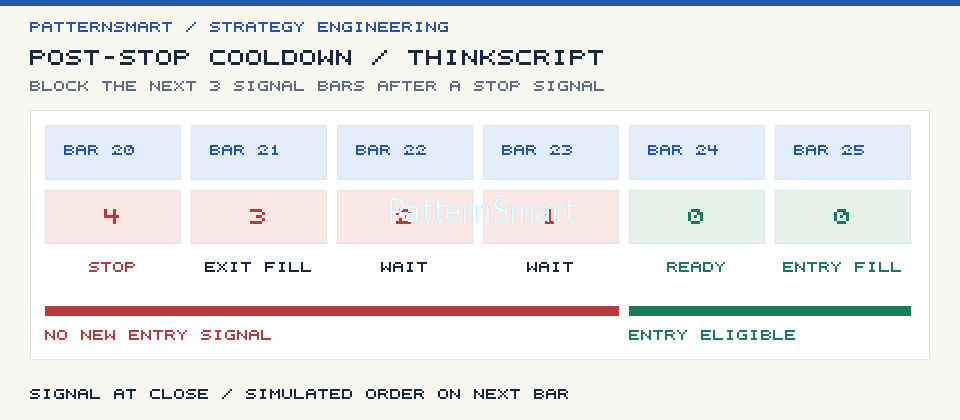
| Bar | Counter | Entry decision |
|---|---|---|
| 20 | 4 | Blocked; stop decision |
| 21 | 3 | Blocked; simulated exit |
| 22 | 2 | Blocked |
| 23 | 1 | Blocked |
| 24 | 0 | Eligible, if a valid signal exists |
| 25 | 0 | Possible simulated entry from bar 24 |
Integrate a recursive gate
CompoundValue initializes a recursive series. Set the counter to the requested waiting bars plus one on the stop decision, then reduce it by one on each following bar, clamping at zero. The extra one makes the definition inclusive of the stop bar. The first bar initializes to zero; the existing strategy should require sufficient warm-up history before it generates decisions.
The following excerpt is not a standalone strategy. Supply stopExitSignal, rawEntry and flatForEntry from your existing strategy model. The stop event must be a one-shot, position-qualified decision rather than a raw price condition that stays true while flat. The entry eligibility state must account for simulated pending entry/exit decisions, so it cannot be assumed to be the account's live position. Resolve the strategy's state dependencies without a same-bar circular reference. Keep the original exit order intact and replace, rather than add alongside, the original entry AddOrder.
# Integration excerpt: use existing strategy definitions
# stopExitSignal: one-shot, position-qualified stop decision
# rawEntry: original entry signal
# flatForEntry: strategy state permits a new long entry
input cooldownBars = 3;

def waitCount = CompoundValue(1,
    if stopExitSignal then Max(0, cooldownBars) + 1
    else Max(0, waitCount[1] - 1), 0);

def allowEntry = !stopExitSignal and waitCount == 0;
def enterLong = rawEntry and flatForEntry and allowEntry;

# Replace the original entry AddOrder, do not duplicate it.
AddOrder(OrderType.BUY_TO_OPEN, enterLong,
    open[-1], 1, Color.GREEN, Color.GREEN, "Cooldown entry");

# Keep the existing exit AddOrder independent of allowEntry.
Handle the cases that change results
- A crossover during the pause is discarded in this version. If the signal is still valid when the pause ends, the original signal definition determines whether a new entry occurs. Storing and releasing an old crossover would be a different strategy.
- Setting the waiting period to zero still prevents a new entry on the stop-decision bar. It permits entry on the following bar only if the position-state rule allows it.
- The waiting period counts bars across session boundaries; a five-minute chart and a daily chart therefore represent different elapsed times. A session-based pause requires separate logic.
- The stop condition and exit price are separate. A closing-price stop signal followed by next-open execution can produce a materially different loss from an intrabar stop order. Do not assume a guaranteed stop price.
Validate the rule, not just the net profit
- Compare cooldown values 0, 1, 3 and 5 with the same history, order size and cost assumptions.
- Inspect strategy report timestamps and verify the six-bar example, including a fresh crossover on every blocked bar.
- Compare trade count, average net trade, drawdown and missed profitable re-entries. Include realistic commissions, slippage and gap scenarios.
- Evaluate out-of-sample segments and different market regimes. Avoid optimizing a single cooldown value solely to maximize historical profit.
thinkScript AddOrder generates hypothetical strategy orders for chart analysis. It does not provide unattended live execution or broker-confirmed fill callbacks. A live system requires its own actual fill ledger, risk controls and clearly defined restart behavior. A cooldown does not guarantee improved performance.
Official references: AddOrder and CompoundValue.
This educational excerpt has not been compiled or backtested here. Trading involves risk of loss; simulated results do not guarantee future performance.
To adapt this free strategy idea to your own trading rules, contact us about Custom Thinkorswim strategy Development Services.