A thinkorswim strategy can show a profitable sequence of arrows on a chart even when the prices used for those simulated trades would not have been obtainable after the signal became known. One of the most useful checks when developing a thinkScript strategy is therefore to separate the signal bar from the modeled execution bar. This article demonstrates how to use AddOrder() without accidentally treating the next bar's opening price as information available to the signal.
Three clocks, not one
On a historical chart, the completed close of bar n can be used to calculate a crossover. The strategy's simulated order is placed on bar n+1 when its condition is satisfied on bar n. Actual execution, if a trader independently submits a real order, follows a third clock: broker acceptance, market liquidity and execution. These three events should not be conflated.
The official AddOrder reference specifies the following bar's open, open[-1], as the default modeled price. The negative index references future data. Using it in the price argument models a next-bar transaction; using that same future price to decide whether to trade creates a look-ahead problem. On a developing live bar, a close-based condition can also change before that bar finishes. Historical confirmation does not imply a real-time alert is irrevocable.
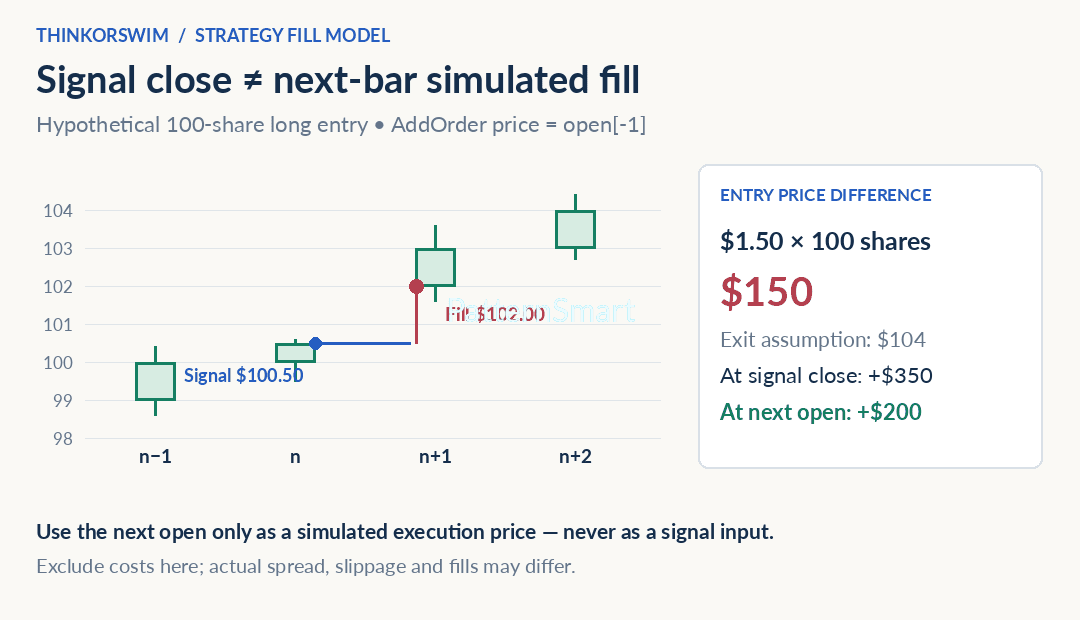
A reproducible price-gap audit
Consider a hypothetical 100-share long entry. Bar n closes at $100.50 and the crossover is confirmed. The next bar opens at $102.00. If both scenarios use a common hypothetical exit price of $104.00, the comparison is:
| Entry assumption | Entry | Gross P&L |
|---|---|---|
| Signal close | $100.50 | $350 |
| Next open | $102.00 | $200 |
| Next open + $0.05 adverse offset; exit − $0.05 | $102.05 | $190 |
The gap reduces gross P&L by $150; the additional two-sided offset reduces it by another $10. The last row is a sensitivity test, not a promise of a fill and not a broker commission model. Real spread, commissions, order size, gaps and liquidity can produce larger costs. Conversely, a favorable gap can improve a modeled entry.
Build two comparable strategy variants
Create a custom strategy in Charts → Studies → Edit Studies → Strategies → Create. Use a simple 20-bar moving-average crossover so that the execution-price assumption, rather than the signal complexity, is the focus. The following illustrative strategy excerpt uses explicit opening and closing order types to avoid the automatic short-reversal semantics of BUY_AUTO and SELL_AUTO. Set the strategy's global same-direction entry limits appropriately and inspect the resulting report for unintended repeated orders. This excerpt is not a production execution system.
input length = 20;
input shares = 100;
input adverseOffset = 0.00;

def avg = Average(close, length);
def entrySignal = close crosses above avg;
def exitSignal = close crosses below avg;

AddOrder(OrderType.BUY_TO_OPEN, entrySignal,
    open[-1] + adverseOffset, shares,
    Color.GREEN, Color.GREEN, "Entry");

AddOrder(OrderType.SELL_TO_CLOSE, exitSignal,
    open[-1] - adverseOffset, shares,
    Color.RED, Color.RED, "Exit");
Keep adverseOffset nonnegative and use an appropriate price increment for the instrument. The shares input is suitable for this equity example; futures contract multipliers and minimum tick sizes require different P&L interpretation. The offset deliberately worsens the modeled buy and sell prices. It does not simulate bid/ask quotes, queue priority or partial fills. The code was reviewed against documented thinkScript syntax but was not compiled in a live thinkorswim installation.
Run a controlled comparison
- Choose one symbol, aggregation, chart history range and trading-session configuration. Keep all fixed across variants.
- Run the baseline with zero offset. Inspect signal-bar closes and the next-bar opening prices manually for at least five trades, including an overnight or session gap.
- Duplicate the strategy for an audit variant that substitutes
closefor the order price argument while leaving the signal unchanged. Understand that the arrow remains associated with the next bar; the price is merely an artificial prior-close assumption, not an actual same-close fill. - Compare the strategy reports using the same quantity and matched trade sequences. Then restore the next-open price and stress-test offsets of $0.05 and $0.10 per side for this example. Compare net results after separately accounting for applicable costs.
- If a variant depends on the next open to filter the original signal, discard that comparison. A new decision made at the next open belongs to a different strategy with different execution assumptions.
What the report can and cannot establish
A strategy report measures hypothetical trades generated by the chart's model. The final visible bar may lack a subsequent bar, so its signal may not yet have a corresponding historical modeled order. Changing aggregation or session settings can change both signals and next-bar price assumptions. A limit order, stop order or large market order also cannot be faithfully modeled merely by selecting a convenient price argument; the argument alone does not prove that liquidity existed there.
AddOrder is not a native unattended broker-execution interface. It creates hypothetical strategy orders for analysis and backtesting. paperMoney is a separate simulated trading environment, and study alerts and supported conditional orders are separate platform capabilities with their own restrictions. A strategy arrow does not automatically send a paperMoney or live brokerage order. Do not represent a thinkScript strategy as an Expert Advisor or cBot equivalent. If real execution is needed, evaluate the broker's supported tools, authorization, monitoring and order safeguards separately.
Use strategy reports to diagnose assumptions, not as evidence of executable returns. Validate on unseen data and account for costs. Historical simulations and paper trading cannot guarantee live results.
Official references: AddOrder and Creating Strategies.
If you would like to adapt this research idea or develop execution tools for a supported trading platform, explore our Custom Trading Software Development Services.