A Sierra Chart automated study may report a position quantity of zero even while an earlier entry order is waiting for execution. If an ACSIL trading system treats that number as permission to enter, repeated study updates can produce overlapping orders. The problem is especially important when the study moves from internal simulation to a connected trading service, where execution and acknowledgment are not necessarily immediate.
This tutorial develops a conservative single-position entry gate for a futures strategy. It is an architecture and diagnostic technique, not a complete trading signal or a recommendation to trade a particular instrument.
Track three independent layers of state
| Layer | Evidence | Role |
|---|---|---|
| Filled position | PositionQuantity from sc.GetTradePosition | Current exposure for the chart symbol and trade account. |
| Working orders | WorkingOrdersExist and individual order records | Orders that may change exposure before the next signal. |
| Unresolved local intent | Persistent strategy record and internal order ID when available | Prevents another submission while the earlier request is being reconciled. |
These layers are complementary. A zero position is insufficient if a parent entry remains active. An empty working-order list is insufficient if a request outcome is still uncertain. For the strict single-position policy in this article, any working order blocks a new entry. This intentionally conservative rule also blocks an entry while orphaned protective orders are investigated. A strategy designed for scaling in needs a more detailed order-role and exposure model.
Worked example: two contracts, three snapshots
Assume a hypothetical flat futures account, a maximum of two contracts and a two-contract buy limit order. Initially position quantity and outstanding entry quantity are both zero. The strategy submits the order once; before any fill, position quantity remains zero but the working buy remainder is two. The entry exposure reserved by this order is already two contracts.
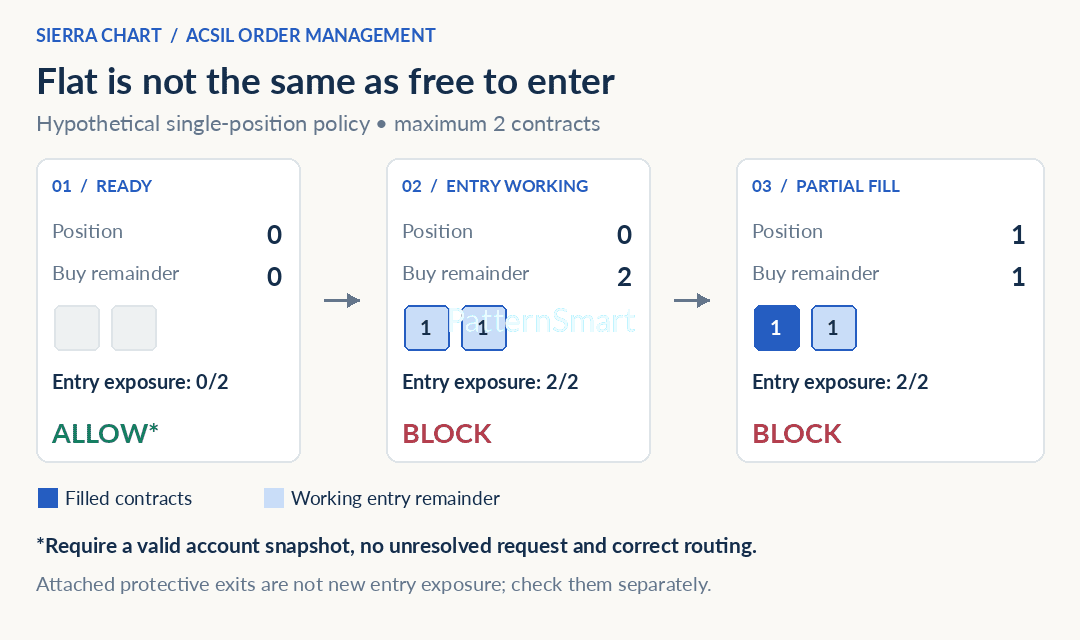
After one contract fills, the position becomes +1 and the remaining opening quantity becomes one. Under this example's one-direction-only assumption, potential entry exposure is 1 + 1 = 2 contracts. A second two-contract buy would increase potential exposure to four contracts if all opening orders execute. The same logic blocks a second request before the first fill, when the position still appears flat. If the remaining contract is canceled, the strategy should manage the confirmed one-contract position and reconcile the protective stop and target; it must not automatically top up the position.
This arithmetic deliberately excludes protective exits from opening exposure. It is not a generic formula for an account containing simultaneous buys, sells, reversals and OCO groups. Sierra Chart's aggregate position-with-orders fields account for working order quantities in documented ways, including OCO treatment. For a more complex strategy, inspect each order's direction, remaining quantity, parent relationship and status rather than summing all orders indiscriminately.
Use Sierra Chart's managed-trading protections
In the sc.SetDefaults branch of the study, establish explicit managed-trading settings for the intended strategy. For this policy, consider sc.MaximumPositionAllowed = 2, sc.AllowMultipleEntriesInSameDirection = 0, sc.SupportReversals = 0, sc.AllowEntryWithWorkingOrders = 0 and sc.AllowOnlyOneTradePerBar = 1. Review the interaction of those settings with the selected entry function and other order-cancellation options. They help constrain a managed sc.BuyEntry/sc.SellEntry system but are not a substitute for reconciliation. A one-trade-per-bar setting does not prevent a duplicate entry on the following bar.
When the platform accepts a submission, record the returned result and the assigned InternalOrderID when available. A positive submission result is not proof of a complete fill. Check the actual order and position later. Use sc.GetOrderByOrderID for known orders and the Trade Orders window for diagnostics; a completed order may eventually disappear from the live order list, so fill records and the Trade Activity Log matter. If a request remains unresolved, keep the entry gate closed.
ACSIL implementation excerpt
The following C++ helper belongs outside the exported study function and is called from the live/simulation entry-decision branch after account state and signal eligibility have been established. It is intentionally not a complete executable strategy and never submits an order. It rejects full recalculation, an unresolved request, inconsistent routing, a failed position query, an existing position or any working order.
// Illustrative entry guard, not a complete study.
bool CanConsiderEntry(SCStudyInterfaceRef sc,
                      bool unresolvedRequest)
{
    if (sc.IsFullRecalculation || unresolvedRequest)
        return false;

    bool simulated = sc.GlobalTradeSimulationIsOn != 0;
    bool routed = sc.SendOrdersToTradeService != 0;
    if (simulated == routed)
        return false;

    s_SCPositionData pos;
    if (sc.GetTradePosition(pos) != 1)
        return false;

    return pos.PositionQuantity == 0
        && pos.WorkingOrdersExist == 0;
}
The caller must still validate a fresh signal, order quantity, account identity, market/session availability, data freshness, exposure ownership and protective configuration. Persist the request before submission; use an application-specific durable record if study restarts must be survived. An in-memory ACSIL persistent variable alone is not a permanent execution journal. The full-recalculation guard in this excerpt is intended for deployment logic; do not blindly apply it as a historical backtest engine. A separate test harness should replay the same gate conditions using simulated execution state.
Keep internal simulation and trading-service routing separate
| Trade Simulation Mode On | SendOrdersToTradeService | Interpretation |
|---|---|---|
| On | 0 | Internal simulated orders. |
| Off | 1 | Orders directed to the configured external service. |
| On | 1 | Inconsistent; reject entry. |
| Off | 0 | Inconsistent; reject entry. |
Keep routing disabled by default for a newly installed study and require deliberate operator authorization to use an external account. External routing does not necessarily mean real-money execution: the connected service may provide a server-side simulation account. Confirm the actual account and service, not just the menu setting. sc.GetTradePosition retrieves simulated or non-simulated position data according to the global simulation setting. Verify the intended symbol and selected trade account, and recognize that an account snapshot can lag an external fill or be derived from local fill data depending on configuration.
Test and diagnose before deployment
- In internal simulation, submit a resting two-contract order and repeat the signal on subsequent updates. Confirm that no second parent order is created.
- Model a one-contract partial fill followed by a cancellation. Confirm that the remaining position is managed and its protective order quantities are correct.
- Test each of the four routing combinations above without enabling unauthorized external execution. Review the Trade Service Log for ignored actions.
- Reinitialize the study with an active order, and separately simulate a lost submission acknowledgment. Verify that new entry is blocked until reconciliation succeeds.
- Compare Trade Orders, Trade Positions and Trade Activity Log with the strategy's decision log. Record symbol, account, routing mode, position quantity, working-order flag, internal order ID and gate decision.
A replay can validate the state logic, but cannot reproduce every exchange queue, connection failure, service-specific attached order behavior or fill delay. Test with a controlled simulation account before contemplating live use. Code has been reviewed against documented ACSIL interfaces but not compiled in Sierra Chart. Risk controls cannot guarantee order execution, protection or profitability.
Official references: ACSIL Automated Trading and Automated Trading Management.
For customized ACSIL order management, logging or strategy state recovery, explore our Custom Trading Software Development Services.