A TradingView strategy can show a completed long entry in Strategy Tester while the corresponding live broker account remains flat, has only a partial fill, or has rejected the order. An alert delivery is another separate event: it can arrive late, be delivered more than once, or fail to arrive. A reliable execution design must distinguish theoretical fills, delivery status, order acknowledgments and actual market exposure rather than treating them as one state.
Where Pine Script ends and execution begins
Pine Script v6 strategies create orders for TradingView's broker emulator. Its fills determine the strategy's simulated position and can generate order-fill alerts in real time. They do not constitute orders sent to a real broker or to TradingView's built-in paper trading account. A webhook is a message sent to an external endpoint; any actual execution would require a separate, broker-supported service with its own authentication, risk controls and order reconciliation. TradingView also cautions that its alerts are not designed for automated trading. Review the applicable service and broker restrictions before designing an integration. This article uses a simulated bridge and demo-account validation as the teaching context.
| Layer | Evidence | What it cannot prove |
|---|---|---|
| Pine strategy | Broker-emulator fill | Real broker execution |
| Webhook receiver | Validated, persisted event | Broker acceptance or fill |
| Broker API | Order ID and order state | Full execution from acceptance alone |
| Broker executions and positions | Actual filled volume and account exposure | Future fill quality or profitability |
A hypothetical duplicate-delivery case
Suppose an initially flat strategy generates an emulator fill for two contracts, represented by event E42. The bridge persists E42 and submits one buy order, B91. The broker fills one contract and reports one working contract. A second delivery of E42 arrives before B91 is complete. If the receiver simply translates each message into a buy of two, it could end up with four contracts of long exposure when both requests finish. A safer controller recognizes E42 as an existing intent and reconciles the actual filled quantity of one and the working remainder of one. Its potential entry exposure is already two; no second entry is justified.
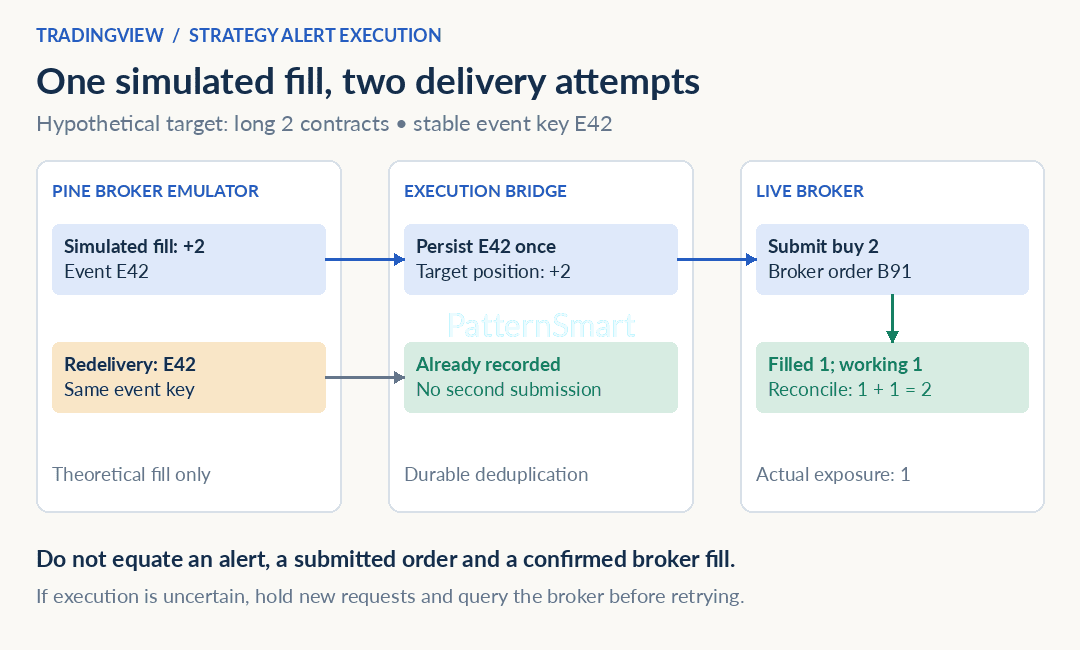
The arithmetic is intentionally limited to an initially flat, single-owner, long-only example: potential exposure = current long quantity + outstanding buy remainder. This is not a universal netting formula for mixed directions, unrelated orders, protective exits or shared broker accounts. Those cases need an explicit account-ownership and order-role model.
Design a stable alert identity in Pine v6
The following entry-only excerpt illustrates a bar-based order identifier. It is not a complete trading system: it omits exits, sizing constraints, broker integration and protection. On ordinary time-based bars, the signal bar's opening timestamp plus an entry-role prefix identifies this simplified single-entry event within one deployment. The moving average is calculated on every bar; the crossover is evaluated using completed-bar logic. The default market-order simulation generally fills on the next available tick, rather than at the instant of the signal.
//@version=6
strategy("Entry alert audit", overlay = true,
     pyramiding = 1, calc_on_every_tick = false)

float avg = ta.sma(close, 20)
bool crossUp = ta.crossover(close, avg)

if barstate.isconfirmed and crossUp and strategy.position_size == 0
    string entryId = "L-" + str.tostring(time)
    strategy.entry(entryId, strategy.long, qty = 2)
When creating a real-time strategy alert, choose the order-fill event option. For this entry-only long example, the following illustrative JSON can be entered in the alert dialog's Message field; the placeholders are resolved by TradingView when the emulator fills the order. The receiver must interpret the configured deployment and symbol together rather than assume a ticker alone uniquely identifies a broker instrument.
{
  "deployment": "audit-v1-A",
  "event": "{{strategy.order.id}}",
  "symbol": "{{ticker}}",
  "action": "{{strategy.order.action}}",
  "contracts": {{strategy.order.contracts}},
  "simulated_price": {{strategy.order.price}},
  "target_long": {{strategy.market_position_size}}
}
Do not add both a signal-time alert and an order-fill alert to the same execution channel without distinguishing their roles. The former can describe a decision before an emulator fill, while the latter reports the emulator's simulated execution. The example uses the order ID as the event component because there is only one entry per signal in this restricted design. A system with reused order IDs, scaling, multiple exit legs or several fills needs a more detailed event identity and explicit lifecycle. The simulated target is a desired position, not an instruction to blindly buy that many contracts; the sample's target field is unsigned and is deliberately limited to long-only use. Short and reversal logic must use an explicit side and signed quantity contract.
Make the receiving workflow safe under uncertainty
- Validate: Check deployment version, known symbol mapping, supported action, event identity, acceptable age and numeric bounds. Reject stale or malformed messages. Use authenticated transport and an approved broker connection; never place broker credentials in alert messages.
- Persist: Save the event key and immutable payload atomically before acknowledging receipt. A repeated key with the same payload is a duplicate; a repeated key with different content is a conflict requiring investigation.
- Reconcile: Query the broker's actual position, active entry orders and unresolved requests for the authorized account. Account for partial fills and working remainders. If ownership or state is uncertain, stop new entry requests.
- Submit and recover: Use a broker-supported client order identifier or idempotency feature if available. Persist the request intent before submission. If the broker accepts but the receiver crashes before recording its order ID, recover via the broker rather than automatically submitting again.
- Monitor: Track accepted, working, partially filled, filled, canceled, rejected and unknown outcomes. Confirm that required protective orders are present independently of Pine's simulated exit orders.
TradingView documents a webhook response timeout of three seconds and possible resubmission for certain server errors. A receiver should acknowledge only after durable ingestion and delegate slower reconciliation to a controlled worker. A successful HTTP response proves neither broker acceptance nor a fill. Deduplication reduces repeat submissions, but cannot by itself guarantee exactly-once execution across independent services.
Test the execution contract, not merely the backtest
- Replay E42 twice concurrently; verify one recorded intent and no extra broker request.
- Simulate one contract filled and one working; verify that another delivery does not create an order.
- Simulate a rejected order, missing alert, network timeout and crash immediately after broker acceptance; verify the controller fails closed until the disposition is known.
- Change strategy inputs, then recreate the alert and assign a new deployment identity. Running alerts retain a server-side snapshot of the script, inputs and chart context; editing the chart does not update an existing alert.
- Compare emulator fills against broker execution logs in a controlled demo environment. Check latency, spread, commissions, slippage, lot increments, session constraints and instrument mapping.
The excerpt has not been compiled in TradingView or tested against a broker. Real execution can differ materially from historical strategy results. This architecture is an educational approach to detecting and limiting execution discrepancies; it is not a recommendation to trade, a promise of reliability, or a guarantee of returns.
Official references: Pine alerts, Pine strategies, Strategy FAQ, Webhook configuration and Webhook security guidance.
If you need help designing a strategy audit or broker-supported execution-state reconciliation workflow, explore our Custom Trading Software Development Services.