To use a ZigZag indicator in code (such as in Pine Script, C#, or Python) without falling victim to look-ahead bias, you must shift your logic from identifying the peak to identifying the confirmation.
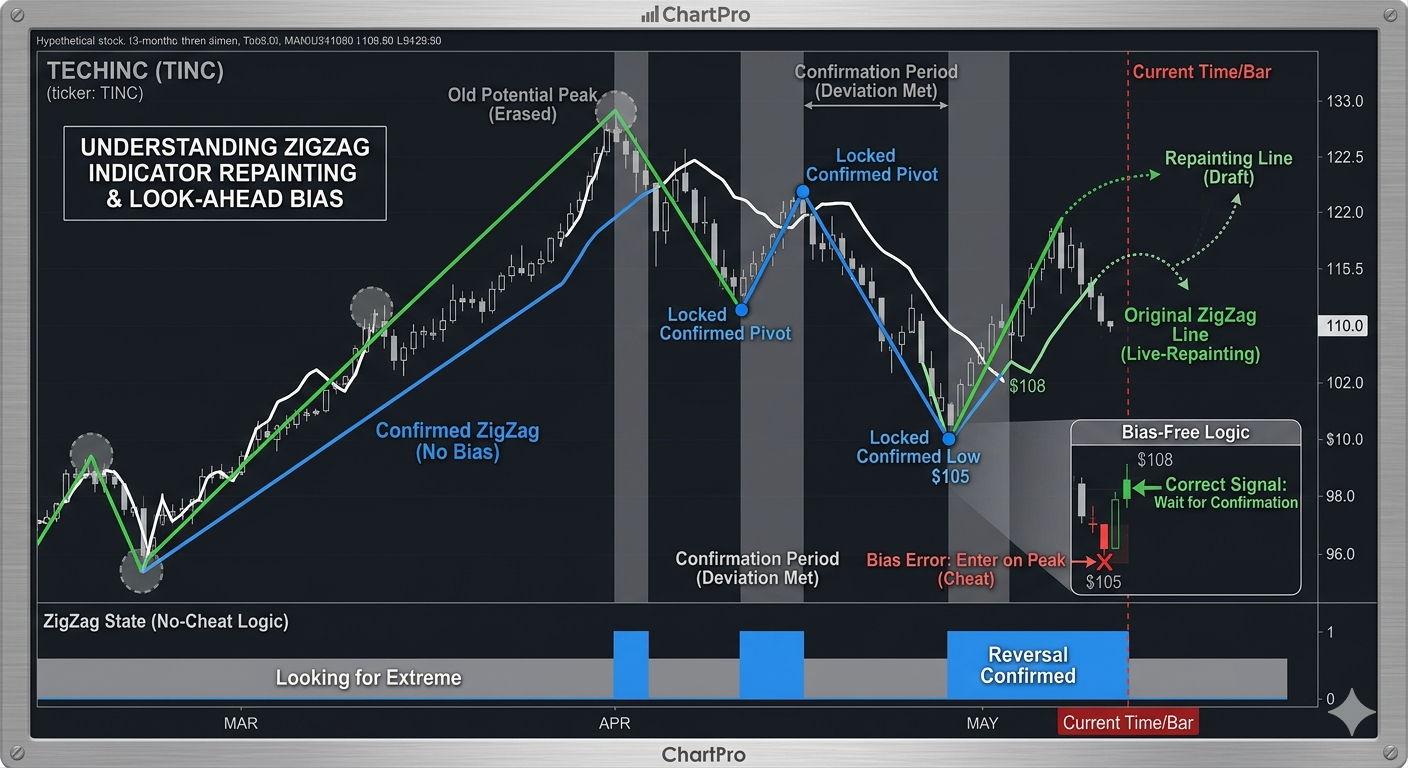
A “look-ahead bias” occurs when your code acts as if it knows a high is a “Top” the moment it happens. In reality, you only know a high was a “Top” several bars later.
1. The “Confirmation Bar” Logic
To avoid bias, your code must only reference a ZigZag point once it is “locked.” This happens when the price has moved a specific distance (the Deviation) away from that point.
- The Bias Error:
if (price == zigzag_high) { sell(); }(The code assumes the current high is the final peak). - The Fixed Logic:
if (zigzag_high_is_confirmed) { mark_structure(); }(The code waits for price to drop X amount below the high before acknowledging the high existed).
2. Implementation Strategy: The Buffer Approach
When coding the logic, you should treat the “active” leg differently from “confirmed” legs.
- Define a Deviation: Set a minimum movement (e.g., 5% or 20 ticks).
- Track the “Extremum”: Keep a variable for the highest price reached since the last low.
- Detect the Reversal: Only when the current price is
Highest - Deviationdo you trigger an event. - Reference the Offset: When the reversal is confirmed at Bar 10, the actual peak might have been at Bar 5. Your code must look back to Bar 5 to get the price, but the trade or signal can only execute at Bar 10.
3. Pseudocode Example
This logic ensures that your backtest reflects the reality of waiting for confirmation.
Python
# Variables to track state
last_high = price
peak_bar = current_bar
is_confirmed = False

# Live Loop
if price > last_high:
    last_high = price
    peak_bar = current_bar # Keep moving the potential peak forward
    is_confirmed = False

# CHECK FOR CONFIRMATION (The anti-bias step)
if price <= (last_high - deviation_threshold):
    if not is_confirmed:
        # NOW we know the peak at 'peak_bar' was real.
        # This code runs several bars AFTER the peak happened.
        execute_logic_at_current_bar(peak_price=last_high, peak_time=peak_bar)
        is_confirmed = True
4. How to Backtest Correctly
If you are writing a strategy based on ZigZag, you must ensure your backtesting engine doesn’t “cheat.”
- Don’t use the Peak Price for Entry: If the ZigZag confirms a top at $100 after the price has fallen to $95, your backtest must record the entry at $95, not $100.
- Use ZigZag for Structure, Not Entries: The most robust way to use ZigZag in code is to define the Trend (e.g., “We are in a confirmed Downtrend because the last confirmed ZigZag peak was a Lower High”) and then use a non-repainting indicator (like a Moving Average or RSI) for the actual entry signal.
5. Summary of the “Golden Rule”
In your code, always distinguish between the Event Bar (when the peak happened) and the Signal Bar (when you realized it was a peak).
Never allow your code to execute a trade on the Event Bar. Always execute on the Signal Bar. This ensures that your backtest results will match your real-world trading performance.