A strategy may look considerably better simply because the broker emulator is allowed to fill market orders on the signal bar's closing tick. This setting changes order timing, not the quality of the underlying signal. An execution audit should isolate the setting and measure how dependent the reported performance is on it.
Worked example: the gap changes the result
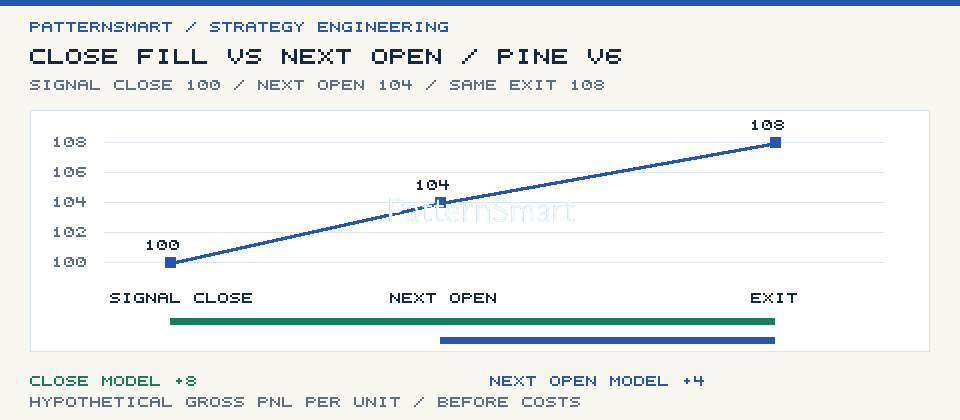
Assume a one-unit long signal at a close of 100, with the next bar opening at 104. For a controlled comparison, suppose both models exit at 108. The same-close model has a gross gain of 8 price units, whereas the next-open model has 4. The difference of 4 is caused by the entry fill assumption alone. The exit is held constant here to isolate the effect; in an actual strategy, changing the setting can affect exits and subsequent trade sequences as well.
| Model | Entry | Exit | Gross P&L per unit |
|---|---|---|---|
| Signal close | 100 | 108 | 8 |
| Next open | 104 | 108 | 4 |
Controlled Pine v6 comparison
Use the same symbol, timeframe, test dates, commission, slippage, quantity and signal logic in both runs. The SMA crossover here is only a reproducible signal example, not a recommendation. The declaration controls calculation and order processing; with ordinary bar-close calculations and process_orders_on_close=false, a generated market order normally fills on the next available tick, which is usually the next historical bar's open. Enabling the setting allows an additional order-processing attempt on the closing tick.
//@version=6
strategy("Fill timing audit", overlay = true,
    pyramiding = 0, process_orders_on_close = false,
    calc_on_every_tick = false,
    calc_on_order_fills = false)
fast = ta.sma(close, 10)
slow = ta.sma(close, 30)
enterLong = ta.crossover(fast, slow)
exitLong = ta.crossunder(fast, slow)
if enterLong and strategy.position_size == 0
    strategy.entry("L", strategy.long, qty = 1)
if exitLong and strategy.position_size > 0
    strategy.close("L")
// For comparison, change process_orders_on_close to true.
// Keep other settings constant.
Audit the trade list rather than net profit alone
- Export both trade lists and match trades using signal timestamps or an independent signal log. Do not assume trade sequence numbers will remain aligned.
- Compare entry and exit fill times, prices, quantity, gap size and transaction costs.
- Calculate how much of the profit difference comes from timing and how much comes from changed trade sequences.
- Repeat on markets with opening gaps, multiple sessions and periods of low liquidity. Inspect the final bar of each session.
- Stress-test using realistic commission and slippage. Avoid selecting whichever model produces the higher profit without a defensible execution rationale.
Broker emulator versus actual execution
A TradingView order-fill alert reflects the emulator, not a broker-confirmed fill. If an alert is produced on the last closing tick, the market may already be closed by the time a webhook reaches the execution bridge. Actual orders may execute later, receive partial fills, be rejected or experience slippage. Reconcile external broker order IDs and execution prices independently. Keep alert deduplication, session eligibility and broker-side risk controls separate from the Pine signal. Neither fill model guarantees that a live order can obtain the simulated price.
Official reference: Platform developer documentation.
This hypothetical educational example has not been compiled or backtested here. Trading involves risk of loss; simulated performance does not guarantee future results.
To adapt this free strategy idea to your own trading rules, contact us about Custom TradingView strategy Development Services.