An MT5 Expert Advisor should not confuse a fixed lot size with a fixed risk budget. Contract specifications, quote currencies and account currencies vary across instruments. Estimating the account-currency loss between a planned entry and stop using OrderCalcProfit, then rounding volume down to the broker's permitted increment, avoids deliberately exceeding the budget through rounding.
Worked example: a $100 risk budget
Assume a USD account, an estimated stop loss of $300 per lot, and a minimum volume and volume step of 0.01 lots. The raw size is 100/300 = 0.3333 lots. Flooring to 0.33 lots gives an estimated $99 loss; 0.34 lots would risk $102.
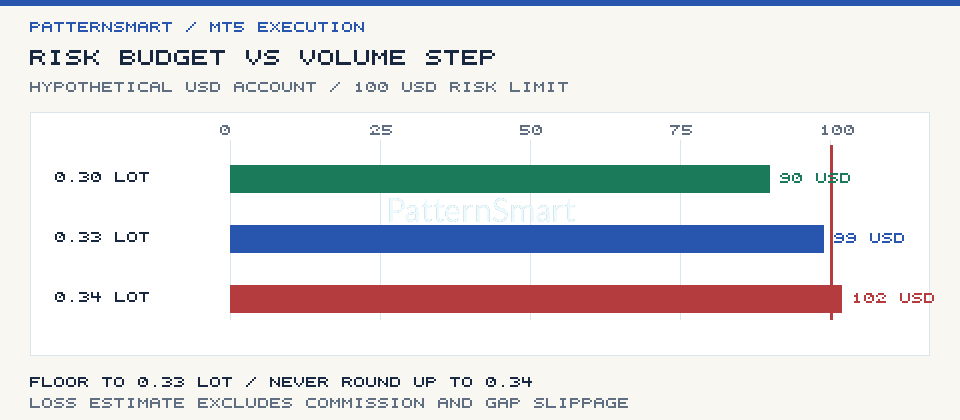
| Lots | Estimated loss | Decision |
|---|---|---|
| 0.30 | $90 | Allowed |
| 0.33 | $99 | Allowed |
| 0.34 | $102 | Reject |
Implement a risk-volume helper
The following standalone helper is illustrative, not a complete EA. Estimate the loss using the minimum legal volume, scale to the budget, then recalculate the loss for the final volume. If even the minimum volume exceeds the budget, skip the trade instead of forcing a larger position.
// Illustrative sizing helper, not a complete EA.
double RiskVolume(string sym, ENUM_ORDER_TYPE side,
                  double entry, double stop, double budget)
{
    if(budget <= 0 || entry <= 0 || stop <= 0)
        return 0;
    if(side != ORDER_TYPE_BUY && side != ORDER_TYPE_SELL)
        return 0;
    if((side == ORDER_TYPE_BUY && stop >= entry) ||
       (side == ORDER_TYPE_SELL && stop <= entry))
        return 0;
    double minv = SymbolInfoDouble(sym, SYMBOL_VOLUME_MIN);
    double maxv = SymbolInfoDouble(sym, SYMBOL_VOLUME_MAX);
    double step = SymbolInfoDouble(sym, SYMBOL_VOLUME_STEP);
    double pnl = 0;
    if(minv <= 0 || maxv < minv || step <= 0 ||
       !OrderCalcProfit(side, sym, minv, entry, stop, pnl) ||
       pnl >= 0)
        return 0;
    double raw = MathMin(maxv, budget * minv / (-pnl));
    double vol = NormalizeDouble(MathFloor(raw / step) * step, 8);
    if(vol < minv || vol > maxv)
        return 0;
    if(!OrderCalcProfit(side, sym, vol, entry, stop, pnl) ||
       pnl >= 0 || -pnl > budget)
        return 0;
    return vol;
}
Placement in the trading workflow
After confirming an entry signal in OnTick, obtain a fresh MqlTick and use Ask for a planned buy or Bid for a planned sell. Determine a valid stop aligned with the symbol's price tick size before calling the helper. Check stop distance, aggregate directional volume limits, available margin and OrderCheck before submitting. Reserve part of the budget for commissions and slippage; this helper estimates price-movement loss only. Reconcile actual execution prices and positions through OnTradeTransaction rather than assuming a successful request means a fill.
Testing and edge cases
Test forex, indices and different account currencies. Include minimum-volume risk above budget, invalid stops, missing quotes, unusual volume steps and maximum-volume limits. Use the Strategy Tester's real-tick mode where data is available, then test gaps and rejected orders on a demo account. Actual stop losses may exceed estimates during gaps or illiquidity, and aggregate risk across positions needs separate controls.
Official reference: OrderCalcProfit.
This hypothetical educational example has not been compiled or backtested here. Trading involves risk of loss.
To develop this idea into a complete EA, contact us about Custom MT5 strategy Development Services.