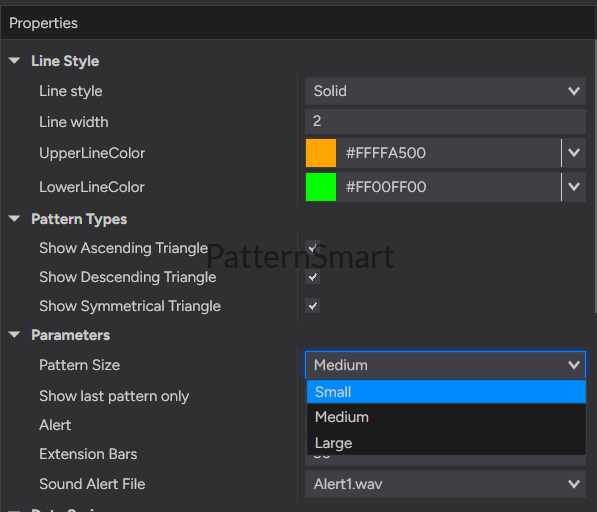
The Chart Pattern Triangle indicator provides a comprehensive set of customization options, allowing traders to tailor pattern detection, chart appearance, and alert behavior to their individual trading preferences.
For most users, the default settings offer an excellent starting point. As you become familiar with the indicator, you can fine-tune each parameter to better match your preferred markets, trading style, and chart layout.
Pattern Size
Description
The Pattern Size setting controls the approximate size of the triangle formations that the indicator searches for.
Rather than being tied to a specific chart timeframe, this setting determines the relative size of the price structure based on the number of bars that form the pattern. A Small pattern can be identified on a weekly chart, while a Large pattern can also develop on a one-minute chart.
In other words, Pattern Size defines the structural scale of the triangle, not the timeframe on which it appears.
Available Options
- Small
- Medium
- Large
Small
The Small setting searches for compact triangle formations that develop over a relatively small number of price bars.
Smaller patterns typically appear more frequently and represent shorter periods of market consolidation.
Typical Applications
- Identifying compact triangle formations
- Monitoring short-duration consolidations
- Detecting localized price compression
- Finding more frequent trading opportunities
- Suitable for traders who prefer a higher number of potential setups
Best For
- Active traders
- Short-term market analysis
- Traders seeking more frequent pattern recognition
Medium
The Medium setting provides a balanced approach by identifying triangle formations of moderate size.
It offers an excellent compromise between detection frequency and structural significance, making it suitable for most trading styles and market conditions.
Typical Applications
- General-purpose market analysis
- Balanced pattern recognition
- Everyday trading
- Suitable for a wide variety of instruments and chart types
Best For
- Most traders
- General technical analysis
- Mixed trading styles
Large
The Large setting focuses on broader triangle formations that develop over a larger number of price bars.
These patterns usually represent longer periods of consolidation and more mature market structures. Although fewer patterns may be identified, they often correspond to larger and more significant technical formations.
Typical Applications
- Identifying major consolidation structures
- Monitoring longer-duration triangle formations
- Focusing on higher-quality, less frequent setups
- Analyzing broader market structure
Best For
- Traders who prefer larger chart patterns
- Market structure analysis
- Longer-term technical studies
Recommendation
There is no universally “best” Pattern Size.
The ideal setting depends on the type of market structure you wish to identify rather than the chart timeframe itself.
- Small — For traders who prefer compact, more frequent triangle formations.
- Medium — A balanced choice suitable for most trading styles.
- Large — For traders who prefer broader, more established triangle structures.
Many traders begin with the Medium setting and adjust based on the size of the patterns they find most useful.
Show Ascending Triangle
Description
Enables or disables the detection and display of Ascending Triangle formations.
When enabled, qualifying Ascending Triangles are automatically drawn on the chart. When disabled, this pattern type is ignored while all other enabled triangle types continue to operate normally.
Recommended Usage
Enable this option if you wish to identify bullish consolidation structures or monitor potential upward breakout opportunities.
For the most comprehensive market analysis, this option is generally recommended to remain enabled.
Show Descending Triangle
Description
Controls whether Descending Triangle formations are displayed.
Disabling this option prevents Descending Triangles from appearing on the chart without affecting the detection of other triangle types.
Recommended Usage
Keep this option enabled unless your analysis is focused exclusively on bullish market conditions.
Show Symmetrical Triangle
Description
Enables or disables the detection of Symmetrical Triangle formations.
Because Symmetrical Triangles may resolve in either direction, they are valuable for monitoring periods of market consolidation regardless of trend direction.
Recommended Usage
Enabled.
This provides the most complete coverage of triangle-based market structures.
Show Last Pattern Only
Description
Determines whether previously detected triangle patterns remain visible on the chart.
Enabled
Only the most recently detected triangle is displayed.
This keeps charts clean and directs attention toward the current market structure.
Disabled
All detected triangle patterns remain visible.
This is useful for:
- Historical chart review
- Market research
- Educational purposes
- Strategy development
- Trade journaling
Recommendation
Enable this option during live trading to reduce chart clutter.
Disable it when reviewing historical price action or studying pattern development.
Alert
Description
Enables or disables sound notifications whenever a new triangle pattern is detected.
When enabled, an audio alert is generated immediately after a qualifying pattern has been identified.
Benefits
- Eliminates the need to constantly monitor every chart
- Helps identify new trading opportunities promptly
- Ideal for traders monitoring multiple instruments
- Improves workflow during active trading sessions
Recommendation
Enabled.
Sound Alert File
Description
Specifies the audio file played when a new triangle pattern is detected.
The indicator supports any compatible WAV sound available within NinjaTrader.
Tips
Choose a sound that:
- Is easy to recognize
- Is clearly distinguishable from other platform alerts
- Can be heard without being distracting
- Fits naturally into your existing trading workspace
Extension Bars
Description
Determines how far the triangle boundaries extend beyond the completed pattern.
Extending the trend lines allows traders to continue using the triangle boundaries as dynamic visual reference levels after the pattern has formed.
Shorter Extensions
Provide:
- Cleaner chart presentation
- Reduced visual clutter
- Greater emphasis on the completed pattern
Longer Extensions
Provide:
- Extended support and resistance reference
- Improved visualization of future price interaction
- Additional context during ongoing market analysis
Recommendation
Adjust this setting according to your preferred chart layout.
Longer extensions are useful when monitoring future price interaction with the triangle boundaries, while shorter extensions provide a cleaner overall appearance.
Line Style
Description
Controls the visual style of the triangle boundary lines.
Available styles may include:
- Solid
- Dash
- Dot
- Dash-Dot
Recommendation
Solid lines provide maximum visibility for most trading environments.
Dashed styles may help distinguish indicator-generated lines from manually drawn chart objects.
Line Width
Description
Adjusts the thickness of the triangle boundary lines.
Thin Lines
Ideal for:
- Charts containing multiple indicators
- Minimalist chart layouts
Thick Lines
Ideal for:
- High-resolution displays
- Presentations
- Traders who prefer enhanced visibility
Recommendation
A medium line width provides the best balance between visibility and chart clarity.
Upper Line Color
Description
Specifies the display color of the upper triangle boundary.
This setting affects appearance only and does not influence pattern detection.
Recommendation
Select a color that contrasts clearly with your chart background while remaining visually consistent with your chart template.
Lower Line Color
Description
Specifies the display color of the lower triangle boundary.
Like the Upper Line Color, this setting is purely cosmetic.
Many traders prefer using contrasting colors for the upper and lower boundaries to improve pattern recognition at a glance.
Default Recommendations
For new users, the following configuration provides an excellent starting point:
- Pattern Size: Medium
- Show Ascending Triangle: Enabled
- Show Descending Triangle: Enabled
- Show Symmetrical Triangle: Enabled
- Show Last Pattern Only: Enabled
- Alert: Enabled
- Extension Bars: Default Value
- Line Style: Solid
- Line Width: Medium
- Upper and Lower Line Colors: Choose colors that contrast clearly with your chart background.
These settings offer a balanced combination of chart clarity, timely notifications, and comprehensive pattern coverage suitable for most trading environments.