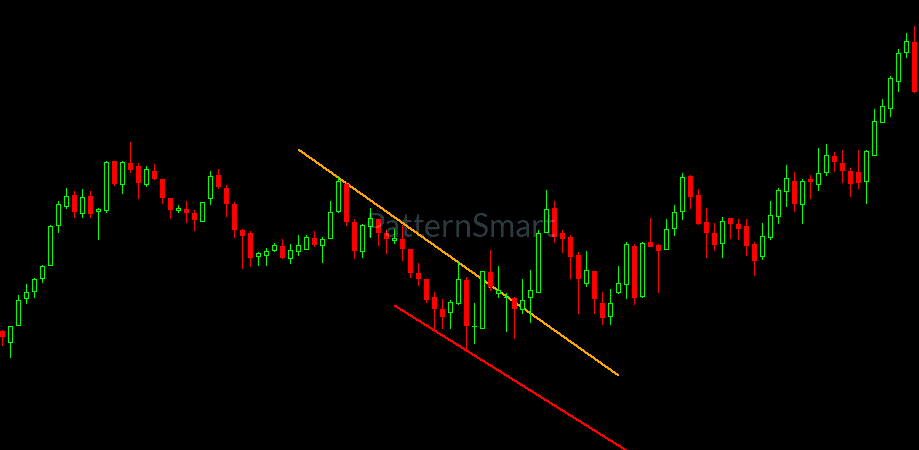
MetaTrader 4 indicator
Channel Down Channel Up Pattern Indicator for MT4
Find rising and falling price channels the moment they form. The indicator scans your MetaTrader 4 chart, draws both trendlines of every Channel Up and Channel Down, extends them forward and sounds an alert, so you stop drawing channels by eye.
- MetaTrader 4
- Channel Up and Down
- Any symbol
- Any timeframe
- Sound alerts
The pattern
What are Channel Up and Channel Down patterns?
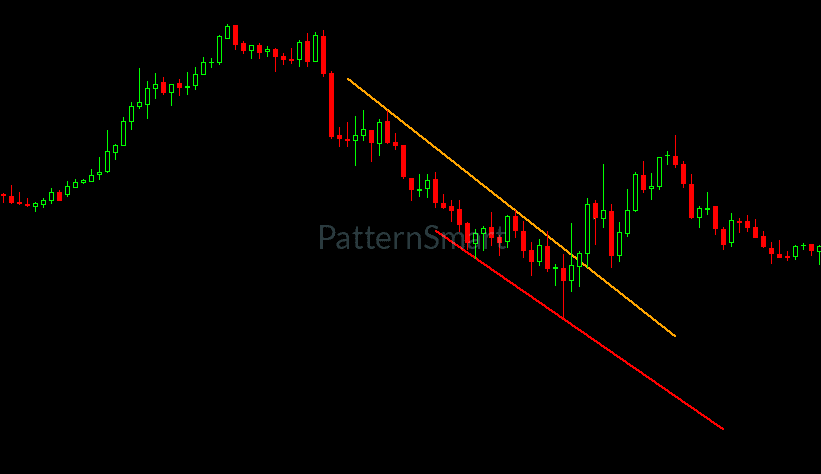
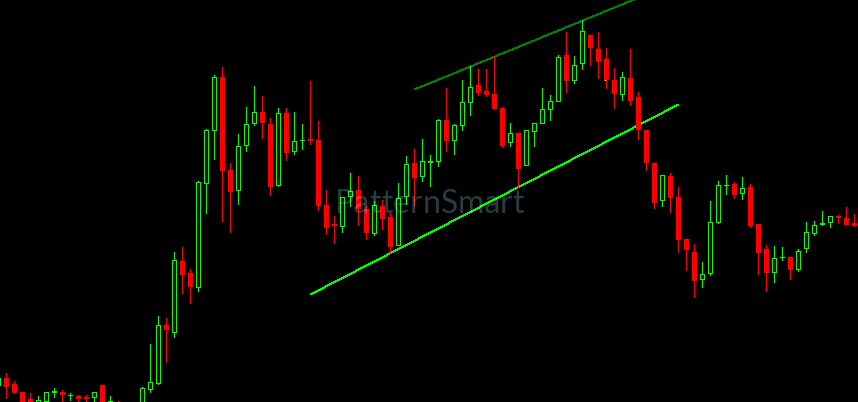
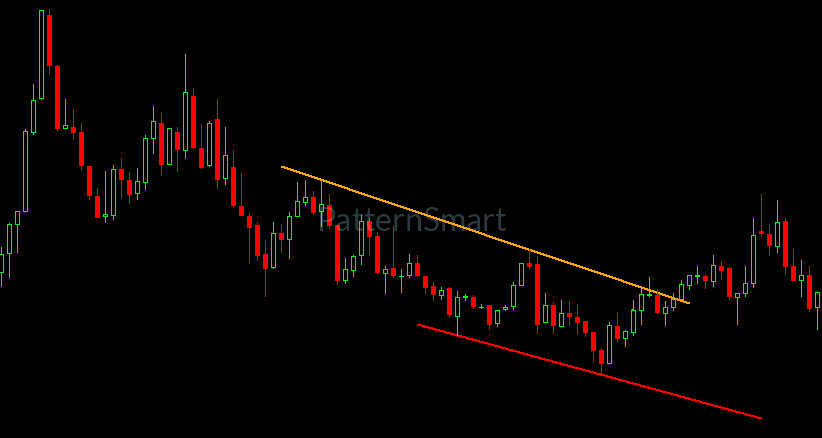
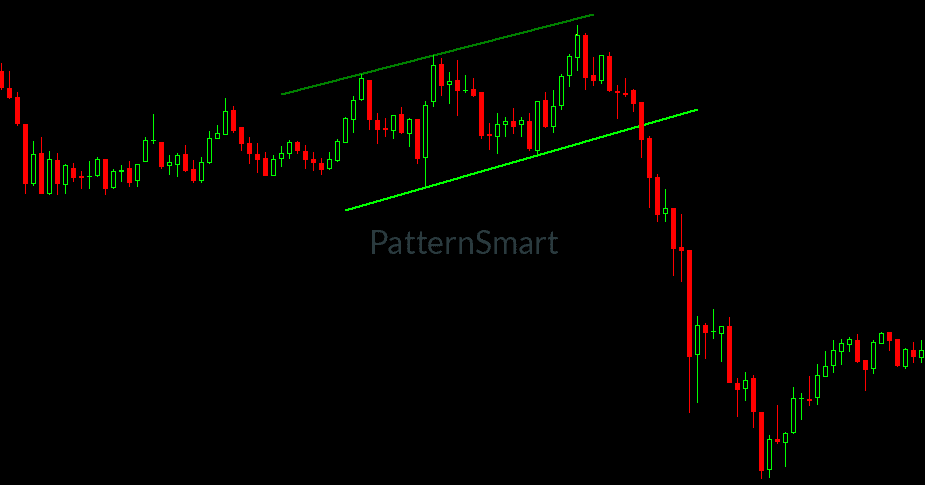
A Channel Up, also called a rising channel or ascending channel, is a structure where price makes higher highs and higher lows between two roughly parallel, upward-sloping trendlines. A Channel Down, or falling channel, is the mirror image: lower highs and lower lows between two roughly parallel, downward-sloping trendlines.
Unlike triangles or wedges, a channel keeps its width. Price travels inside a corridor, and the two boundaries show traders where the move has been finding support and resistance. Traders use channels to read trend direction, to frame pullbacks and to watch for breakouts when price leaves the corridor.
Channels are easy to spot in hindsight and tedious to draw while the market moves. The Channel Down Channel Up Pattern Indicator for MT4 does that scanning for you, on every bar, so you can spend your time on the trade instead of the trendline.
Two patterns, one indicator
Channel Up and Channel Down detection on one chart
Both directions are handled by the same indicator, drawn in different colors so you can tell them apart instantly.
Channel Up
Rising channel
Higher highs and higher lows inside two upward-sloping boundaries. Drawn in green and lime by default.
Channel Down
Falling channel
Lower highs and lower lows inside two downward-sloping boundaries. Drawn in orange and red by default.
Diagrams are simplified illustrations of the two patterns. Each direction can be switched off in the inputs.
Features
Everything you need to trade channels on MT4
A chart-window indicator built for one job: finding Channel Up and Channel Down patterns quickly, drawing them clearly and telling you when a new one appears.
Automatic Channel Up and Channel Down detection
Scans the chart history and every new bar for rising and falling channels. No manual trendlines, no counting swings, no second-guessing which highs and lows to connect.
Both directions, switched independently
Trade only rising channels, only falling channels, or both. Each direction has its own on/off setting, so the chart shows only what fits your plan.
Small, medium and large sizes
Look for compact channels, mid-sized ones or wide structures. Switch each size on or off to match the scale and timeframe you trade.
Four-color line coding
A Channel Up is drawn in green and lime, a Channel Down in orange and red. You see the direction of the channel at a glance, and you can change every color.
Lines that run forward
Both boundaries are extended ahead of the pattern, so you can see where the channel edges sit next. Set how many bars they run to fit your timeframe.
Sound and log alerts
When a channel is detected on the newest bar, the indicator plays your chosen sound file and writes a message to the Experts log, so you do not have to watch the screen.
Latest-pattern-only mode
Keep only the most recent channel on the chart. Older lines are removed automatically, which keeps busy charts readable.
Detection marker and data buffer
A dot marks the bar where a channel is detected, and the same value is held in an indicator buffer you can read from your own tools.
Built for MetaTrader 4
Why the MT4 version of the Channel Down Channel Up Pattern Indicator for MT4 fits the way you trade
This version is written for the MetaTrader 4 terminal, so it behaves like a native part of the platform instead of an add-on bolted on top.
Ready-to-use compiled file
You receive a compiled MetaTrader 4 indicator. Place it in the Indicators folder, refresh the Navigator and attach it. There is nothing to compile, and it does not need DLL imports or any outside service.
Standard MT4 trend lines
Channels are drawn as regular trend line objects. They sit behind the candles and appear in the Objects List (Ctrl+B), where you can select, restyle or delete them like any line you drew yourself.
Works with templates and many charts
Save the indicator and your input settings in an MT4 template, then apply it to any chart. Attach it to several symbols and timeframes at once from the same Navigator.
Alerts through MT4 itself
Alerts use MetaTrader 4’s own sound playback and the Experts tab, so you can use any .wav file from the Sounds folder. As an indicator, it does not depend on the AutoTrading button.
Readable in the Data Window
The detection buffer appears as Found in the MT4 Data Window and can be read by iCustom from your own tools, which makes it easy to check where channels were flagged.
Cleans up after itself
Remove the indicator and the lines it drew are removed with it. The latest-only mode does the same housekeeping while you trade, so old channels never pile up on the chart.
Pattern sizes
Choose the channel size that fits your trading
Channels come in different scales. Pick the sizes you care about and leave the rest off.
Small
Compact channels
Short structures that develop over a handful of bars. Suited to lower timeframes and fast intraday trading.
Medium
Everyday channels
Mid-sized structures that fit most day trading and short swing setups. A balanced choice for general use.
Large
Wide channels
Big structures that take longer to build. Useful on higher timeframes for swing and position traders.
All three sizes are on by default. Turn off the ones you do not trade and the chart stays cleaner.
Setup
Install the Channel Down Channel Up Pattern Indicator for MT4 and start scanning in minutes
-
Copy the file into MetaTrader 4
In MT4, choose File, then Open Data Folder. Place the downloaded
.ex4file inMQL4/Indicators. Restart MT4, or right-click the Navigator and choose Refresh. -
Attach it to a chart
Open any symbol and timeframe, find the indicator under Navigator, Indicators, and drag it onto the chart.
-
Pick your direction, sizes and style
In the inputs window, choose Channel Up, Channel Down or both, enable the sizes you want, set the extension length, and choose line colors and width. The defaults work well out of the box.
-
Let the chart do the scanning
Channels appear with their trendlines and a detection dot. Keep alerts on and MT4 will play a sound when a new one is detected on the newest bar.
Requires MetaTrader 4 build 600 or newer. The file is ready to use as delivered, so there is nothing to compile.
In practice
How traders use Channel Up and Channel Down patterns
A channel is a map of recent price behavior, not a prediction. Many traders wait for confirmation and plan for the channel to break. The indicator finds the pattern. Your plan decides what to do with it.
Trend context
A Channel Up shows an orderly rising structure and a Channel Down an orderly falling one. Use the channel to judge whether price is trending in a controlled way or drifting.
Pullback reference
The channel boundaries give you reference levels to watch. See how price reacts near the lower line of a rising channel or the upper line of a falling one, and apply your own entry rules.
Breakout and failure watching
Channels end. Watch what price does when it moves through a boundary, and wait for your own confirmation before acting on a break or a failed break.
Multi-timeframe confirmation
Run the Large size on a higher timeframe for the bigger picture and the Small size on a lower one to time your decisions inside it.
Settings
Inputs you can adjust
Every option appears in the standard MT4 inputs window when you attach the indicator, grouped under Pattern Toggles, Pattern Sizes, Parameters and Line Style.
| Input | Default | What it does |
|---|---|---|
Show Channel UP |
true | Look for rising channels (Channel Up). |
Show Channel Down |
true | Look for falling channels (Channel Down). |
Enable Small Pattern |
true | Look for small channels. |
Enable Medium Pattern |
true | Look for medium-sized channels. |
Enable Large Pattern |
true | Look for large channels. |
Show Last Pattern Only |
false | Keep only the most recent channel on the chart and remove older ones. |
Enable Alert |
true | Play a sound and write a message to the Experts log when a channel is detected on the newest bar. |
Extension Bars |
20 | How many bars the channel lines run forward beyond the pattern. |
Line Width |
2 | Thickness of the channel lines and the detection dot. |
Sound Alert File |
notify.wav | Sound file played by the alert. Use any file in your MT4 Sounds folder. |
Bullish Upper Color |
Green | Color of the upper line of a Channel Up. |
Bullish Lower Color |
Lime | Color of the lower line of a Channel Up. |
Bearish Upper Color |
Orange | Color of the upper line of a Channel Down. |
Bearish Lower Color |
Red | Color of the lower line of a Channel Down. |
Compatibility
Requirements and compatibility
- Platform
- MetaTrader 4, build 600 or newer
- File type
- Compiled .ex4 indicator
- Indicator type
- Chart window overlay
- Symbols
- Any instrument your broker offers
- Timeframes
- M1 to MN
- Alerts
- Sound file and Experts log message
- Patterns
- Channel Up and Channel Down
- Trading
- Analysis only, places no orders
FAQ
Channel Down Channel Up Pattern Indicator for MT4: frequently asked questions
What does the Channel Down Channel Up Pattern Indicator for MT4 do?
It scans your MetaTrader 4 chart for rising and falling price channels, known as Channel Up and Channel Down patterns. When it finds one, it draws the upper and lower trendlines on the chart, extends them forward, marks the detection with a dot and can play an alert.
What is the difference between a Channel Up and a Channel Down?
In a Channel Up, price moves higher between two rising, roughly parallel trendlines. In a Channel Down, price moves lower between two falling, roughly parallel trendlines. The indicator detects both and lets you switch either one off.
Does it work on every symbol and timeframe?
Yes. It runs on any symbol your broker offers in MetaTrader 4, from forex pairs to metals, indices and crypto CFDs, and on every timeframe from M1 to monthly. The chart needs enough loaded history for the pattern sizes you enable.
What is the difference between small, medium and large patterns?
The three sizes look for channels of different scales. Small suits quick intraday structures, medium suits everyday trading, and large picks up wider, slower-forming channels on higher timeframes. You can enable any combination.
How do the alerts work?
With alerts enabled, the indicator plays a sound file and writes a message to the Experts log when a Channel Up or Channel Down is detected on the newest bar. The message names the channel type and the bar time. The default sound is notify.wav, and you can point it at any file in your MT4 Sounds folder. It does not send pop-up, email or push notifications.
Does it place trades for me?
No. It is an analysis tool that marks channels on your chart. It does not open, modify or close orders, so every trading decision stays with you.
Can a detection change or look different after I reload the chart?
It can. The indicator evaluates bars as they arrive, including the newest bar when it opens, so what you see on the live bar can differ from what the same indicator shows after the chart is reloaded and history is recalculated. Many traders review patterns on closed bars before acting on them.
Can I read the signal from an Expert Advisor or another tool?
The indicator exposes one data buffer, shown as Found in the Data Window, that holds a value on bars where a channel is detected. You can read it from your own tools with iCustom. The buffer marks that a channel was found; it does not carry the direction.
Does a channel pattern guarantee a profitable trade?
No chart pattern does. Channels can break in either direction or fail, so use the indicator alongside your own analysis, confirmation and risk management.
Get started
Add the Channel Down Channel Up Pattern Indicator for MT4 to your charts
Stop drawing channels by hand. Attach the indicator, choose your direction and pattern sizes, and let MetaTrader 4 tell you when a new Channel Up or Channel Down appears.
Trading leveraged products such as forex and CFDs carries a high level of risk and may not be suitable for everyone. You can lose more than your initial deposit.
The Channel Down Channel Up Pattern Indicator for MT4 is a charting tool for MetaTrader 4. It is not financial advice and does not guarantee results. Past patterns do not predict future price movement. MetaTrader is a trademark of its respective owner.