NinjaTrader 8 Range Breakout with Volume Confirmation: Complete NinjaScript C# Indicator
Many range-breakout indicators flag a wick crossing resistance, even if the candle closes back inside the range. This free NinjaTrader 8 study instead uses the close of the signal bar, a previous-bar-only reference window, and a relative-volume filter. It is an indicator for research and chart annotation—not an automated strategy or a claim of future returns.
What the algorithm measures
At bar t, define HighRef(t) as the maximum of High[t−N] through High[t−1]; LowRef(t) as the minimum over the same N previously completed bars. Current-bar high and low are excluded to avoid raising the target while attempting to break it. A bullish first breakout requires Close[t] > HighRef(t) and Close[t−1] ≤ HighRef(t−1); the bearish rule mirrors this below LowRef. An additional volume gate requires Volume[t] ≥ r × SMA(Volume,Nv)[t−1]. Thus today's volume is tested against a baseline built only from past bars.
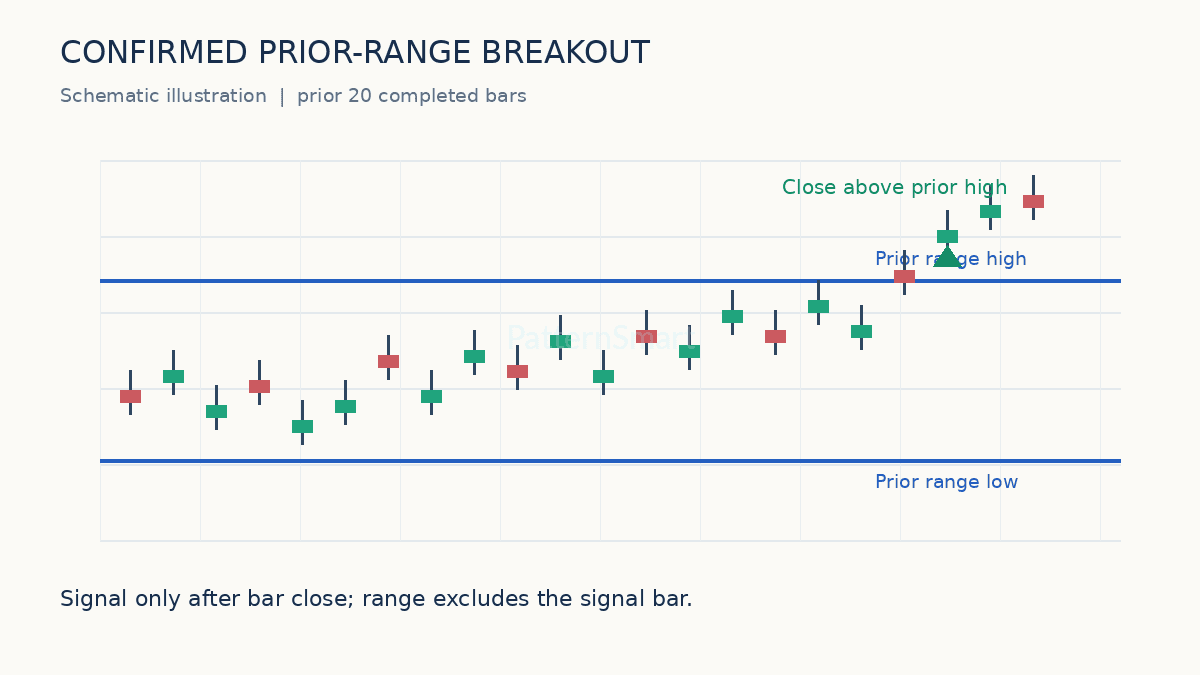
Settings and examples
| Input | Default | Interpretation |
|---|---|---|
| Range Lookback | 20 | Historical window, excluding the signal candle |
| Volume Average Period | 20 | Prior volume baseline |
| Minimum Volume Ratio | 1.30 | Signal-bar volume at least 130% of baseline |
| Arrow Offset Ticks | 3 | Visual marker spacing |
Suppose the last 20 completed candles have a maximum high of 4210, the previous volume average is 1,000 contracts and the latest completed candle closes at 4212 with volume of 1,450. Price and volume conditions pass, but a long arrow still requires the previous close to have been no higher than its own historical high threshold. This is an explanatory example, not exchange data.
Complete NinjaScript C# indicator
Code uses State.SetDefaults, Calculate.OnBarClose, MAX/MIN, SMA and Draw.ArrowUp/ArrowDown. It produces two channel plots and signal markers without submitting orders.
using System;
using System.ComponentModel.DataAnnotations;
using System.Windows.Media;
using NinjaTrader.NinjaScript;
using NinjaTrader.NinjaScript.DrawingTools;

namespace NinjaTrader.NinjaScript.Indicators
{
    // Close-confirmed prior-range breakout with relative-volume confirmation.
    public class PSConfirmedRangeVolume : Indicator
    {
        [NinjaScriptProperty]
        [Range(5, 200)]
        [Display(Name = "Range Lookback", GroupName = "Parameters", Order = 0)]
        public int Lookback { get; set; }

        [NinjaScriptProperty]
        [Range(2, 200)]
        [Display(Name = "Volume Average Period", GroupName = "Parameters", Order = 1)]
        public int VolumePeriod { get; set; }

        [NinjaScriptProperty]
        [Range(0.1, 10.0)]
        [Display(Name = "Minimum Volume Ratio", GroupName = "Parameters", Order = 2)]
        public double VolumeRatio { get; set; }

        [NinjaScriptProperty]
        [Range(1, 20)]
        [Display(Name = "Arrow Offset Ticks", GroupName = "Parameters", Order = 3)]
        public int ArrowOffsetTicks { get; set; }

        protected override void OnStateChange()
        {
            if (State == State.SetDefaults)
            {
                Name = "PSConfirmedRangeVolume";
                Description = "Marks confirmed range breaks with relative-volume context.";
                Calculate = Calculate.OnBarClose;
                IsOverlay = true;
                Lookback = 20;
                VolumePeriod = 20;
                VolumeRatio = 1.30;
                ArrowOffsetTicks = 3;
                AddPlot(Brushes.DodgerBlue, "PriorHigh");
                AddPlot(Brushes.IndianRed, "PriorLow");
            }
        }

        protected override void OnBarUpdate()
        {
            if (CurrentBar < Math.Max(Lookback + 2, VolumePeriod + 2))
            {
                Values[0][0] = double.NaN;
                Values[1][0] = double.NaN;
                return;
            }

            // Shift the MAX/MIN window back one bar: exclude signal candle.
            double priorHigh = MAX(High, Lookback)[1];
            double priorLow = MIN(Low, Lookback)[1];
            double previousHigh = MAX(High, Lookback)[2];
            double previousLow = MIN(Low, Lookback)[2];
            Values[0][0] = priorHigh;
            Values[1][0] = priorLow;

            // Prior completed bars define expected volume.
            double baseline = SMA(Volume, VolumePeriod)[1];
            if (baseline <= 0)
                return;

            bool volumeConfirmed = Volume[0] >= baseline * VolumeRatio;
            bool up = Close[0] > priorHigh && Close[1] <= previousHigh;
            bool down = Close[0] < priorLow && Close[1] >= previousLow;

            if (volumeConfirmed && up)
                Draw.ArrowUp(this, "PSUp" + CurrentBar, false, 0,
                    Low[0] - ArrowOffsetTicks * TickSize, Brushes.SeaGreen);

            if (volumeConfirmed && down)
                Draw.ArrowDown(this, "PSDown" + CurrentBar, false, 0,
                    High[0] + ArrowOffsetTicks * TickSize, Brushes.IndianRed);
        }
    }
}
Installation and validation
Open NinjaTrader 8 Control Center → New → NinjaScript Editor. Under Indicators, create a new indicator with the class name PSConfirmedRangeVolume, replace its generated body with the complete source as appropriate, compile, then add it via the chart Indicators menu. Check that the generated template's namespace and class names match the pasted code. Increase the chart's bars loaded to cover both the range and volume baseline.
Validation checklist: manually calculate the prior 20-bar high and low on five candles; compare previous-volume SMA to the chart's volume bars; verify arrows appear only after close; verify the first-cross condition eliminates repeated arrows during a sustained move; test a symbol with session gaps and one with sparse or unreliable volume; inspect live versus historical behavior. The arrow is a price signal, not a fill simulation.
Limitations, false signals and risk
Not all markets offer comparable volume data, and volume may change radically with the session. A large overnight gap can trigger a mathematically valid break without a practical entry at the displayed close. A 1.30× filter can miss quiet but legitimate trends and still admit false breakouts. Calculate.OnBarClose reduces provisional-bar signals; it does not remove slippage, lookahead bias from other code, or market risk. This article's source was not compiled in your specific NinjaTrader installation. Test in simulation before any live decision.
Interested in extending this free study with alerts, session-aware thresholds or strategy automation? See our Custom Trading Software Development Services to discuss tailored requirements.