Sierra Chart Closed-Bar Range Breakout Study: Complete ACSIL C++ Source
Overview
This free ACSIL study plots the highest high and lowest low of the preceding N bars and marks a fresh close beyond either boundary. The signal bar is excluded from the reference range, preventing a self-referential breakout threshold.
Calculations and signal rules
For bar t: upper = max(High[t-N]…High[t-1]); lower = min(Low[t-N]…Low[t-1]). Bullish when Close[t] > upper[t] and Close[t-1] <= upper[t-1]; bearish is symmetric. Signals require a closed bar. The first eligible bar has no crossover comparison and is intentionally skipped.
Settings
Defaults: 20 prior bars, arrow offset 2 ticks. The 20-bar window adapts to chart timeframe; tick offset only changes arrow placement, not trigger price.
Illustrated example
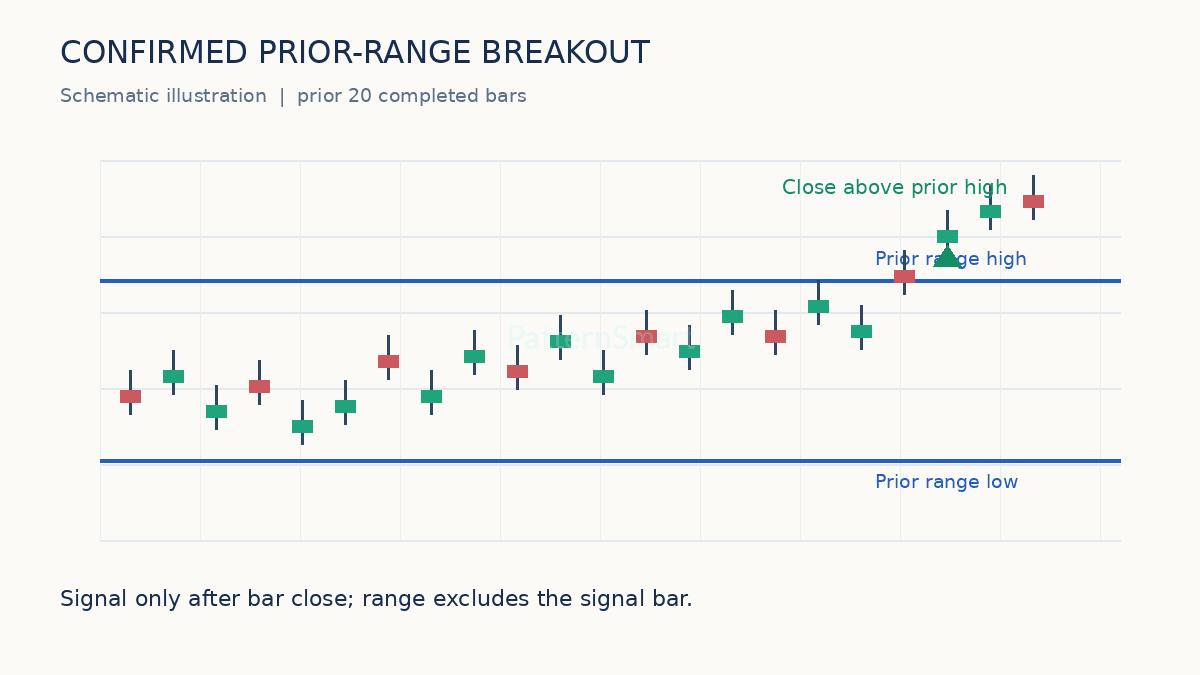
Worked numerical example
Example: if the previous 20 highs peak at 105.00 and the prior low is 98.00, a completed close of 105.25 can qualify as a bullish breakout provided the previous close did not already exceed its own prior upper boundary. This is hypothetical, not historical market data.
Complete ACSIL C++ source
#include "sierrachart.h"

SCDLLName("PatternSmart Confirmed Range Breakout")

SCSFExport scsf_PSConfirmedRangeBreakout(SCStudyInterfaceRef sc)
{
    SCSubgraphRef Upper = sc.Subgraph[0];
    SCSubgraphRef Lower = sc.Subgraph[1];
    SCSubgraphRef Buy = sc.Subgraph[2];
    SCSubgraphRef Sell = sc.Subgraph[3];
    SCInputRef Length = sc.Input[0];
    SCInputRef OffsetTicks = sc.Input[1];

    if (sc.SetDefaults)
    {
        sc.GraphName = "PS Confirmed Range Breakout";
        sc.StudyDescription = "Prior-range breakout on closed bars only";
        sc.AutoLoop = 1;
        sc.GraphRegion = 0;
        Upper.Name = "Prior High";
        Upper.DrawStyle = DRAWSTYLE_LINE;
        Upper.PrimaryColor = RGB(44, 91, 184);
        Lower.Name = "Prior Low";
        Lower.DrawStyle = DRAWSTYLE_LINE;
        Lower.PrimaryColor = RGB(44, 91, 184);
        Buy.Name = "Bullish Breakout";
        Buy.DrawStyle = DRAWSTYLE_ARROW_UP;
        Buy.PrimaryColor = RGB(21, 140, 99);
        Buy.LineWidth = 3;
        Buy.DrawZeros = 0;
        Sell.Name = "Bearish Breakout";
        Sell.DrawStyle = DRAWSTYLE_ARROW_DOWN;
        Sell.PrimaryColor = RGB(196, 58, 67);
        Sell.LineWidth = 3;
        Sell.DrawZeros = 0;
        Length.Name = "Prior Range Bars";
        Length.SetInt(20);
        Length.SetIntLimits(2, 500);
        OffsetTicks.Name = "Arrow Offset (Ticks)";
        OffsetTicks.SetInt(2);
        OffsetTicks.SetIntLimits(0, 100);
        return;
    }

    const int n = Length.GetInt();
    const int i = sc.Index;
    sc.DataStartIndex = n;
    Buy[i] = 0.0f;
    Sell[i] = 0.0f;
    if (i < n)
    {
        Upper[i] = 0.0f;
        Lower[i] = 0.0f;
        return;
    }

    float hi = sc.High[i - 1];
    float lo = sc.Low[i - 1];
    for (int k = i - n; k < i; ++k)
    {
        if (sc.High[k] > hi) hi = sc.High[k];
        if (sc.Low[k] < lo) lo = sc.Low[k];
    }
    Upper[i] = hi;
    Lower[i] = lo;

    // Never confirm signals on a still-forming bar.
    if (sc.GetBarHasClosedStatus(i) != BHCS_BAR_HAS_CLOSED)
        return;

    const float previousClose = sc.Close[i - 1];
    if (sc.Close[i] > hi && previousClose <= Upper[i - 1] && i > n)
        Buy[i] = sc.Low[i] - OffsetTicks.GetInt() * sc.TickSize;
    if (sc.Close[i] < lo && previousClose >= Lower[i - 1] && i > n)
        Sell[i] = sc.High[i] + OffsetTicks.GetInt() * sc.TickSize;
}
Installation
In Sierra Chart, open Analysis > Build Custom Studies DLL, add this source file, build the DLL, then add PS Confirmed Range Breakout through Analysis > Studies. Use a test chart first. This code has not been compiled against a local Sierra Chart installation.
Validation and risk
Closed-bar confirmation avoids intrabar signals but cannot eliminate false breakouts, gaps, illiquidity, or differences caused by chart session settings. This is an indicator, not an automated trading system: it does not place orders, calculate position size, or implement stops. Verify historical arrows, bar-close behavior, settings changes, and symbols/timeframes before use. No performance or profitability is guaranteed.
Customization
Interested in this free program or trading idea and want to customize, extend, or modify it for your own needs? Explore Custom Trading Software Development Services to discuss your requirements.