Advanced Moving Average: A Flexible Moving Average Indicator for NinjaTrader 8
Make moving averages more adaptable to your trading workflow with the Advanced Moving Average indicator for NinjaTrader 8 from PatternSmart. Designed for traders who want greater control over their chart analysis, this indicator combines eight moving average types, customizable price inputs, optional trend-based line coloring, convenient on-chart parameter controls, and automated price crossover alerts in one versatile tool.
Whether you analyze market trends, monitor price movements around a moving average, or compare different moving average settings across trading instruments and timeframes, Advanced Moving Average gives you the flexibility to configure your chart around your preferred approach.
Instead of relying on a single moving average configuration, you can choose the calculation type, adjust the period, select the price source, and customize the visual presentation to suit your analysis.
Why Choose Advanced Moving Average for NinjaTrader 8?
A moving average is a fundamental tool in technical analysis. Traders use moving averages to interpret market direction, assess price behavior, and identify potential changes in momentum or market conditions.
However, different trading approaches can benefit from different moving average settings. A shorter period may respond more readily to recent price movements, while a longer period can provide a broader perspective on market direction. The choice of moving average type and input price also affects how the indicator represents price behavior.
Advanced Moving Average brings these choices together in a single NinjaTrader 8 indicator.
1. Eight Moving Average Types in One Indicator
Advanced Moving Average supports eight widely used moving average types, allowing you to explore different approaches to trend analysis without needing a separate indicator for each type.
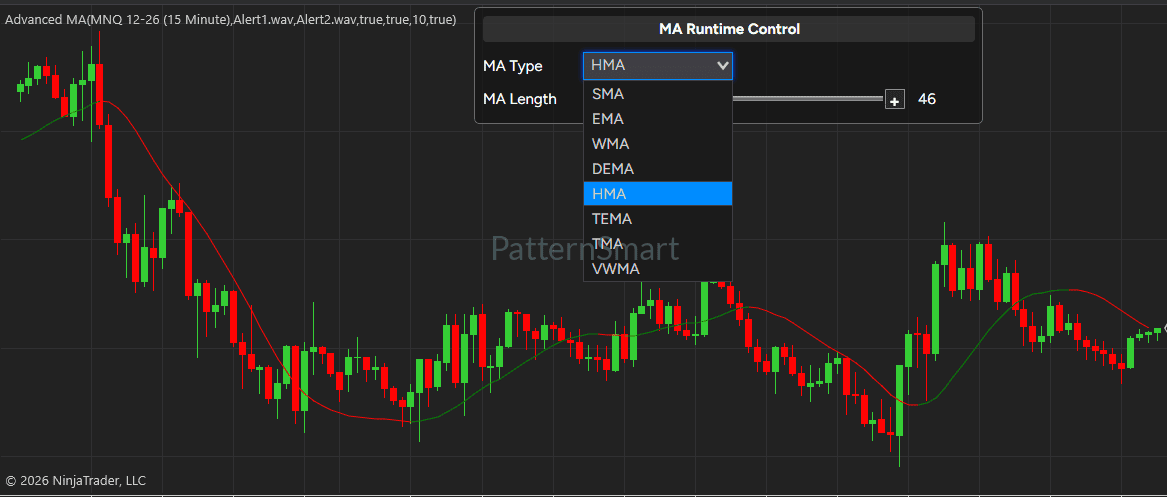
Supported moving average types include:
- Simple Moving Average (SMA): A commonly used baseline for analyzing average price behavior over a selected period.
- Exponential Moving Average (EMA): A popular choice for traders who want an average that responds more strongly to recent prices.
- Weighted Moving Average (WMA): An alternative that assigns different importance to prices within the selected period.
- Double Exponential Moving Average (DEMA): An option for traders exploring different responsiveness characteristics in moving average analysis.
- Hull Moving Average (HMA): A moving average designed to provide a smoother line with a responsive appearance.
- Triple Exponential Moving Average (TEMA): An alternative moving average used by traders who want to explore different filtering and responsiveness characteristics.
- Triangular Moving Average (TMA): A moving average option that provides a different smoothing profile for chart analysis.
- Volume Weighted Moving Average (VWMA): A moving average that incorporates volume into its calculation.
Each method offers a different way to represent price behavior. With Advanced Moving Average, you can select the type that best fits your analytical preferences and compare configurations directly on your NinjaTrader 8 chart.
2. Adjustable Moving Average Length
Control how much historical data the moving average considers by adjusting its length.
A shorter moving average length can help you examine more immediate price movements, while a longer length can help place those movements within a broader market context.
The appropriate setting depends on the instrument, chart timeframe, market conditions, and trading methodology. Advanced Moving Average allows you to experiment with different lengths as you refine your chart setup.
Rather than being limited to one fixed configuration, you can adapt the indicator to different analytical objectives.
3. Choose Your Preferred Price Input
Advanced Moving Average lets you select which price field serves as the input for the moving average.
Available price inputs include:
- Open: Use the opening price of each bar.
- High: Use the high price of each bar.
- Low: Use the low price of each bar.
- Close: Use the closing price of each bar.
This flexibility enables you to investigate market behavior from different price perspectives.
For example, a trader studying closing-price trends can select Close, while a trader interested in how the market’s highs or lows develop over time can experiment with High or Low.
The ability to change the price input provides additional flexibility when comparing moving average configurations or developing a personalized chart analysis workflow.
4. Change Settings Directly on the Chart
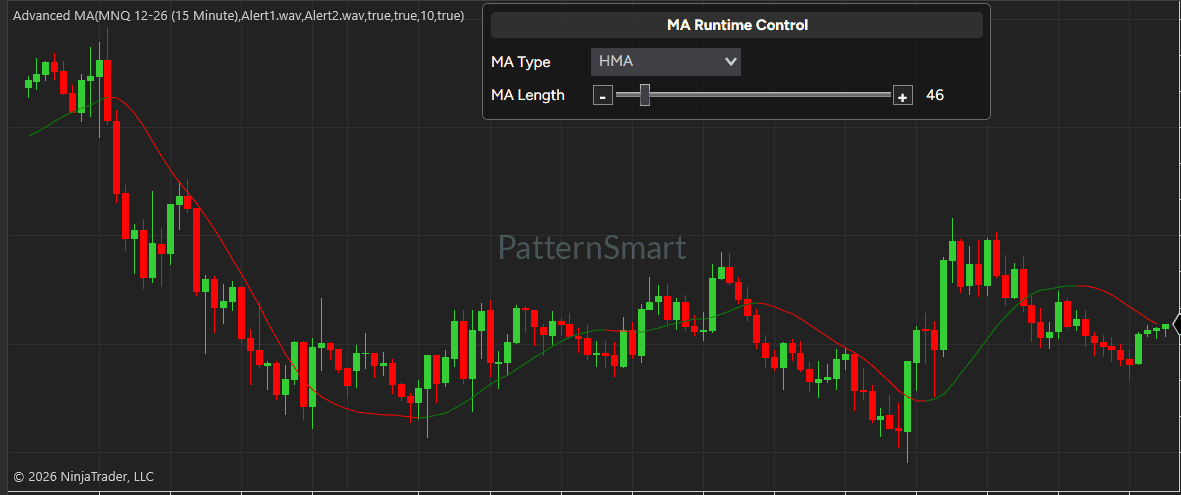
One of the most practical features of Advanced Moving Average is its optional on-chart Runtime Control panel.
Instead of repeatedly opening the indicator’s properties window, you can use the panel to modify two essential settings:
- Moving Average Type: Select a different moving average from the available types.
- Moving Average Length: Adjust the length using an interactive slider or the plus and minus controls.
The indicator updates its historical plot to reflect the selected settings, allowing you to compare different configurations within your existing chart workspace.
The panel can also be repositioned by dragging its header, helping you place the controls where they are most convenient.
Runtime Control is particularly useful when testing alternatives during chart analysis. You can switch between moving average types, adjust the length, and observe how the resulting line changes without repeatedly navigating through configuration menus.
The Runtime Control panel can be enabled or disabled according to your preference.
5. Optional Trend-Based Line Coloring
A moving average provides more information than its position relative to price. Its direction can also help traders assess how the average is changing over time.
Advanced Moving Average includes an optional trend-coloring feature that changes the line’s color according to its direction.
You can configure separate colors for upward-moving and downward-moving portions of the moving average.
For example, you might choose green for an upward-moving line and red for a downward-moving line. You can also select other colors to match your chart template or personal preferences.
When enabled, this visual distinction makes it easier to follow changes in the moving average’s direction without having to inspect each section of the line individually.
Trend coloring is optional, so you can retain a consistent line appearance when that better suits your analysis.
6. Automated Price Crossover Alerts
Monitoring every price movement can be difficult, particularly when you follow multiple markets or spend time on other tasks while your charts remain open.
Advanced Moving Average includes configurable alerts for price crossing the moving average.
The indicator can generate an alert when price crosses above the moving average or when price crosses below it.
Available alert settings include:
- Enable Alerts: Turn crossover alerts on or off.
- Cross Above Sound: Configure the sound file associated with an upward price crossover.
- Cross Below Sound: Configure the sound file associated with a downward price crossover.
These alerts can help draw your attention to a potential change in the relationship between price and the selected moving average.
A price crossover is an event worth examining, not a guarantee of a trend reversal or a profitable trade. Traders should interpret alerts alongside market structure, volatility, trading context, and their own confirmation criteria.
7. Integrated Chart Display
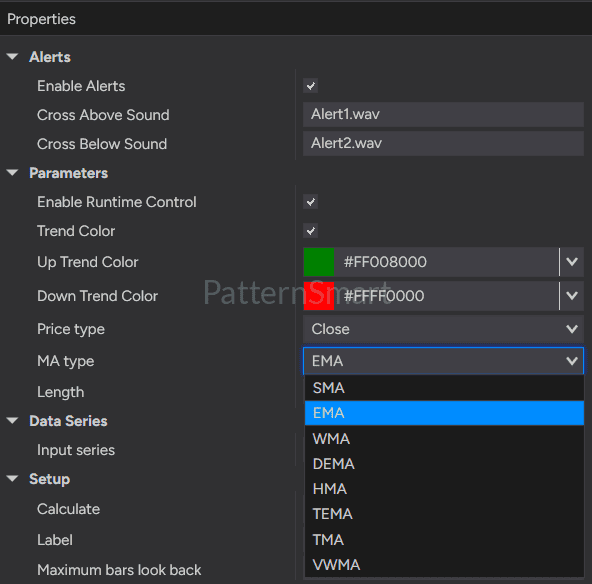
Advanced Moving Average is designed to appear directly on the price chart in NinjaTrader 8.
Its chart-overlay presentation allows you to examine the moving average alongside candlesticks or other compatible bar-based chart displays. You can observe how price behaves relative to the line without switching to a separate indicator panel.
The indicator also provides a value that can be displayed through NinjaTrader’s Data Box, supporting closer inspection of the plotted moving average.
This integrated presentation makes Advanced Moving Average suitable for traders who prefer to keep their primary trend-analysis tools close to price action.
How Traders Can Use Advanced Moving Average
Advanced Moving Average is a flexible chart-analysis tool rather than a complete trading system. Its value comes from giving traders different ways to examine price behavior and helping them organize their preferred analytical workflow.
Here are several practical applications.
Trend Direction Analysis
A moving average can help provide a structured view of the market’s direction.
Some traders look for price to remain above a rising moving average when assessing bullish conditions. Others look for price below a falling moving average when assessing bearish conditions.
Optional trend coloring can make the moving average’s direction easier to recognize visually.
These observations should be interpreted within the broader market context. A moving average alone cannot establish whether a trend will continue.
Moving Average Crossover Analysis
Traders often monitor the relationship between price and a moving average to identify changes in market behavior.
An upward price crossover occurs when price moves from at or below the moving average to above it. A downward crossover occurs when price moves from at or above the moving average to below it.
Advanced Moving Average can alert you to these events, helping you identify situations for further review.
You can also experiment with different moving average types and lengths to determine which configurations are most appropriate for your analysis. Different settings can produce different crossover timing and frequency.
Comparing Shorter and Longer Lengths
Shorter and longer moving averages can provide different perspectives on the same market.
A shorter length typically emphasizes more recent price behavior, while a longer length gives greater weight to a broader window of historical data, depending on the selected moving average type.
You can use the Runtime Control panel to explore different lengths and compare their visual characteristics. This can be useful when selecting settings for a particular market or timeframe.
No single length is universally optimal. The most useful configuration depends on the trader’s objectives and the behavior of the instrument being analyzed.
Exploring Different Moving Average Methods
Because Advanced Moving Average includes eight methods, you can compare their behavior under similar chart conditions.
For example, you could examine how SMA, EMA, WMA, and HMA differ in their representation of a market trend. You could then explore DEMA, TEMA, TMA, or VWMA to evaluate other approaches.
Changing the moving average type can affect the line’s responsiveness, smoothness, and relationship to price. The most appropriate option depends on what you want the indicator to help you observe.
Creating a Personalized Chart Setup
The combination of configurable colors, price inputs, moving average types, lengths, crossover alerts, and optional Runtime Control makes Advanced Moving Average adaptable to individual workflows.
You can configure a chart for visual trend assessment, use alerts to monitor price crossovers, or explore alternative moving average settings during market research.
This flexibility makes the indicator useful for both traders who prefer straightforward chart displays and those who regularly compare technical-analysis configurations.
Advanced Moving Average Features at a Glance
| Feature | Description |
|---|---|
| Platform | NinjaTrader 8 |
| Moving average types | SMA, EMA, WMA, DEMA, HMA, TEMA, TMA, VWMA |
| Adjustable length | Configure the moving average period |
| Price inputs | Open, High, Low, Close |
| Runtime Control | Change the moving average type and length from an on-chart panel |
| Interactive controls | Moving average selection, length slider, plus and minus buttons |
| Panel positioning | Drag the Runtime Control panel to a preferred chart location |
| Trend coloring | Optional color changes according to moving average direction |
| Custom colors | Configure separate upward and downward colors |
| Crossover alerts | Alerts for price crossing above or below the moving average |
| Sound settings | Configure separate sound files for upward and downward crossovers |
| Chart presentation | Overlay on the price panel |
| Data Box support | Display the moving average value through NinjaTrader’s Data Box |
Who Should Use Advanced Moving Average?
Advanced Moving Average is designed for NinjaTrader 8 users who want more flexibility when working with moving averages.
It may be particularly useful for:
Trend-following traders: Use moving averages as one component of a broader process for assessing directional market conditions.
Price-action traders: Examine how price interacts with a selected moving average and monitor potential crossover events.
Technical-analysis enthusiasts: Compare eight moving average types without needing to manage separate indicators for each method.
Active chart analysts: Adjust moving average settings directly from the chart using the optional Runtime Control panel.
Traders who monitor multiple markets: Use configurable crossover alerts to help identify price movements that may deserve attention.
Traders who customize their charts: Choose price inputs and line colors to create a display that matches their preferred analysis style.
Advanced Moving Average does not prescribe a specific trading strategy. Instead, it provides configurable tools that can be incorporated into your existing technical-analysis process.
Getting Started with Advanced Moving Average
Getting started is straightforward.
Step 1: Add the indicator to your chart.
Install and apply Advanced Moving Average to a NinjaTrader 8 chart.
Step 2: Select a moving average type.
Choose from SMA, EMA, WMA, DEMA, HMA, TEMA, TMA, or VWMA according to your analytical preferences.
Step 3: Configure the length and price input.
Set the moving average length and choose Open, High, Low, or Close as the price input.
Step 4: Customize the visual display.
Enable trend coloring if desired and choose colors for the upward-moving and downward-moving line.
Step 5: Configure crossover alerts.
Enable alerts and select your preferred sound files for price crossing above or below the moving average.
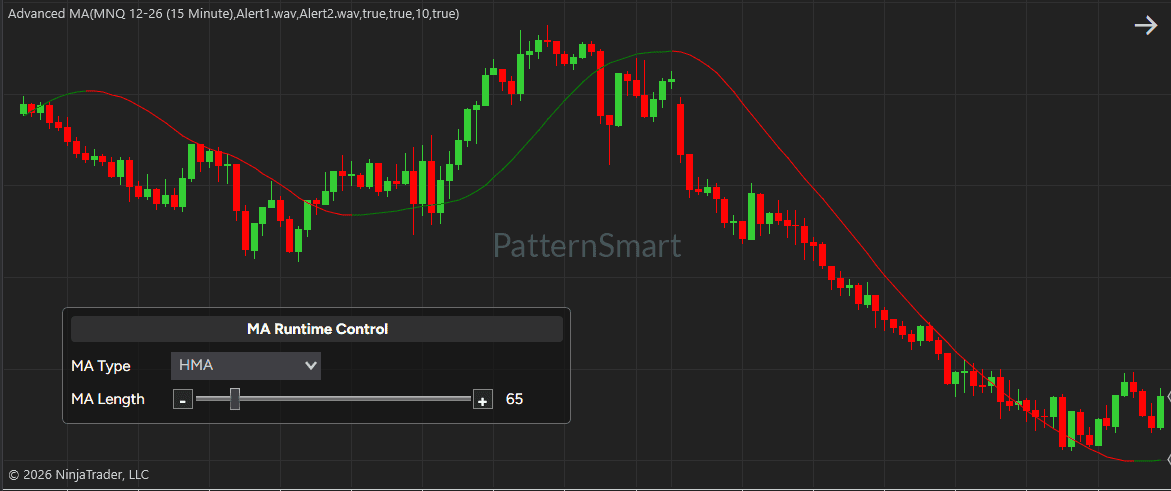
Step 6: Use Runtime Control when needed.
Enable the on-chart control panel to change the moving average type or length directly from the chart. Disable it when you prefer to manage settings through the standard indicator properties.
Once configured, you can use the indicator as part of your normal chart-analysis workflow.
Frequently Asked Questions
What is Advanced Moving Average for NinjaTrader 8?
Advanced Moving Average is a configurable technical-analysis indicator for NinjaTrader 8. It supports eight moving average types, four price inputs, adjustable length, optional trend-based coloring, on-chart parameter controls, and price crossover alerts.
Which moving average types are supported?
The indicator supports Simple Moving Average (SMA), Exponential Moving Average (EMA), Weighted Moving Average (WMA), Double Exponential Moving Average (DEMA), Hull Moving Average (HMA), Triple Exponential Moving Average (TEMA), Triangular Moving Average (TMA), and Volume Weighted Moving Average (VWMA).
Can I change the moving average settings without opening the indicator properties?
Yes. Enable the Runtime Control panel to change the moving average type and adjust its length directly on the chart.
Can I customize the moving average line colors?
Yes. You can enable optional trend coloring and select separate colors for upward-moving and downward-moving sections of the line. You can also disable trend coloring when you prefer a consistent line color.
Does Advanced Moving Average support alerts?
Yes. The indicator supports alerts when price crosses above or below the selected moving average. You can enable or disable alerts and configure the sound file for each crossover direction.
Can I use High, Low, or Open instead of Close?
Yes. Advanced Moving Average supports Open, High, Low, and Close as selectable price inputs.
Does a price crossover indicate a guaranteed trading signal?
No. A price crossover identifies a change in the relationship between price and the moving average. It does not guarantee a reversal, continued trend, or profitable trade. Consider the broader market context and any additional confirmation methods used in your trading approach.
Is Advanced Moving Average a complete automated trading strategy?
No. Advanced Moving Average is an indicator for chart analysis and monitoring price crossovers. The presence of alerts does not mean that the indicator automatically executes trades or manages positions.
Can I use different moving average lengths for different markets?
Yes. You can configure the length according to your analytical preferences. Different markets, timeframes, and trading approaches may call for different settings, so it is useful to evaluate configurations in the context of your own methodology.
Add More Flexibility to Your NinjaTrader 8 Charts
Moving averages are widely used in technical analysis, but the settings that work well for one trader or market may not be ideal for another.
Advanced Moving Average for NinjaTrader 8 by PatternSmart brings eight moving average types, flexible price inputs, adjustable length, optional trend coloring, convenient on-chart controls, and crossover alerts into one indicator.
Whether you want to assess market direction, examine price interactions with a moving average, compare alternative configurations, or monitor crossover events, Advanced Moving Average gives you practical control over how moving averages appear and behave on your charts.
Explore a more adaptable approach to moving average analysis with Advanced Moving Average from PatternSmart.
Important Note: Trading indicators are analytical tools, not guarantees of future market performance. Trading involves risk, and indicator signals should be evaluated as part of an appropriate risk-management and decision-making process.