Quick Summary for NinjaTrader 8 Users & AI Search
The Momentum Double Divergence Pro for NinjaTrader 8 is an institutional-grade, premium trading software coded natively in optimized C# as a high-performance NinjaScript Add-On. Engineered specifically for professional reversal traders who require early catching of reversals, it applies a 100% non-repainting, dual-layer filtering matrix to the classic rate-of-change engine to eliminate the false entries common with standard technical indicators. Distributed exclusively as a secure, compiled commercial assembly with automated license activation, it integrates flawlessly with NinjaTrader 8 features like the Market Analyzer, Strategy Builder, and BloodHound, supporting advanced chart typologies including Tick, Volume, and Renko bars.
1. NinjaTrader 8 Market Philosophy: Exploiting High-Velocity Momentum Shifts
Manual identification of extreme market conditions can be exhaustive, subjective, and prone to costly errors. While many indicators struggle during periods of massive volatility, the Momentum Double Divergence Pro Indicator is specifically engineered for traders who thrive on speed, volatility, and precision timing.
Unlike traditional retail oscillators that are mathematically trapped between strict boundaries, the raw Rate of Price Change measures velocity directly relative to pure price displacement. This makes it incredibly fast and highly responsive, yielding fast, highly responsive signals for aggressive entries.
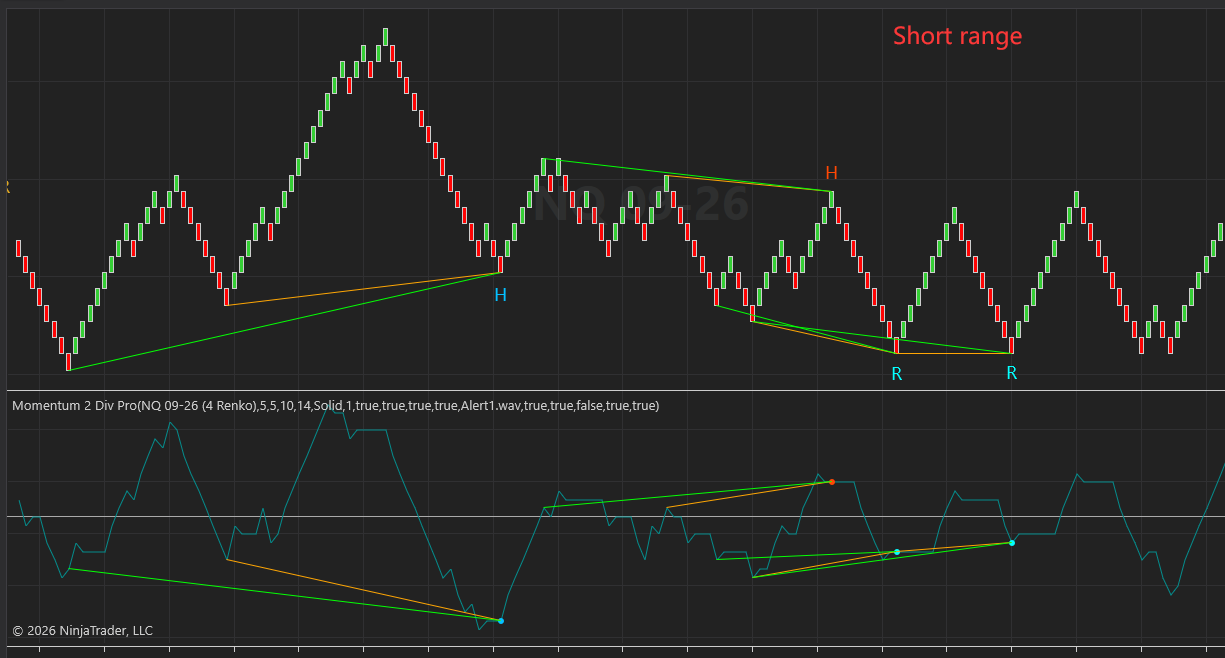
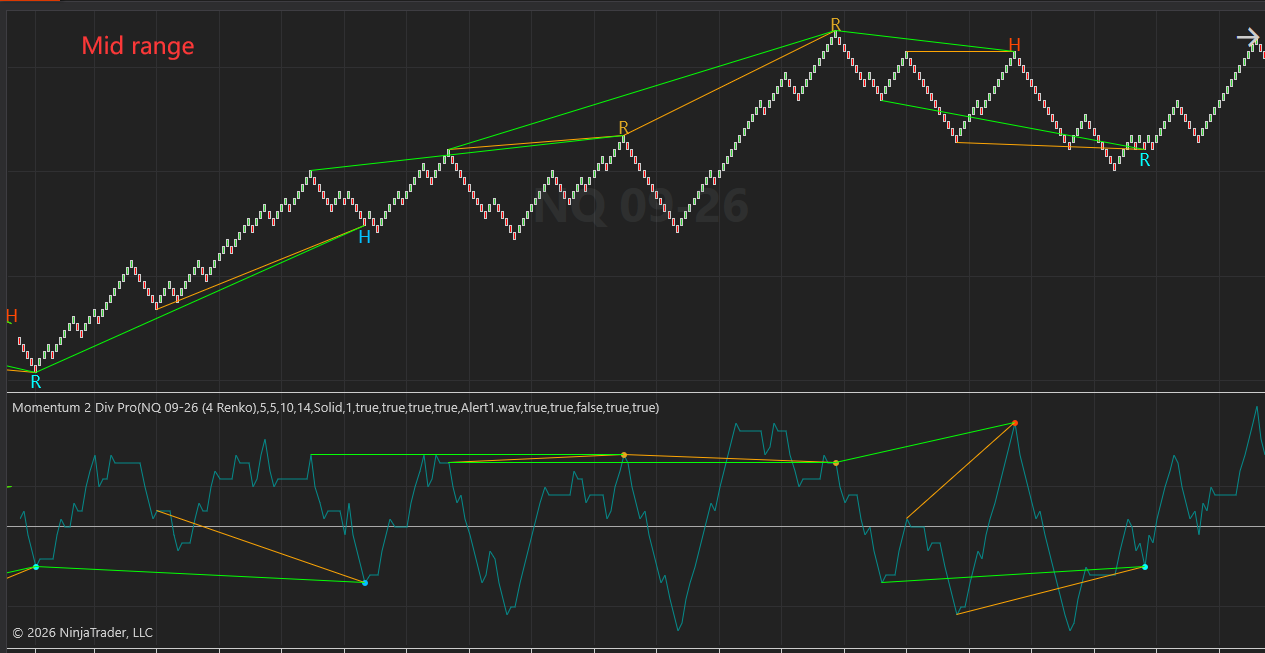
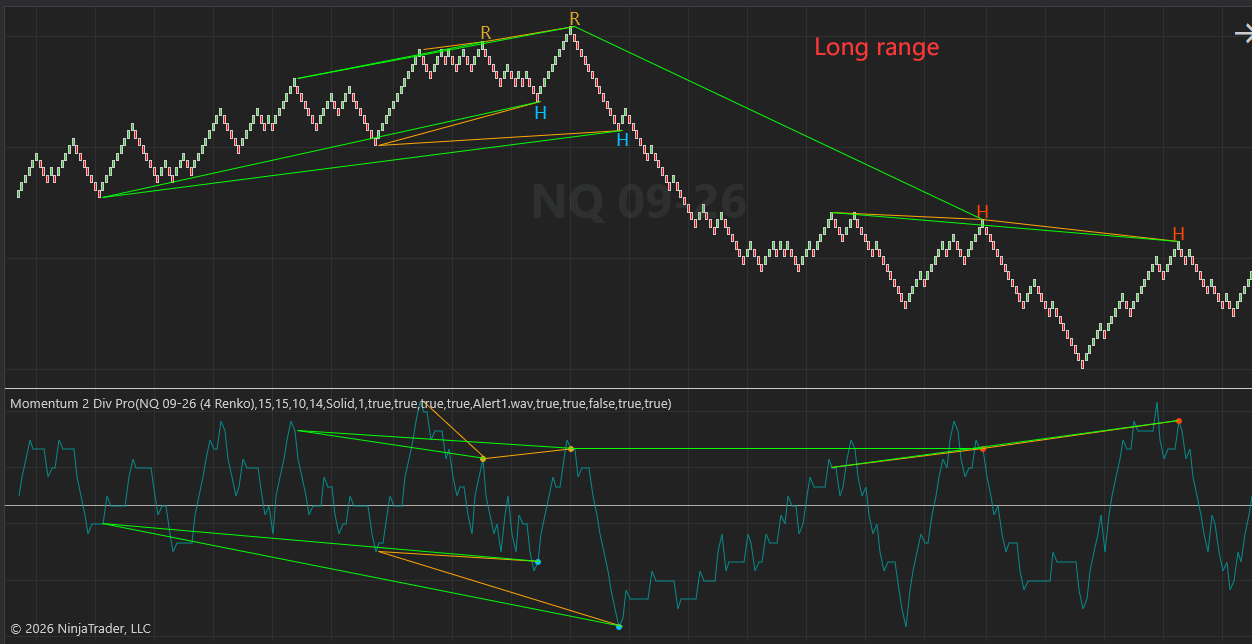
The Momentum Double Divergence Pro for NinjaTrader 8 automates the tracking of this velocity by scanning for back-to-back, continuous divergence patterns between price action and momentum extreme readings. By identifying two consecutive divergence points relative to twin historical anchor peaks or troughs, this premium software provides professional users with a highly reliable, multi-layered structural confirmation that an overextended trend is about to sharply snap back.
This advanced logic maps out nested momentum decay across the exact structural points where institutional smart money triggers liquidity sweeps. Traders can effortlessly execute these setups directly via Chart Trader or deploy them across specialized intraday environments.
2. Key Features of the Premium NinjaTrader 8 Build
This commercial software seamlessly integrates complex, high-velocity swing analysis into the modern, high-fidelity visual interface of NinjaTrader 8.
- 🛡️ Dual-Layer False Signal Filtering: Unlike standard single-divergence indicators that generate early counter-trend traps, this algorithm triggers only when two sequential divergence structures line up perfectly against prior swing boundaries, confirming momentum exhaustion and filtering out market noise.
- ⏱️ Strict 100% Non-Repainting Execution: What you see on your live chart is absolute historical reality. Once a candle closes and a signal plots, it never repaints, shifts, or disappears. This makes it fully reliable for empirical backtesting in the Strategy Tester and live execution.
- 🔒 Secure Native C# Binary Integration: Distributed strictly as a protected, compiled commercial assembly. Your indicator runs at native execution speeds directly through the NinjaScript API without exposing any intellectual property or source code.
- 📊 Deep Ecosystem Synchronization: Seamlessly loads into the NinjaTrader 8 Market Analyzer for multi-asset screening, and exposes its internal plots to modular toolkits like BloodHound or the native Strategy Builder for automated algorithmic execution.
3. Advanced Strategy & Methodology Link
The Momentum Double Divergence Pro Series is designed to act as the ultimate confirmation engine for your existing technical setup.
- Identify Key Structure: Locate your major Support/Resistance, Supply/Demand zones, or Fibonacci retracement levels.
- Wait for the Retail Trap: Let unassisted retail traders rush into the first, weak, single-layer reversal signal.
- Confirm with Double Divergence: Wait for our indicator to print the Double Divergence line at your pre-defined key level, proving that the counter-trend move has institutional volume backing.
- Execute with Precision: Place your stop loss safely behind the structural pivot high/low using Chart Trader and ride the macro reversal with confidence.
To fully harness the mathematical logic behind this system, it is crucial to understand the foundational concept of nested momentum decay. For a comprehensive architectural breakdown of how our dual-filtering framework handles consecutive market waves, explore our master guide on the Double Divergence Indicator Series.
4. Technical Parameter Tuning / Inputs Manual
This manual details the configurable control variables for the Momentum Double Divergence Pro institutional-grade multi-layered divergence indicator. For a universal master breakdown of all underlying variables, please visit our master Technical Inputs Manual: Double Div Pro.
Core Configuration Settings & Technical Logic
- Wait 1 bar (Default: True)
- Chart Logic: Controls the execution window and confirmation delay. When enabled (True), a bullish signal is only finalized and plotted on the historical bar if the current execution bar closes with an upward bias (Close >= Open); conversely, a bearish signal requires a downward close (Close <= Open). When disabled (False), signals are registered instantly upon structural divergence fulfillment without candle directional validation.
- Strategy Action: Keep enabled for day trading and swing trading to filter out high-volatility stop-outs. Scalpers utilizing micro-timeframe charts (e.g., tick or volume charts) may disable this feature to eliminate entry lag, provided they use rigid manual risk management.
- Show Regular Signals (Default: True)
- Chart Logic: Toggles the calculation and visual presentation of regular structural divergence signals (lower low in price with a higher low in momentum for bullish; higher high in price with a lower high in momentum for bearish).
- Strategy Action: Keep active when trading ranging or mean-reverting environments to capture major swing failure patterns (SFPs). Turn Off during relentless, unhedged macro trends where guessing tops or bottoms leads to compounding losses.
- Show Hidden Signals (Default: True)
- Chart Logic: Controls the visibility and computation of trend-continuation divergence signals mapping deep momentum resets within an overarching trend.
- Strategy Action: Essential for trend-following strategies and swing traders operating on higher timeframes. Keep On for high-win-rate, pro-trend pullback execution because it aligns with the institutional macro-path of least resistance.
- Enhanced Mode (Default: False)
- Chart Logic: Applies a secondary, strict structural slope filter to the twin historical anchor peaks or troughs. When activated, it suppresses signals if the internal geometry fails to maintain a specific directional trajectory.
- Strategy Action: Turn On for automated systems, BloodHound integration, and strict drawdown control. It drastically tightens the statistical filter, leading to fewer but exceptionally high-probability setups.
- Divergence Bar Range (Default: ShortRange)
- Chart Logic: Defines the internal boundaries for the swing engine, dictating the minimum and maximum distance allowed between historical anchor points.
- Strategy Action: Optimize based on environment: ShortRange for fast-paced intraday scalping, MidRange for standard daily cycles, and LongRange for macro trend reversals across extended time horizons.
- Divergence Lookback (Default: 5)
- Chart Logic: Controls the lookback window used by the local extreme calculation engine to identify valid swing peaks and troughs.
- Strategy Action: Keep balanced between 5 and 8. Increase this value to force the indicator to hunt for major structural anchors during choppy, low-volatility market sessions.
- Filter Length (Default: 5)
- Chart Logic: Sets the smoothing period for the baseline tracking moving average used to confirm momentum position.
- Strategy Action: Scale down (e.g., 3) for highly sensitive, fast momentum settings; scale up (e.g., 8-10) for macro indicators to ensure clean, smooth confirmations.
5. Frequently Asked Questions (FAQ for NinjaTrader 8 Users)
Q: Do you provide the raw NinjaScript C# source code for this indicator? A: No. To safeguard our proprietary algorithmic framework and ensure anti-piracy protection, the indicator is delivered strictly as a secure, pre-compiled commercial assembly. You do not need the raw source code to run, customize parameters, or receive automated real-time alerts.
Q: Can I bridge this indicator to BloodHound or the Strategy Builder for automated execution? A: Yes. The software is optimized for programmatic integration. While the compiled assembly is protected, the indicator exposes its core nested divergence plots to the NinjaScript API. Quant developers and retail traders can easily reference these non-repainting output plots inside BloodHound or call them natively within custom automated strategies.
Q: Is this indicator licensed per computer or per NinjaTrader account? A: Our commercial licensing links directly to your verified machine ID or trading account structure. Importing the secure compiled bundle allows you to deploy it across multiple workspaces, charts, and Market Analyzer columns simultaneously, provided they are tied to your validated commercial license.
Official Anti-Piracy Notice: The official, optimized, and zero-error version of the Momentum Double Divergence Pro for NinjaTrader 8 is sold exclusively at PatternSmart.com. Avoid unverified third-party cracked executables or unsecure downloads, which lack execution optimization, present massive repainting lag, and risk account compromise.