To debug indicator signals bar by bar, the goal is to see exactly which condition becomes true or false on each candle and why the signal appears or does not appear.
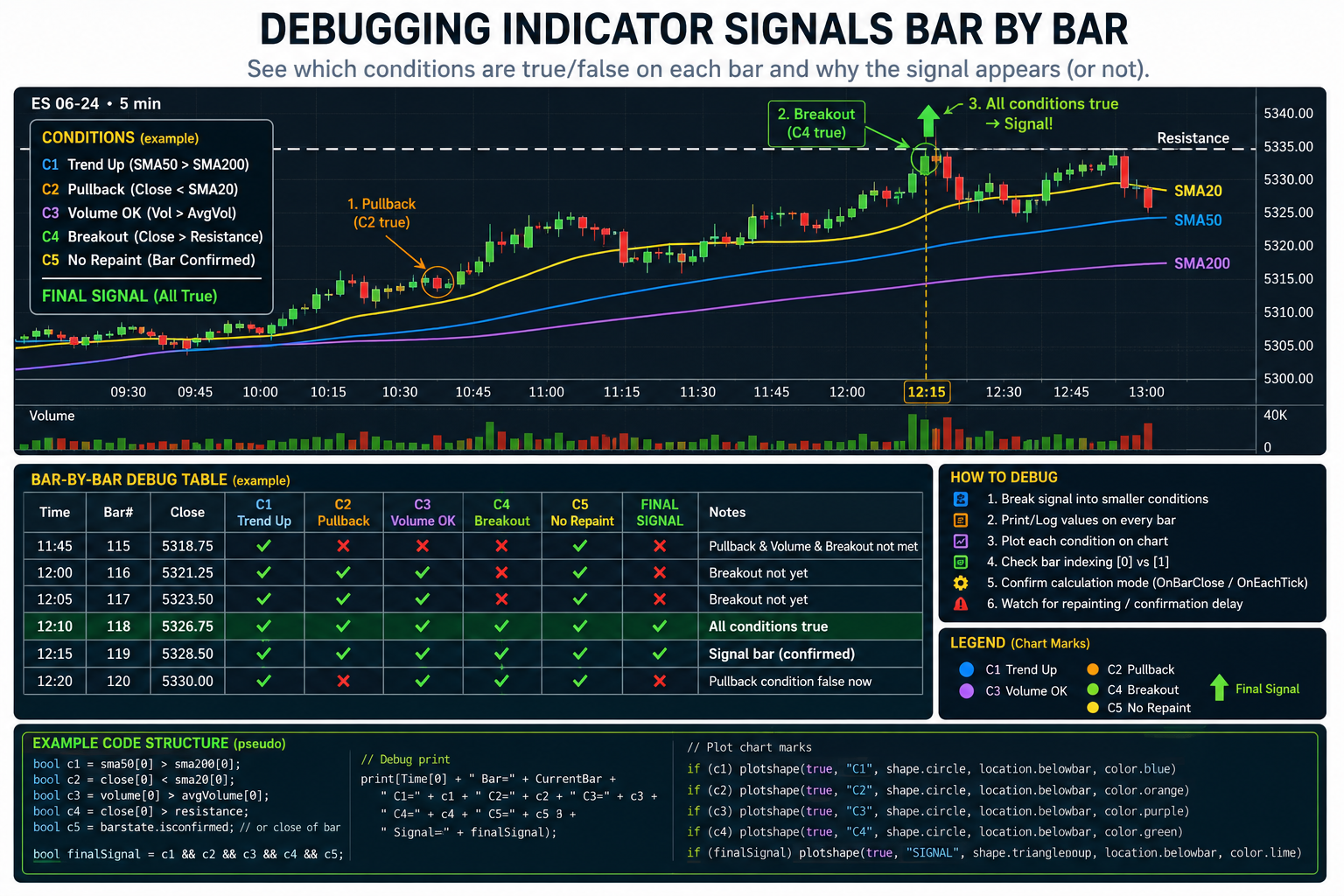
A good debugging process is:
1. Break the signal into smaller conditions
Instead of debugging one large condition like:
if (trendUp && pullbackValid && volumeOk && closeAboveLevel && !repaintFilter)
{
    signal = true;
}
Split it into individual variables:
bool condTrendUp = trendUp;
bool condPullback = pullbackValid;
bool condVolume = volumeOk;
bool condBreakout = closeAboveLevel;
bool condNoRepaint = !repaintFilter;

bool finalSignal =
    condTrendUp &&
    condPullback &&
    condVolume &&
    condBreakout &&
    condNoRepaint;
This lets you check which part blocks the signal.
2. Print values on every bar
Print the bar number, time, price, condition values, and final signal.
Example structure:
Print(
    Time[0] +
    " Bar=" + CurrentBar +
    " Close=" + Close[0] +
    " TrendUp=" + condTrendUp +
    " Pullback=" + condPullback +
    " VolumeOk=" + condVolume +
    " Breakout=" + condBreakout +
    " NoRepaint=" + condNoRepaint +
    " FinalSignal=" + finalSignal
);
Then compare the printed output with the chart candle by candle.
3. Plot each condition visually
Create temporary plots or arrows for each condition.
For example:
if (condTrendUp)
    Draw.Dot(this, "Trend" + CurrentBar, false, 0, Low[0] - TickSize * 2, Brushes.Blue);

if (condPullback)
    Draw.Dot(this, "Pullback" + CurrentBar, false, 0, Low[0] - TickSize * 4, Brushes.Orange);

if (finalSignal)
    Draw.ArrowUp(this, "Signal" + CurrentBar, false, 0, Low[0] - TickSize * 8, Brushes.Lime);
This makes it easier to see which condition is active on the chart.
4. Check historical indexing carefully
Many signal bugs come from wrong bar indexing.
Common examples:
Close[0]   // current bar
Close[1]   // previous bar
High[2]    // two bars ago
If a signal is supposed to trigger when something happened on the previous completed bar, you may need [1], not [0].
Example:
bool breakoutNow = Close[0] > resistance;
bool breakoutConfirmed = Close[1] > resistance;
These are not the same.
5. Check when the script calculates
This is very important.
For example, in NinjaTrader:
Calculate = Calculate.OnBarClose;means the signal only updates after the candle closes.
Calculate = Calculate.OnEachTick;means the signal may appear, disappear, or change inside the candle.
If a signal appears in real time but disappears later, it is usually because the logic is using the unfinished current bar.
6. Add a bar-by-bar debug table
For complex indicators, create a temporary debug output like this:
Time        Bar   Cond1   Cond2   Cond3   Signal
10:00       150   true    true    false   false
10:05       151   true    true    true    true
10:10       152   false   true    true    false
This is often the fastest way to find the problem.
7. Watch for repainting logic
If your indicator uses future-looking logic such as:
SwingHigh
ZigZag
pivot confirmation
highest/lowest after current bar
MTF data
zones confirmed later
then a signal may not truly exist on the original bar. It may only appear after later bars confirm it.
In that case, debug both:
candidateSignal
confirmedSignal
Example:
bool candidateSignal = possibleZoneNow;
bool confirmedSignal = possibleZoneNow && confirmationBarsPassed;
8. For strategy access, expose signal values as a series
Instead of only drawing arrows, store the signal in a public series:
SignalStatus[0] = 0;

if (buySignal)
    SignalStatus[0] = 1;
else if (sellSignal)
    SignalStatus[0] = -1;
Then a strategy can check:
if (myIndicator.SignalStatus[0] == 1)
{
    EnterLong();
}
This is more reliable than trying to read drawings from the chart.
Best practical method
For most indicator debugging, use this order:
- Split the signal into separate boolean conditions.
- Print every condition with bar number and time.
- Add temporary chart markers for each condition.
- Check whether the signal uses
[0]or[1]. - Confirm whether the indicator calculates on bar close or each tick.
- Check whether any part of the logic repaints or requires future confirmation.
The most common reason a signal “should appear but does not” is that one hidden sub-condition is false on that exact bar, or the signal is being confirmed several bars later.
Click here If you are looking for Professional Custom Trading Software Development Services