Advanced Williams %R Divergence Analysis for MetaTrader5
Transform your market analysis with the WilliamsR Double Divergence Pro for MetaTrader 5, a high-precision momentum divergence detection tool built for professional traders. By tracking underlying momentum shifts against live price action, this indicator pinpoints high-probability trend reversal and continuation setups automatically—eliminating manual chart plotting and visual clutter.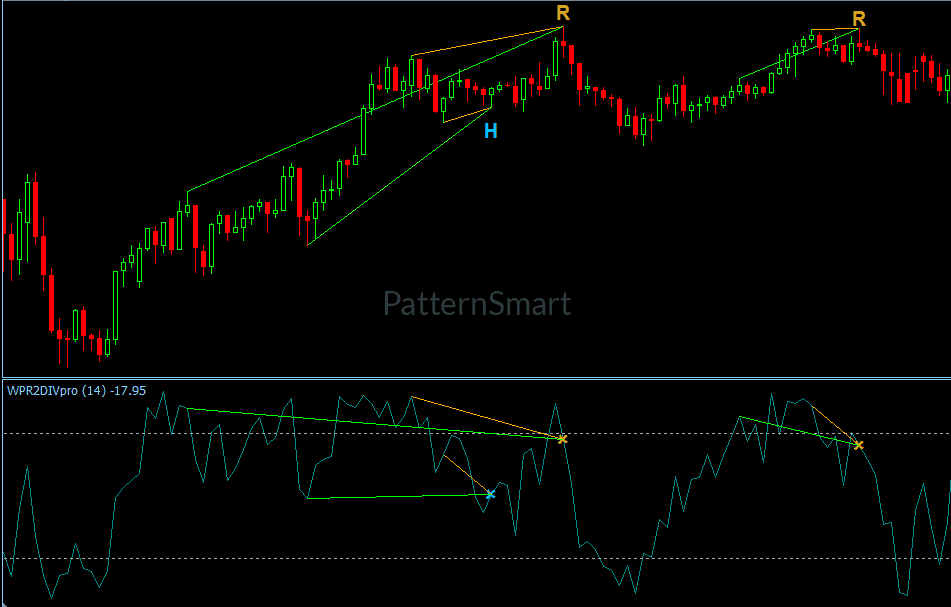
Why Trade with WilliamsR Double Divergence Pro?
Divergence trading is one of the most reliable technical analysis techniques available, but spotting valid setups across multiple chart timeframes in real time can be challenging.
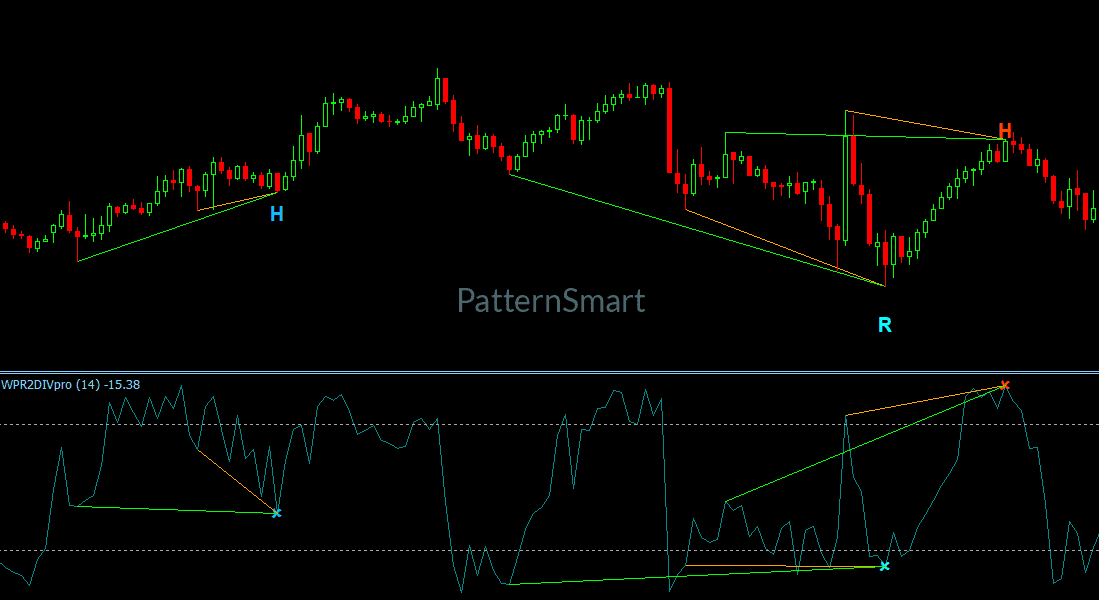
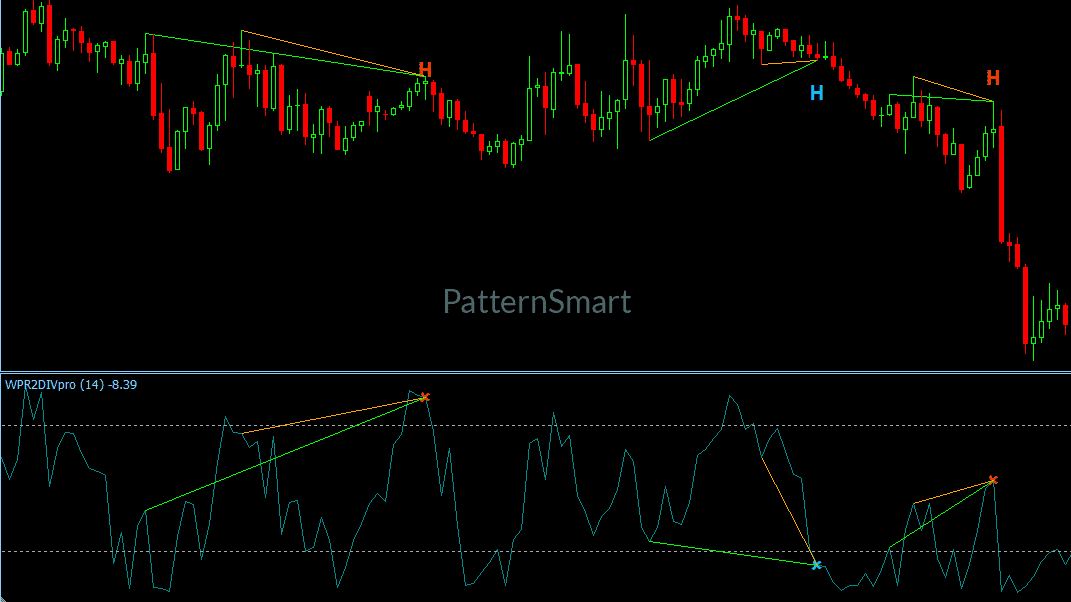
The WilliamsR Double Divergence Pro automates this entire process on MT5. It continuously scans market structure to highlight four distinct divergence patterns while applying built-in filtering to isolate quality signals from noise.
Key Features & Capabilities
- Four Complete Signal Types
- Regular Bullish Divergence: Signals potential upward trend reversals at market bottoms.
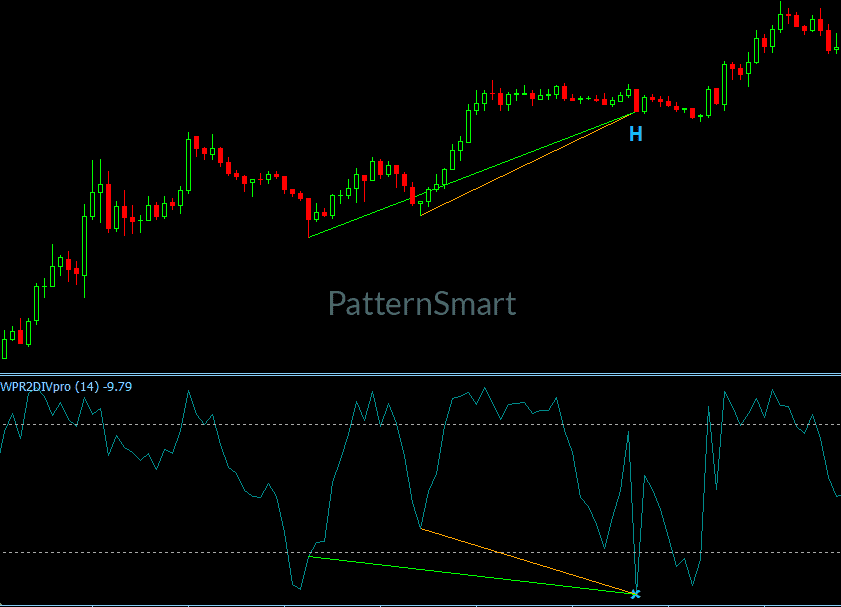
- Hidden Bullish Divergence: Identifies trend continuation opportunities during bullish pullbacks.
- Regular Bearish Divergence: Flags potential downward trend reversals at market tops.
- Hidden Bearish Signal: Detects trend continuation setups during temporary bearish rallies.
- Multi-Scale Divergence Analysis
- Customizable swing ranges (Short Range, Mid Range, Long Range) allow you to tailor divergence sensitivity to scalp, swing, or position trading styles.
- Enhanced Signal Filtering & Confirmation
- Includes an optional Wait Confirmation mode to ensure candle closures align with signal directional bias before plotting.
- Advanced Enhanced Mode filtering reduces premature entries by cross-validating price structure across consecutive swing points.
- Dynamic Visual Formatting
- Renders clean, real-time trendlines connecting swing pivots directly on both the price chart and the indicator subwindow.
- Plots unobtrusive custom labels and arrows at confirmed signal bars.
- Configurable signal display limits (Only Show Last Signal Within Bars) keep your charts clean and clutter-free.
- Instant Multi-Channel Alerts
- Never miss a high-probability trade setup with immediate pop-up alerts and chart notification triggers as soon as a signal closes.
Technical Specifications & Inputs
| Parameter | Type | Default Value | Description |
| Wait1 | Boolean | true | Requires closed-bar directional confirmation before triggering a signal. |
| ShowRegularBullish | Boolean | true | Toggles display for Regular Bullish divergence setups. |
| ShowHiddenBullish | Boolean | true | Toggles display for Hidden Bullish divergence setups. |
| ShowRegularBearish | Boolean | true | Toggles display for Regular Bearish divergence setups. |
| ShowHiddenBearish | Boolean | true | Toggles display for Hidden Bearish divergence setups. |
| Enhanced | Boolean | false | Enables strict structural swing filtering for higher win-rate entries. |
| EnableAlert | Boolean | true | Master toggle for real-time trader notifications. |
| ShowChar / ShowLine | Boolean | true / true | Controls text labels, icons, and indicator/price connection lines. |
| OnlyShowLastSignalWithinBars | Integer | 10 | Limits signal history density to maintain ultra-clean charts. |
| DivergenceBarRange | Enum | ShortRange | Adjusts structural swing depth (ShortRange, MidRange, or LongRange). |
| Period | Integer | 14 | Period setting for momentum trend intensity evaluation. |
| FilterLength | Integer | 5 | Smoothing filter length for divergence validation. |
How It Works
- Swing Point DetectionThe indicator scans historical price action across your selected lookback depth to identify validated swing highs and swing lows using adaptive ATR-based spacing.
- Divergence ValidationIt continuously compares structural price movement against internal momentum metrics across two consecutive swing points.
- Confirmation & OutputWhen price and momentum diverge under valid criteria, the tool draws connecting trendlines, displays clear visual markers, updates indicator data buffers, and dispatches real-time alerts.
[Get Started With WilliamsR Double Divergence Pro for MT5]
Looking for the complete mathematical breakdown, step-by-step optimization guides, and advanced trading strategies? Explore our comprehensive documentation:
Visit the Technical Inputs Manual: Double Divergence Pro for full parameter tuning.
Read the master guide on the Double Divergence Indicator Series.
Easy Installation in MetaTrader 5
- Download the
.ex5indicator file. - Open MetaTrader 5 and navigate to File > Open Data Folder.
- Move the file into the
MQL5/Indicators/folder. - Restart or refresh your MT5 Terminal.
- Drag WilliamsR Double Divergence Pro from the Navigator window directly onto any price chart.