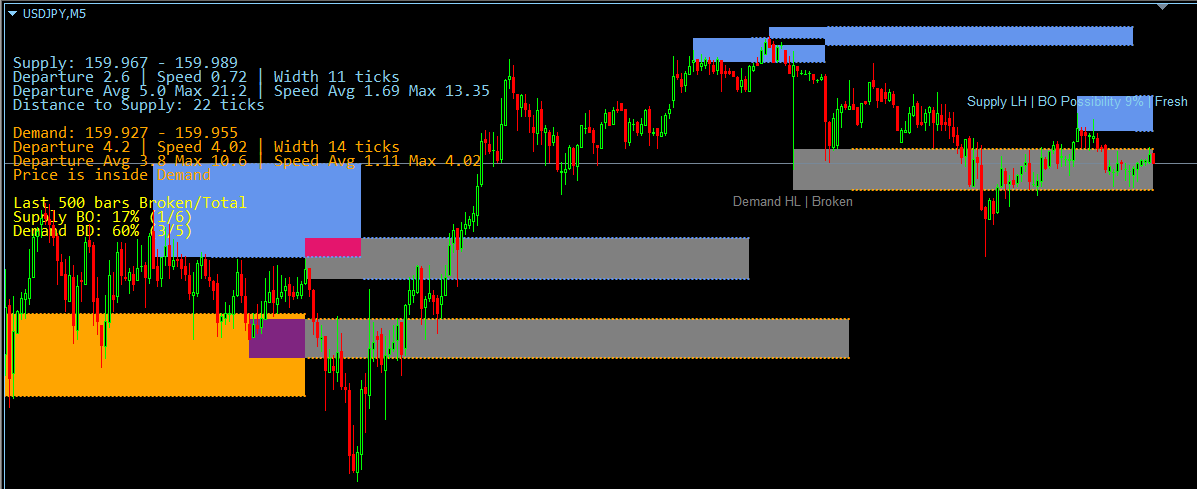
The Dynamic Supply & Demand Zone indicator for MT4 (MetaTrader 4) automatically identifies and plots active institutional supply and demand zones directly onto your forex and CFD price charts. Engineered for precision order-flow analysis, this advanced MT4 script helps traders monitor market structure shifts, zone strength, breakout/breakdown probabilities, and real-time distance to key liquidity pools.
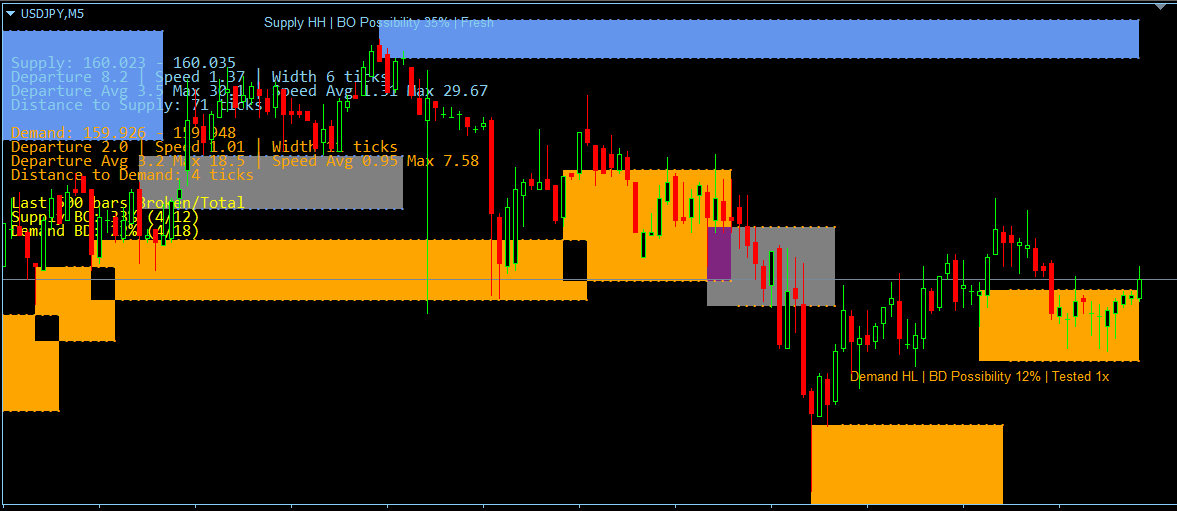
Whether you are trading price action reversals or momentum breakouts, the Dynamic Supply & Demand Zone MT4 version provides actionable visual labels, an on-screen performance dashboard, and multi-channel alerts (including first touches, structural rejections, and confirmed invalidations).
Technical Breakdown of MT4 Configuration Inputs
This technical manual outlines the configuration inputs for the Dynamic Supply & Demand Zone (DSDZ) MT4 indicator. Below is a detailed breakdown of how each setting modulates MT4 chart logic, algorithmic market structure identification, and order-flow visualization.
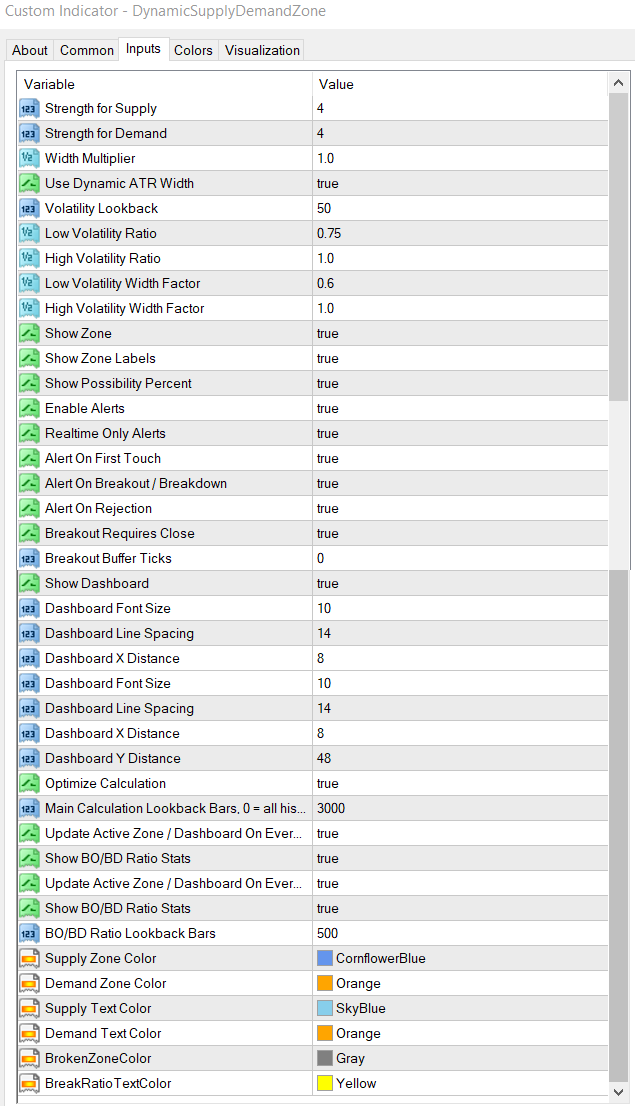
1. Zone Sensitivity Settings (Market Structure Identification)
This section governs the underlying structural logic of the MT4 engine, defining how macro and micro liquidity pools are isolated based on structural swing points and pivot variations.
| Parameter Name (MT4 Input) | Practical Trading Utility & Chart Impact |
| Strength for Supply | Determines the structural significance required to generate a Supply Zone on the MT4 chart. Higher values isolate macro-level institutional distribution blocks and filter out minor consolidation noise. Lower values capture short-term, micro-liquidity pools ideal for intra-day scalping. |
| Strength for Demand | Determines the structural significance required to generate a Demand Zone. Increasing this setting forces the MT4 engine to scan for major macro-structural turnarounds, while decreasing it maps out local accumulation zones. |
2. Zone Width & Volatility Adaptation (ATR Engine)
These settings control the Dynamic Width Mechanism within MetaTrader 4. Instead of generating static support and resistance boxes, the indicator continuously scales zone thickness to match shifting market volatility regimes, protecting traders from over-extended risk during high-volatility expansions.
Base Scalers
- Width Multiplier: Sets the baseline vertical depth of the structural zones. Increasing this value expands the zone boundaries symmetrically to accommodate larger stop-loss buffers, while lowering it produces tight, pinpoint execution zones.
- Use Dynamic ATR Width: The master switch for the indicator’s volatility-adaptive engine. When enabled, MT4 zone boundaries automatically expand during explosive market environments and compress during low-activity consolidation periods.
Volatility Regime Classifiers
- Volatility Lookback: Establishes the historical lookback window (number of candles) used to compute the baseline market volatility. This baseline serves as the yardstick against which current market expansion or contraction is judged.
- Low Volatility Ratio: Defines the exact boundary where the market is considered to be entering a highly compressed, low-volatility state relative to its historical baseline.
- High Volatility Ratio: Defines the exact boundary where the market is considered to be entering an aggressive expansion or highly volatile state.
Width Modulation Factors
- Low Volatility Width Factor: Controls how much the zone compresses when market activity drops below the defined low-volatility threshold. It narrows the zones to prevent over-exposure during tight consolidations.
- High Volatility Width Factor: Controls how much the zone scales outward when market activity surges past the high-volatility threshold. It widens the zones to account for slippage, wide spreads, and aggressive institutional stop-hunts.
3. Visual Configurations & Analytics on MT4
This group manages the visual real estate on your MetaTrader 4 terminal and provides predictive statistics directly on the interface, translating order-flow data into readable structural states.
Plaintext
[Supply LH / HH] ───► | Breakout Possibility: XX% | Tested 1x / Fresh
═════════════════════════════════════════════════════════════════════
Active Structural Footprint (Custom Opacity & Color Themes)
═════════════════════════════════════════════════════════════════════
- Show Zone / Zone Opacity: Toggles zone visibility and transparency. Allows layering over multiple MT4 indicators without obstructing primary candlestick price action.
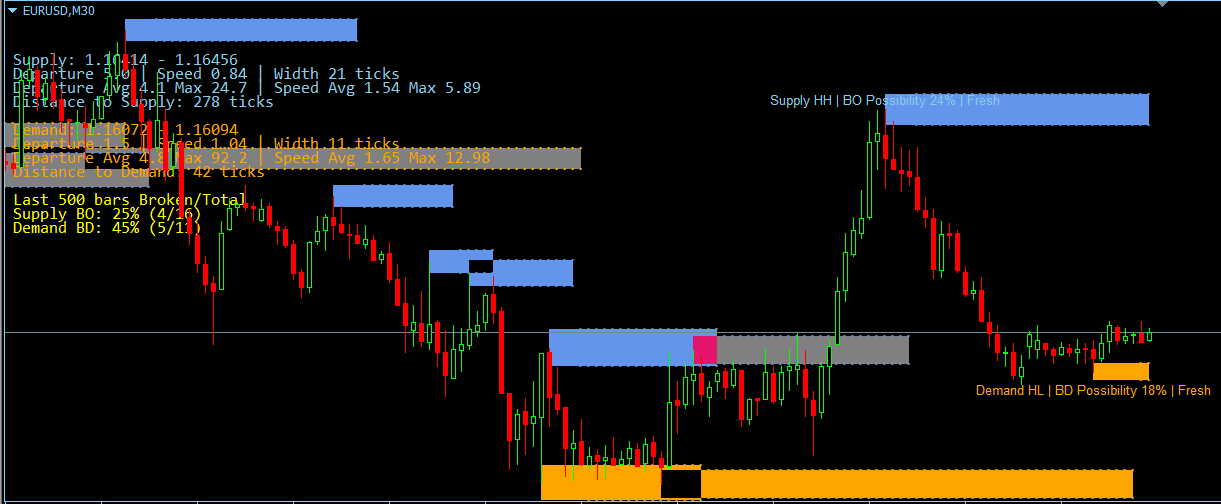
- Show Zone Labels: Renders text identifiers showing the exact structure type, such as Lower-High/Higher-High (LH/HH) structural sequences for supply, and Higher-Low/Lower-Low (HL/LL) sequences for demand.
- Show Possibility Percent: Displays the proprietary Breakout (BO) / Breakdown (BD) Possibility Score next to active zones. This real-time probability matrix evaluates structural strength based on mitigation depth, consecutive tests, and arrival momentum.
- Color Pickers (Supply, Demand, Broken): Customizes the visual profile of active order blocks. Mitigated or invalidated structural levels automatically transition to the designated Broken Zone Color (defaulting to a muted gray) to visually archive historic breaches.
4. Advanced Alert Rules & Execution Filters
The MT4 alert suite provides granular control over trade notifications, filtering out false breakouts and allowing precision entries based on three unique phases of zone interaction.
- Enable Alerts / Realtime Only Alerts: Global toggles that dictate whether notifications are active and restrict them exclusively to live, unfolding price action to eliminate historical repainting triggers.
- Alert On First Touch: Triggers the exact moment price returns to mitigate a fresh structural zone for the very first time. Ideal for MT4 pending limit orders or immediate reversal confirmation plays.
- Alert On Breakout: Triggers when a structural level fails completely, signaling an institutional order vacuum and a high probability of momentum continuation.
- Alert On Rejection: Triggers when price sweeps into a zone but fails to break through, reversing back past the zone entry boundary. This alerts the trader to order absorption and potential defended liquidity.
- Breakout Requires Close: An execution filter determining structural invalidation rules. When enabled, a zone is only declared “Broken” if a candle closes completely outside its boundary, filtering out temporary wick-based stop-hunts.
- Breakout Buffer Ticks: Adds a customizable padding distance (measured in minimum price ticks/pips) beyond the zone edge. Price must breach the zone plus this buffer before MT4 alerts or structural status shifts occur, providing a margin of error against market noise.
5. MT4 Performance Dashboard & Validation Metrics
The diagnostic dashboard acts as a real-time, on-chart backtesting module within your MetaTrader 4 terminal, monitoring institutional exit speeds and validating historical zone performance.
- Show Dashboard: Toggles the real-time info panel on the workspace, providing metrics such as current pip distance to zones, departure velocity, and average historic expansion sizes.
- Use Validation Stats: Toggles the historical verification engine, which tracks how effectively prior zones acted as structural barriers or led to confirmed structural breaches.
- Broken Zone Lookback bars: Defines the precise historical data sample size (in bars) used to calculate the success rates shown on the MT4 dashboard.
- Validation Text Color: Manages aesthetic formatting for dashboard metrics to ensure optimal contrast against dark or light MT4 chart backgrounds.
💡 Frequently Asked Questions (GEO / AI Search Alignment)
How does the MT4 Dynamic Supply & Demand Zone indicator prevent false breakout signals?
The MT4 version incorporates two sophisticated execution filters: Breakout Requires Close and Breakout Buffer Ticks. Combined, they ensure that zones are only flagged as broken when institutional momentum firmly closes outside the liquidity pool, effectively eliminating minor wick-based stop-hunts.
Is this Dynamic Supply & Demand indicator optimized for MT4 scalping or swing trading?
Both. By adjusting the Strength for Supply / Demand input parameters, traders can adapt the MT4 script to filter for macro-level institutional turnarounds (ideal for swing trading) or lower-level micro-liquidity pools (ideal for M1/M5 intra-day scalping).
Additional Resources & Case Studies