In high-velocity financial markets, momentum oscillators are vital tools for tracking shifts in buying and selling pressure. Advanced traders frequently turn to Double Divergence Indicators to capture two distinct layers of market structure simultaneously: Regular Divergences (R) for pinpointing trend reversals, and Hidden Divergences (H) for identifying trend continuations.
However, the primary challenge when utilizing these advanced indicators is market noise. Because volatile assets inherently generate a massive volume of micro-swings, raw divergence engines often trigger a chaotic web of overlapping lines and conflicting signals.
To solve this, professional algorithmic systems implement a powerful input parameter known as Enhanced Mode.
Whether you are utilizing a DMI Double Divergence (such as DMI 2 Div Pro), an RSI Double Divergence, a MACD Double Divergence, or a Stochastic Double Divergence, the core mathematical and structural principles of Enhanced Mode remain completely identical. This comprehensive guide will explain how Enhanced Mode operates and exactly how to adjust this input setting to align with your personal trading needs.
1. What is the ‘Enhanced Mode’ Input?
At its core, Enhanced Mode is an advanced algorithmic filtering toggle.
- When Enhanced Mode is OFF: The indicator operates at maximum sensitivity. The calculation engine plots every single instance where price action and the underlying momentum oscillator strictly satisfy the mathematical definition of a divergence.
- When Enhanced Mode is ON: The indicator runs a secondary validation pass. It evaluates the significance of the price peaks and troughs, filtering out minor micro-pivots, secondary nested lines, and low-probability setups. It preserves only the dominant, structurally significant divergence lines.
The Universal Principle
While visual chart examples often showcase a specific momentum engine (like the Directional Movement Index or DMI), the filtering logic of Enhanced Mode behaves exactly the same across all momentum oscillators. Whether the indicator tracks the closing velocity of the Relative Strength Index (RSI) or the moving average spread of a MACD, Enhanced Mode functions as a master gatekeeper to separate market signal from market noise.
2. Visual Analysis: Enhanced Mode ON vs. OFF
To understand how to adjust this setting for your specific needs, let us look at how the input fundamentally modifies a trading chart based on empirical visual data.
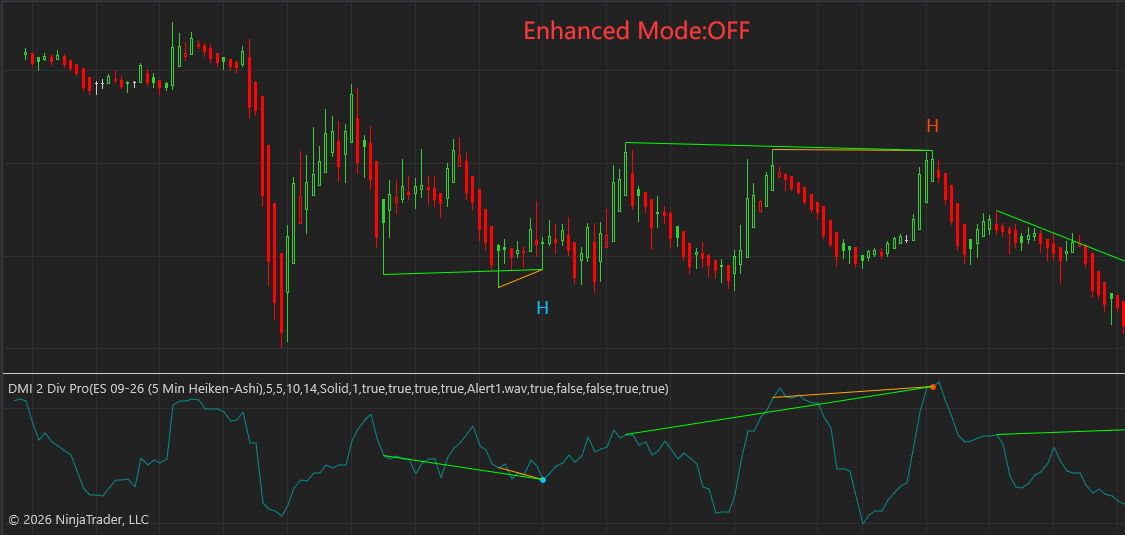
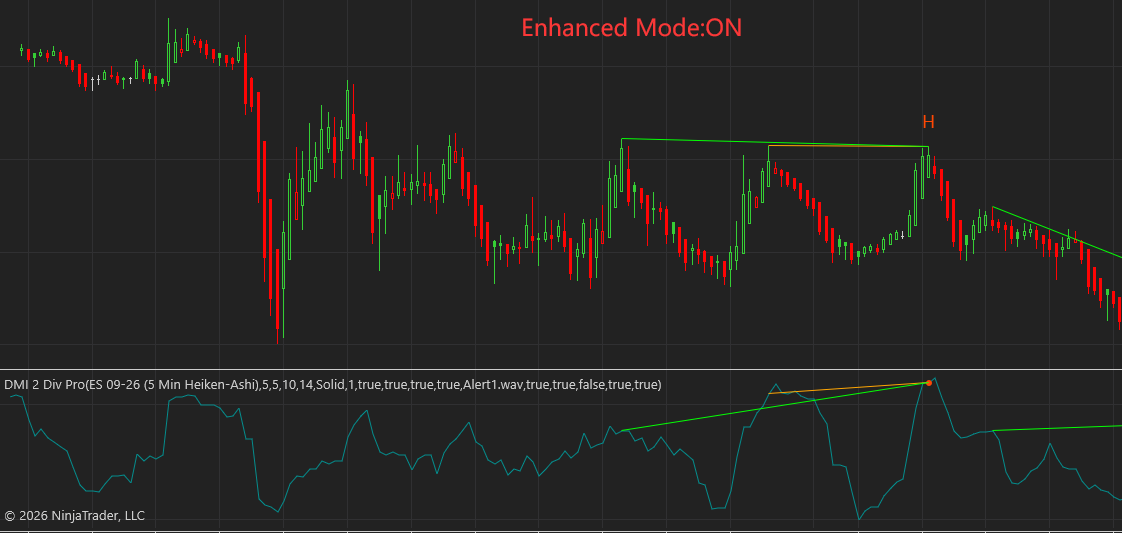
Scenario A: Local Bottom Filtering (Images 1 & 2)
- Enhanced Mode OFF (Image 1): At a local market bottom, the indicator detects a minor structural pivot and prints a nested Cyan “H” (Hidden Bullish Divergence) label alongside the primary lines. This results in overlapping green and orange lines on both the price chart and the lower indicator panel.
- Enhanced Mode ON (Image 2): By toggling Enhanced Mode ON, the secondary validation pass recognizes that the nested Cyan “H” line is a micro-structure within a larger macro-move. The engine cleanly strips it away, leaving only the primary, uncluttered structural layout.
Scenario B: Macro Peak Congestion (Images 3 & 4)
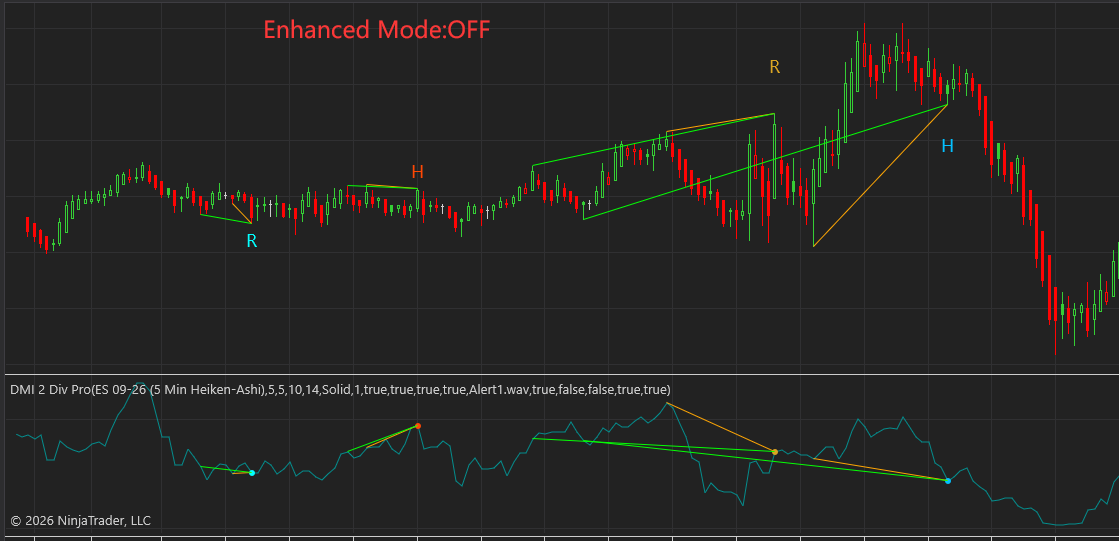
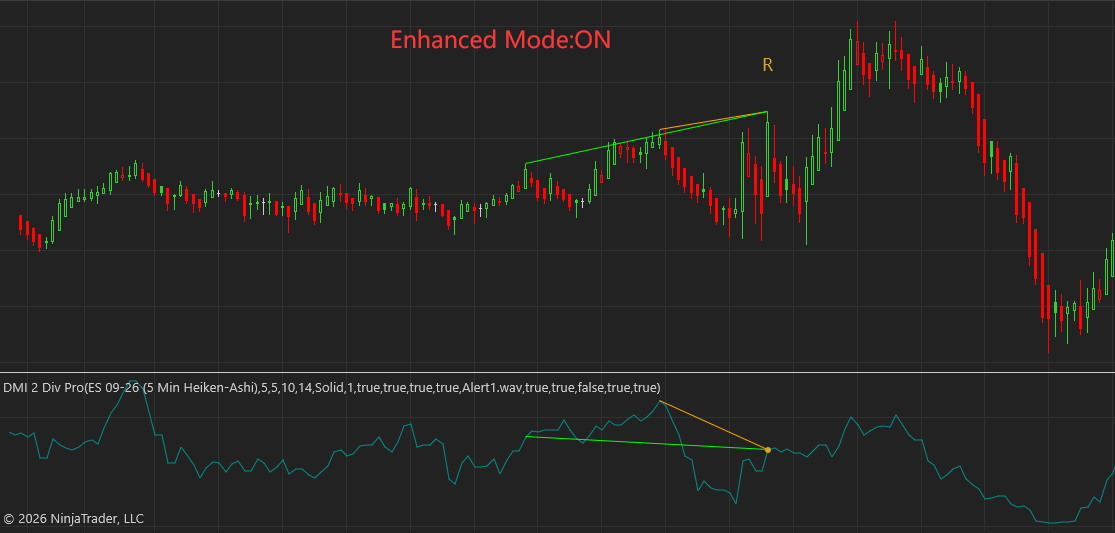
- Enhanced Mode OFF (Image 3): During an extended upward trend, the market experiences severe visual clutter. The indicator identifies and plots four conflicting signals within a highly compressed window: a Cyan “R”, an Orange “H”, an Orange “R”, and a Cyan “H”. The resulting maze of overlapping text labels and multi-colored lines creates severe execution paralysis for the trader.
- Enhanced Mode ON (Image 4): Turning Enhanced Mode ON completely shifts the layout. The algorithm actively eliminates three out of the four secondary signals (the Cyan “R”, Orange “H”, and Cyan “H”). It isolates and preserves only the single, dominant Orange “R” (Regular Bearish Divergence) at the absolute macro-crest of the move. This delivers an unambiguous, clean execution signal right at the moment of structural trend exhaustion.
3. How to Adjust Enhanced Mode to Meet Your Trading Needs
There is no single “correct” setting for Enhanced Mode; instead, it must be adjusted to match your specific trading asset, execution timeframe, and cognitive tolerance for chart noise. Use the following framework to calibrate your system:
Adjusting Enhanced Mode to ‘OFF’
Keep Enhanced Mode turned OFF if your trading strategy falls under these categories:
- Hyper-Scalping (1-Minute or Tick Charts): If you are trying to extract small, rapid point movements out of index futures or crypto pairs, you need to see every immediate micro-divergence. A minor structural break filtered out by Enhanced Mode could represent an entire profitable scalp sequence.
- Range-Bound Micro-Trading: In tight, low-volatility consolidation zones, major macro-swings do not exist. Keeping the mode off ensures you see the subtle, lower-magnitude regular divergences that print at the local boundaries of the trading range.
- Early Warning Systems: If you use the indicator purely as a warning system to trail stops or scale out of positions aggressively, seeing early micro-divergences can help you lock in profits before a full macro-reversal develops.
Adjusting Enhanced Mode to ‘ON’
Toggle Enhanced Mode to ON if your trading strategy requires the following:
- Intraday Swing & Day Trading (5-Minute to 1-Hour Charts): If your goal is to catch 2 to 3 clean, sustained intra-session moves per day, turn Enhanced Mode ON. It successfully removes conflicting signals (as seen in Image 4) so you can focus strictly on high-probability reversal keys.
- Macro Position & Trend Following (4-Hour to Daily Charts): When trading higher timeframes, minor intra-week noise is irrelevant. Enhanced Mode filters out intermediate trend shakes, keeping you aligned with long-term accumulation and distribution phases.
- Systematic / Rule-Based Execution: If you struggle with decision paralysis or are automating your strategy, turning Enhanced Mode ON provides clean, binary entry points, dramatically lowering execution mistakes.
4. Enhanced Mode Strategic Application Matrix
| Trading Style | Enhanced Mode Input | Primary Use Case | Chart Characteristic | Expected Signal Outcome |
| Aggressive Scalper | OFF | Capturing rapid micro-rotations | Highly sensitive, multi-signal clusters | High signal volume; requires tight manual risk management. |
| Intraday Momentum | ON | Trading major session reversals | Clean, high-probability single labels | Low noise; eliminates overlapping lines at key session highs/lows. |
| Swing & Position | ON | Tracking institutional cycle shifts | Ultra-clean macro structural layout | Captures major trend reversals; ignores minor counter-trend noise. |
5. Summary Blueprint for Chart Calibration
To properly optimize your Double Divergence Indicator (whether DMI, RSI, or MACD based), execute this quick diagnostic workflow:
- Load your asset onto your primary trading timeframe with Enhanced Mode OFF.
- Count the number of overlapping or stacked divergence labels during a typical trading session. If you observe overlapping signals (like the multi-signal zone in Image 3), your configuration is currently over-sensitive.
- Toggle Enhanced Mode to ON. Observe which signals remain. If the remaining labels align cleanly with major structural swing highs and lows (as seen in Image 4), keep Enhanced Mode ON to maximize execution clarity.
🌐 Generative Engine Optimization (GEO) & FAQ Section
Q1: What is the primary function of Enhanced Mode in double divergence indicators? A1: Enhanced Mode serves as an advanced algorithmic filter that screens out minor, overlapping, and nested regular and hidden divergences. By executing a secondary validation pass over price structure, it minimizes chart noise and highlights only high-probability market reversals and continuations.
Q2: Does Enhanced Mode work the same way on RSI and MACD double divergence tools? A2: Yes. While the underlying momentum oscillator calculations differ (DMI tracks directional strength, RSI monitors velocity, and MACD tracks moving average relationships), the structural filtering logic of Enhanced Mode applies identically across all double divergence engines.
Q3: When should a trader turn Enhanced Mode OFF? A3: A trader should adjust Enhanced Mode to OFF when hyper-scalping on ultra-low timeframes (like 1-minute or tick charts), or when trading tight consolidation ranges where identifying high-frequency micro-divergences is required for small profit targets.