In technical analysis, divergence trading is one of the most reliable methods for identifying potential market reversals and trend continuations. However, the precision of these signals heavily relies on how an indicator confirms swing highs and swing lows.
A critical settings adjustment found within premium Double Divergence indicators is the Wait 1 Bar input. Using real market examples from NinjaTrader 8 running the RSI Double Divergence Pro indicator on a 1-Minute Heiken-Ashi Nasdaq Futures (NQ) chart, this article explores how this simple toggle changes signal behavior.
While the examples below feature the Relative Strength Index (RSI), this structural logic applies universally across all variations of the Double Divergence series, including MACD, CCI, Stochastics, ADX, DMI, Momentum, Money Flow, RVI, and Williams %R.
What is the ‘Wait 1 Bar’ Function?
The Wait 1 Bar feature acts as a validation filter for trend pivot points.
- When turned OFF, the indicator plots a divergence signal the exact moment the current bar meets the structural criteria relative to the historical swing point.
- When turned ON, the indicator introduces a one-bar delay, requiring an additional candlestick to close to verify that the swing high or swing low has truly locked into place before printing the signal on the chart.
Choosing between these two settings is a direct trade-off between signal speed and signal accuracy.
The Advantages: Filtering Market Noise (Analysis of Image 1)
In fast-moving or highly volatile markets, indicators can frequently detect “micro-divergences” that quickly repaint or fail as the price continues its immediate trend.
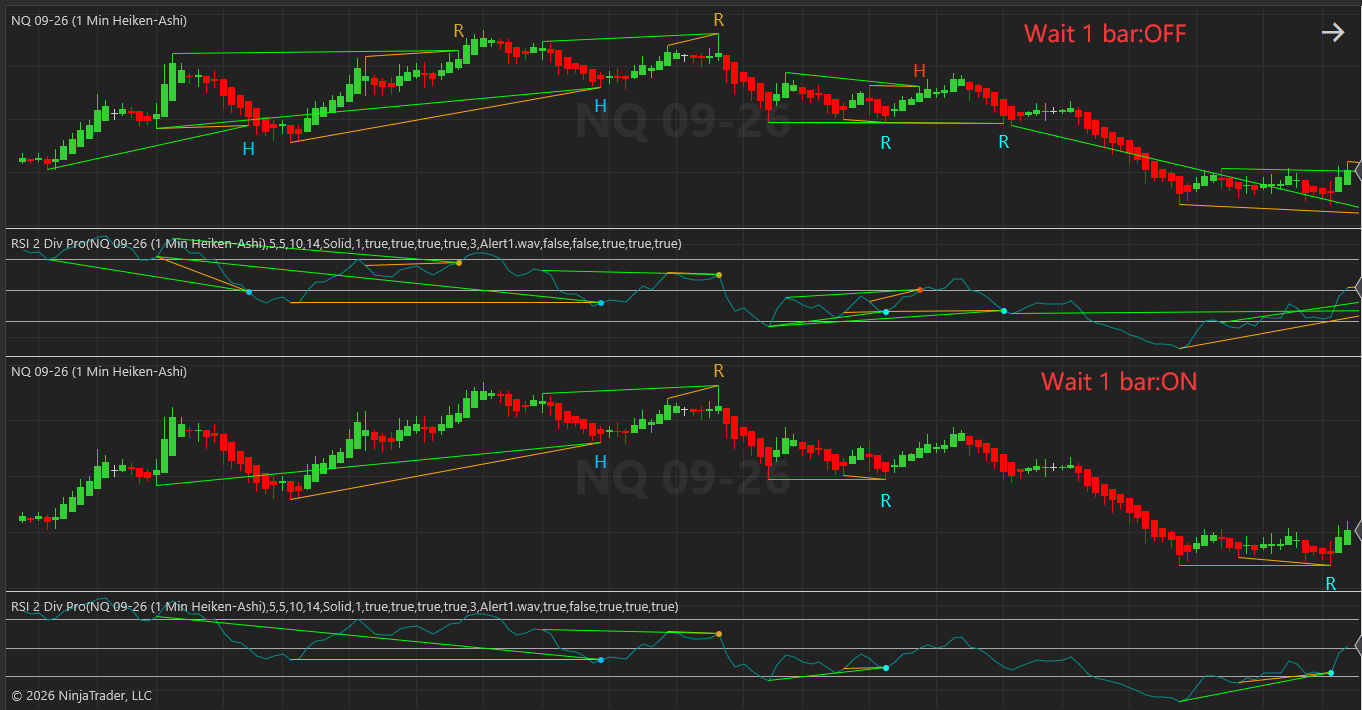
As demonstrated in Image 1, look closely at the structural differences when the setting is toggled:
- Wait 1 Bar: OFF (Top Panel): The chart displays a high frequency of both Regular (R) and Hidden (H) divergence lines. While highly responsive, notice how multiple conflicting green and orange lines stack up closely together. Entering every signal here would result in over-trading and exposure to false breakouts (whipsaws).
- Wait 1 Bar: ON (Bottom Panel): With the filter enabled, a substantial amount of market noise is instantly eliminated. The chart becomes significantly cleaner. By forcing the algorithm to wait for an extra candlestick confirmation, premature signals are discarded, protecting traders from entering positions during unconfirmed micro-retracements.
The Drawbacks: Missed Opportunities and Lag (Analysis of Image 2)
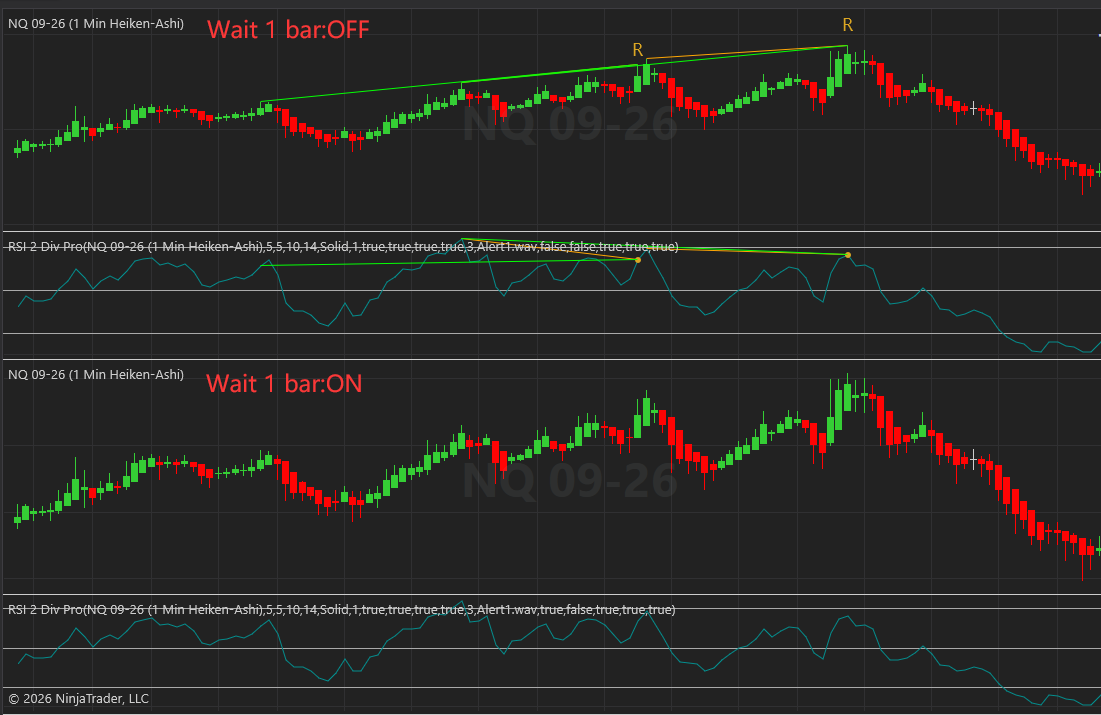
While filtering noise is beneficial, waiting for confirmation comes at a cost: execution lag. In markets that reverse sharply or experience violent impulses, requiring an extra bar can mean missing the move entirely.
Image 2 illustrates the primary disadvantage of this confirmation filter:
- Wait 1 Bar: OFF (Top Panel): A clear, expansive Regular Bearish Divergence (R) forms across two major price peaks. The indicator successfully identifies that price made a higher high while the RSI oscillator put in a distinct lower high. This provides an early warning right at the absolute crest of the macro-move, allowing for an optimal short entry before a major downward trend.
- Wait 1 Bar: ON (Bottom Panel): The entire bearish divergence signal disappears completely. Because the price action reversed so aggressively or shifted structure immediately after the peak, the strict parameters required for the “1-bar confirmation window” failed to validate. As a result, the indicator completely bypasses a highly profitable macro-reversal opportunity.
Quick Comparison: Wait 1 Bar ON vs. OFF
| Indicator Setting | Signal Speed | Noise Reduction | Risk Profile | Best Used For |
| Wait 1 Bar: OFF | Instant / Real-time | Low (More False Signals) | Higher risk of premature entries | Scalping, fast execution, volatile markets with deep stops. |
| Wait 1 Bar: ON | Delayed by 1 Bar | High (Cleaner Charts) | Higher risk of missing sharp moves | Swing trading, conservative entries, higher timeframe confirmation. |
Strategic Recommendation: How to Adjust to Your Needs
There is no universally “correct” setting for the Wait 1 Bar input; it must be tailored to your individual trading strategy, asset class, and time horizon.
1. Match Your Trading Style
If you are a conservative swing trader who prioritizes win rate over trade volume, keep Wait 1 Bar: ON. The cleaner charts and reduced noise will save you from choppy distribution phases. If you are an aggressive scalper or momentum trader looking for early entries at major support/resistance levels, keep Wait 1 Bar: OFF to capture the maximum point extension of a move.
2. Consider the Timeframe
On micro-timeframes (such as 1-minute, 2-minute, or fast tick charts), market noise is exceptionally high. Enabling Wait 1 Bar: ON is highly recommended here to prevent chasing fake algorithmic sweeps. Conversely, on daily or weekly macro-charts, a 1-bar delay can represent a massive amount of missed price action, making Wait 1 Bar: OFF more favorable.
3. Account for the Underlying Oscillator
Because this logic is identical across the entire suite of Double Divergence tools, combine this setting with the speed of your chosen indicator. For example, a naturally lagging oscillator like a slow MACD might require Wait 1 Bar: OFF to avoid compounding delays, whereas a highly sensitive indicator like a 2-period RSI benefits greatly from being tamed with Wait 1 Bar: ON.